

One Dot - Lock Screen Calendar
Daniil Kartsev Productivity iPhoneiPadiPod touch
One Dot - Lock Screen Calendar is a free Productivity app for iPhone and iPad by Daniil Kartsev. Rated 4.5/5 from 8 ratings. Requires iOS 17.0.
- Rating
- 4.5
- 8 ratings
- Price
- Free
- on the App Store
- Size
- 85 MB
- Age 4+
- Updated
- Sep 7
- 2026 · v1.4.1
Screenshots
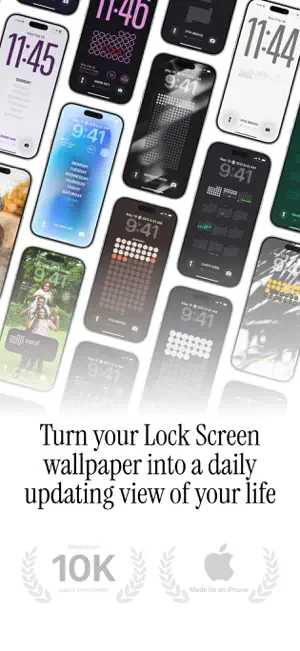
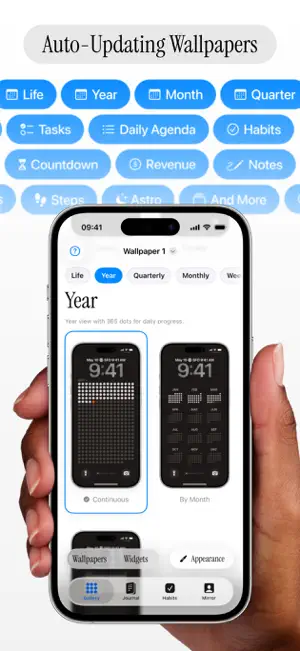


About One Dot - Lock Screen Calendar
Turn passing time into something you can see whenever you pick up your iPhone. One Dot creates customizable, auto-updating Lock Screen wallpapers and widgets for your year, habits, journal, agenda, reminders, steps, and goals. PLAN YOUR DAY, YOUR WAY • See Apple Calendar events in Daily, Week Card, Week + Today, circular Sectograph, vertical Timeline, or Monthly layouts • Turn Apple Reminders lists into Daily, Minimal, Week + Today, or four-list Matrix wallpapers • Keep the right note close by showing any journal text as a Live Activity on your Lock Screen SEE PROGRESS AT A GLANCE • View your life in weeks or your year as 365 dots • Track habits, streaks, journal entries, and moods • Follow countdowns, Apple Health steps, or revenue from Stripe and RevenueCat • Add interactive Home Screen and Lock Screen widgets 16 VISUAL MODES Life, Year, Season, Quarter, Month, Week, Countdown, Agenda, To-Do, Notes, Journal, Mood, Habits, Steps, Revenue, and Astro. MAKE IT YOURS Choose from a wide range of themes, dot shapes, colors, and layouts. Adjust size, spacing, placement, opacity, labels, stats, and backgrounds. Use a solid color, gradient, preset, or your own photo. Save multiple wallpaper setups for different parts of your life. AUTOMATIC DAILY REFRESH Set up the included Shortcuts automation once and your wallpaper can update each day, keeping your progress, calendar, and reminders current. BUILT FOR PRIVACY One Dot requires no account or proprietary cloud sync. Personal content is processed on your device, and optional integrations are accessed only with your permission. Limited product analytics and diagnostics help improve the app. START FREE The free version includes Life, Year, Journal, and Habits modes, plus core customization. One Dot Premium unlocks all 16 modes, more themes and shapes, advanced widgets, multiple wallpaper slots, and full customization. Make every day visible with One Dot. Terms of Use (EULA): https://www.apple.com/legal/internet-services/itunes/dev/stdeula/
Ratings & reviews
4.5
8 ratings
What’s new
Version 1.4.1 · Updated September 7, 2026
- Fixed an issue where sample events and to-dos could appear on exported wallpapers.
App privacy
The developer, Daniil Kartsev, reported these privacy practices to Apple.
Data Not Linked to You
The following data, which may be collected but is not linked to your identity, may be used for the following purposes:
- Identifiers: Device ID
- Usage Data: Product Interaction, Other Usage Data
- Purchases: Purchase History
- Diagnostics: Crash Data, Other Diagnostic Data
Used for: Analytics, App Functionality
Alternatives to One Dot - Lock Screen Calendar
Looking for apps like One Dot - Lock Screen Calendar? Here are 6 similar apps on the App Store. The highest rated is Ember: Streak & Habit Tracker (5.0/5), and all 6 are free to download.
-
 Ember: Streak & Habit Tracker
5.0
Ember: Streak & Habit Tracker
5.0
-
 Pocket Goals: Save Up Easier
4.8
Pocket Goals: Save Up Easier
4.8
-
 ROBODORO
5.0
ROBODORO
5.0
-
 Note & Widget
4.2
Note & Widget
4.2
-
 Noti - Lock Screen Notes
5.0
Noti - Lock Screen Notes
5.0
-
 onedo
5.0
onedo
5.0
| App | Rating | Price | Last updated | Compare |
|---|---|---|---|---|
| One Dot - Lock Screen Calendar | 4.5 / 5 (8 ratings) | Free | September 7, 2026 | |
| Ember: Streak & Habit Tracker | 5.0 / 5 (7) | Free | Sep 30, 2026 | Compare |
| Pocket Goals: Save Up Easier | 4.8 / 5 (5) | Free | Oct 18, 2026 | Compare |
| ROBODORO | 5.0 / 5 (1) | Free | Jan 12, 2024 | Compare |
| Note & Widget | 4.2 / 5 (5) | Free | Jun 12, 2026 | Compare |
| Noti - Lock Screen Notes | 5.0 / 5 (1) | Free | Aug 20, 2026 | Compare |
| onedo | 5.0 / 5 (5) | Free | Aug 17, 2026 | Compare |