

Deck Buddy: Remote Deck
Daniel Miara Utilities iPhoneiPadiPod touch
Deck Buddy: Remote Deck is a free Utilities app for iPhone and iPad by Daniel Miara. Requires iOS 17.0. Updated May 2, 2026.
- Price
- Free
- on the App Store
- Size
- 12 MB
- Age 4+
- Updated
- May 2
- 2026 · v1.0
Screenshots
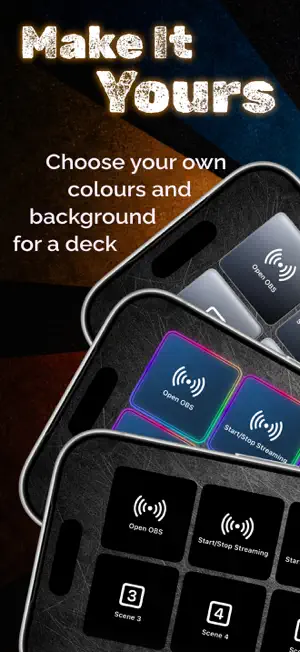

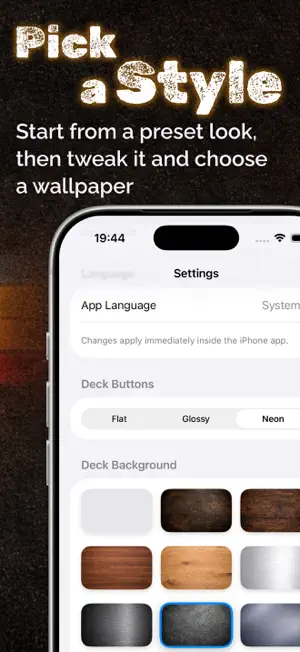

About Deck Buddy: Remote Deck
Deck Buddy turns your iPhone or iPad into an intelligent control deck for your Mac. It’s more than a “shortcut remote” - it’s a full system for fast, context-aware control that adapts to whatever you’re doing. ≋≋ Always the right buttons ≋≋ DeckBuddy can switch layouts automatically based on the app currently active on your Mac. Use one deck for Xcode, another for Safari, another for your creative tools - and let DeckBuddy keep up as you switch. ≋≋ Two ways to work ≋≋ • Auto Mode: DeckBuddy follows the active Mac app and loads the matching deck. • Manual Mode: lock a specific deck whenever you want consistent controls. ≋≋ Built for real workflows ≋≋ • Trigger keyboard shortcuts remotely from your iPhone • Run advanced actions with AppleScript on macOS • Pair fast with a 6-digit code and remember trusted devices • Discover your Mac automatically via Bonjour (no IP typing) • Capture a shortcut from your Mac keyboard and assign it to a button • Create decks with multiple pages, custom rows/columns, and iPad layouts • Personalise button styles: colours, borders, system icons, and your own SVG/PNG • Start quickly with ready-made presets for popular use cases • Import/export backups of your profiles and actions ≋≋ Mac setup that’s actually clear ≋≋ Deck Buddy includes a guided macOS onboarding screen with setup steps, Accessibility permissions, and an option to launch at login. If you love speed, shortcuts, streaming, or creative work - DeckBuddy is a great one to try ≋≋ Version 1.0 ≋≋ • First release of DeckBuddy • Auto/Manual profiles, shortcut buttons, AppleScript actions • Presets, custom layouts, and backup import/export ≋≋ SUBSCRIPTION INFORMATION ≋≋ • Enjoy your first 2 weeks free with an annual subscription • Enjoy your first 3 days free with a monthly subscription • Payment will be charged to your Apple ID account at confirmation of purchase • Your subscription renews automatically unless canceled at least 24 hours before the end of the current billing period • You can manage or cancel your subscription anytime in your Account Settings • Pricing may vary by country or region and will be shown before purchase https://www.apple.com/legal/internet-services/itunes/dev/stdeula/
App privacy
The developer, Daniel Miara, reported these privacy practices to Apple.
Data Not Collected
The developer does not collect any data from this app.
Alternatives to Deck Buddy: Remote Deck
Looking for apps like Deck Buddy: Remote Deck? Here are 6 similar apps on the App Store. The highest rated is Teleport WEB - Proxy Browser (5.0/5), and all 6 are free to download.
-
 AI Identifier Photo Scan
-
 Phone Location: Geo Tracker.
-
 McCormick Farm
-
 Teleport WEB - Proxy Browser
5.0
-
 Becard - Digital Business Card
-
 Daylight BASIC
2.0
| App | Rating | Price | Last updated | Compare |
|---|---|---|---|---|
| Deck Buddy: Remote Deck | – | Free | May 2, 2026 | |
| AI Identifier Photo Scan | – | Free | Apr 3, 2026 | Compare |
| Phone Location: Geo Tracker. | – | Free | Jul 4, 2025 | Compare |
| McCormick Farm | – | Free | Jul 23, 2026 | Compare |
| Teleport WEB - Proxy Browser | 5.0 / 5 (2) | Free | Jun 18, 2026 | Compare |
| Becard - Digital Business Card | – | Free | Oct 30, 2026 | Compare |
| Daylight BASIC | 2.0 / 5 (6) | Free | Aug 7, 2024 | Compare |