

SpeakApp Flow: Voice Keyboard
Elve Tech Productivity iPhoneiPadiPod touch
SpeakApp Flow: Voice Keyboard is a free Productivity app for iPhone and iPad by Elve Tech. Requires iOS 17.6. Updated August 31, 2026.
- Price
- Free
- on the App Store
- Size
- 33 MB
- Age 4+
- Updated
- Aug 31
- 2026 · v1.4
Screenshots



About SpeakApp Flow: Voice Keyboard
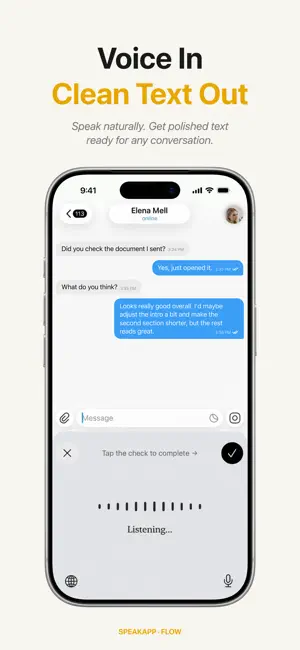
Turn your voice into text in any app. SpeakApp Flow adds a custom keyboard to your iPhone that lets you dictate messages, emails, notes, and more, wherever you type. Just speak naturally, and watch your words appear. Powered by advanced AI transcription, SpeakApp Flow captures what you say with remarkable accuracy, even in noisy environments. • Works everywhere. Use it in Messages, Mail, Notes, Slack, WhatsApp, or any app with a text field • AI-powered accuracy. Advanced speech recognition delivers highly accurate transcription • Natural speech. Speak in full sentences with pauses, filler words, and natural phrasing. The AI understands you • Fast and private. Audio is processed securely and never stored HOW IT WORKS 1. Install SpeakApp Flow and enable the keyboard in Settings 2. Switch to the SpeakApp Flow keyboard in any app 3. Tap the microphone and start talking 4. Your transcribed text appears instantly. Edit and send PERFECT FOR • Sending long messages without thumb fatigue • Composing emails on the go • Taking quick notes hands-free • Accessibility needs • Anyone who thinks faster than they type Privacy policy: https://elvetech.io/privacy EULA: https://www.apple.com/legal/internet-services/itunes/dev/stdeula/
What’s new
Version 1.4 · Updated August 31, 2026
- bug fixes
App privacy
The developer, Elve Tech, reported these privacy practices to Apple.
Data Used to Track You
The following data may be used to track you across apps and websites owned by other companies:
- Identifiers: User ID
Data Linked to You
The following data, which may be collected and linked to your identity, may be used for the following purposes:
- Identifiers: User ID
Used for: Analytics, App Functionality
Data Not Linked to You
The following data, which may be collected but is not linked to your identity, may be used for the following purposes:
- Purchases: Purchase History
- Identifiers: Device ID
- Usage Data: Product Interaction
- Diagnostics: Crash Data, Performance Data
Used for: Analytics, App Functionality
Alternatives to SpeakApp Flow: Voice Keyboard
Looking for apps like SpeakApp Flow: Voice Keyboard? Here are 6 similar apps on the App Store. The highest rated is SpeakType: AI Voice Keyboard (5.0/5), and all 6 are free to download.
-
 SpeakType: AI Voice Keyboard
5.0
SpeakType: AI Voice Keyboard
5.0
-
 Speakly: AI Voice Keyboard
3.6
Speakly: AI Voice Keyboard
3.6
-
 SpeakON: AI Voice Keyboard
4.9
SpeakON: AI Voice Keyboard
4.9
-
 Annotime: Smart AI Notes
4.9
Annotime: Smart AI Notes
4.9
-
 Melonote:AI Voice to Text Note
4.9
Melonote:AI Voice to Text Note
4.9
-
 Recco: AI Meeting Note Taker
4.2
Recco: AI Meeting Note Taker
4.2
| App | Rating | Price | Last updated | Compare |
|---|---|---|---|---|
| SpeakApp Flow: Voice Keyboard | – | Free | August 31, 2026 | |
| SpeakType: AI Voice Keyboard | 5.0 / 5 (1) | Free | Apr 22, 2026 | Compare |
| Speakly: AI Voice Keyboard | 3.6 / 5 (16) | Free | Sep 19, 2026 | Compare |
| SpeakON: AI Voice Keyboard | 4.9 / 5 (81) | Free | Sep 8, 2026 | Compare |
| Annotime: Smart AI Notes | 4.9 / 5 (19) | Free | Oct 1, 2026 | Compare |
| Melonote:AI Voice to Text Note | 4.9 / 5 (43) | Free | Oct 1, 2026 | Compare |
| Recco: AI Meeting Note Taker | 4.2 / 5 (15) | Free | Sep 28, 2026 | Compare |