

VoiceNPC: AI Voice Clone & TTS
SUNLIT GRACE PTY LTD Entertainment iPhoneiPadiPod touch
VoiceNPC: AI Voice Clone & TTS is a free Entertainment app for iPhone and iPad by SUNLIT GRACE PTY LTD. Rated 3.7/5 from 3 ratings. Requires iOS 26.1.
- Rating
- 3.7
- 3 ratings
- Price
- Free
- on the App Store
- Size
- 1.9 GB
- Age 4+
- Updated
- Oct 9
- 2026 · v1.5.0
Screenshots


About VoiceNPC: AI Voice Clone & TTS
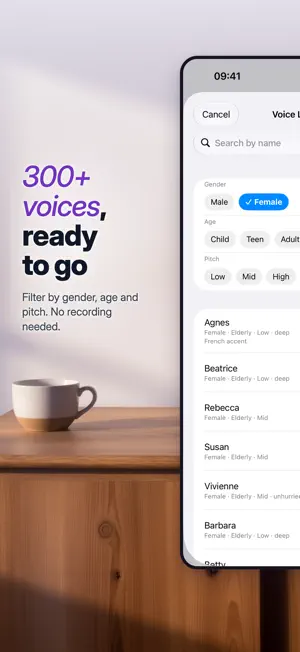
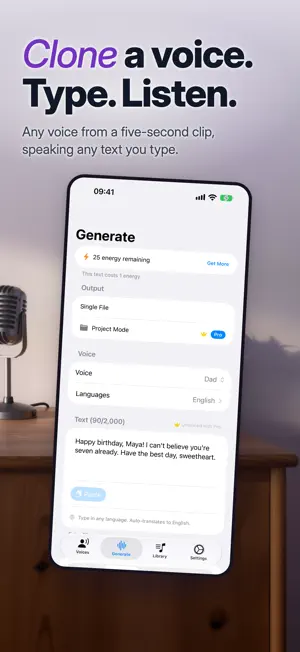
Pick one of 300+ ready-made voices in the Voice Library, or record 5 seconds and clone your own. Type anything and hear it spoken back in 10+ languages, with translation built in. Cloning, speech and translation all run on your device, so your recordings, your text and the audio you make never leave it. VoiceNPC runs the Qwen3-TTS model locally through Apple's MLX framework. From a short recording it builds a voice fingerprint, then speaks whatever you type in that voice. Works on iPhone, iPad, and Mac with Apple Silicon. What you can do: - Browse the Voice Library: 300+ ready-made voices. Filter by gender, age and pitch, play a demo of any voice, nothing to record or download - Pro: pick any voice in the Voice Library and generate in all 10 languages - Clone any voice from a 5–15 second recording, or import one from a video - Generate speech in English, Chinese, Japanese, Korean, French, German, Spanish, Russian, Italian, Portuguese, and more - Skip the typing: scan a printed page or pick a photo, and its text appears in the box, read on your device - Pro: scan several pages at once and get one project section per page - Translate your text on-device and have your cloned voice read it out in another language - Pro: pick multiple target languages and generate them all in a single pass - Preview and edit a translation before you generate the audio - Pro: create multi-voice projects and give each section its own voice and language, for dialogue, audiobooks, and podcasts - Choose a style preset (Stable, Natural, Expressive), or adjust the settings yourself - Export as WAV, or share a voice fingerprint (a .voicenpc file) over AirDrop, Messages, or any app, so others can generate speech in your voice - Clone as many voices as you like, on the free plan too Built for creators: - YouTubers: dub your videos in several languages in your own voice, with no separate translation step - Podcasters: produce multi-speaker episodes without extra recording sessions - Audiobook narrators: give every character its own voice - Voiceover artists: share your voice fingerprint with clients so they can generate lines on demand - Game developers: generate NPC dialogue in every language you ship Why it's different: - Cloning, speech and translation run on-device, and keep working offline after install - Your recordings and the text you type stay in the app's sandbox, never uploaded - No cloud processing: your voice never touches a server - Apple Silicon does the work: the model runs on the chip in your iPhone, iPad, or Mac How energy works: - 1 energy ≈ 100 characters of text, about 1–2 sentences - 25 energy every day, enough for about 5 full generations - Watch a short video for 25 bonus energy (up to 5 videos a day) - Earn extra energy by sharing the app daily or inviting friends with your code - Pro subscribers get unlimited generations with no ads Go Pro: - Unlimited generations and no ads, plus multi-language runs, multi-voice projects and generating with any voice in the Voice Library - Choose a monthly, annual, or one-time lifetime plan Requires iPhone 13 or later, iPad mini (6th gen) or later, iPad Air (5th gen) or later, iPad (11th gen) or later, or any Apple Silicon Mac. Terms of Use: Standard Apple Terms of Use (EULA) [https://www.apple.com/legal/internet-services/itunes/dev/stdeula/]
What’s new
Version 1.5.0 · Updated October 9, 2026
What's new in 1.5.0: • Text from Photo: scan a page with the camera or pick a photo, and its words appear in the text box, ready to be read aloud. The text is recognized on your device, and the photo never leaves it. • Pro: in a Guided project, Add Sections from Photos turns each page into its own section. • Bug fixes and improvements
App privacy
The developer, SUNLIT GRACE PTY LTD, reported these privacy practices to Apple.
Data Used to Track You
The following data may be used to track you across apps and websites owned by other companies:
- Identifiers: Device ID
- Usage Data: Advertising Data
Data Linked to You
The following data, which may be collected and linked to your identity, may be used for the following purposes:
- Identifiers: Device ID
- Usage Data: Advertising Data
Used for: Third-Party Advertising
Data Not Linked to You
The following data, which may be collected but is not linked to your identity, may be used for the following purposes:
- Purchases: Purchase History
- Identifiers: User ID
- Diagnostics: Other Diagnostic Data
Used for: App Functionality
Alternatives to VoiceNPC: AI Voice Clone & TTS
Looking for apps like VoiceNPC: AI Voice Clone & TTS? Here are 6 similar apps on the App Store. The highest rated is Mimic: Voice Clone & Changer (5.0/5), and all 6 are free to download.
-
 AI Voice Clone: TenLabs
4.4
AI Voice Clone: TenLabs
4.4
-
 Clonic: Voice Clone & AI Cover
3.9
Clonic: Voice Clone & AI Cover
3.9
-
 VocalShift: Voice Changer
-
 Mimic: Voice Clone & Changer
5.0
Mimic: Voice Clone & Changer
5.0
-
 VoxFun: Video Voice Changer
5.0
VoxFun: Video Voice Changer
5.0
-
 Voice Changer AI
4.2
Voice Changer AI
4.2
| App | Rating | Price | Last updated | Compare |
|---|---|---|---|---|
| VoiceNPC: AI Voice Clone & TTS | 3.7 / 5 (3 ratings) | Free | October 9, 2026 | |
| AI Voice Clone: TenLabs | 4.4 / 5 (111) | Free | Aug 3, 2026 | Compare |
| Clonic: Voice Clone & AI Cover | 3.9 / 5 (7) | Free | Jul 23, 2026 | Compare |
| VocalShift: Voice Changer | – | Free | Oct 10, 2026 | Compare |
| Mimic: Voice Clone & Changer | 5.0 / 5 (2) | Free | Oct 13, 2026 | Compare |
| VoxFun: Video Voice Changer | 5.0 / 5 (3) | Free | Oct 17, 2026 | Compare |
| Voice Changer AI | 4.2 / 5 (27) | Free | Oct 10, 2026 | Compare |