

Future Timer: Alarm Planner
TSUBASA FUKUCHI Lifestyle iPhoneiPadiPod touchApple Watch
Future Timer: Alarm Planner is a free Lifestyle app for iPhone and iPad by TSUBASA FUKUCHI. Requires iOS 17.0. Updated September 20, 2026.
- Price
- Free
- on the App Store
- Size
- 12 MB
- Age 4+
- Updated
- Sep 20
- 2026 · v1.5.1
Screenshots
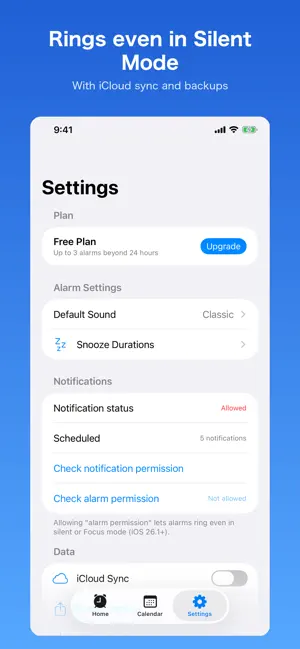

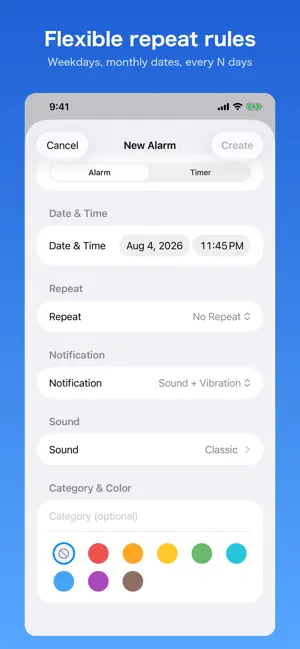

About Future Timer: Alarm Planner
Future Timer lets you schedule alarms for any date and time in the future — tomorrow morning, 3 days from now, or any moment you need. ■ Key Features [Alarm Mode] Pick a date and time to receive a notification. Set it hours or days ahead with ease. [Timer Mode] Enter days, hours, and minutes. The countdown starts the moment you save, and you'll be notified when time is up. [Repeat Alarms] Choose from daily, weekly, weekdays only, or weekends only. The next occurrence is automatically scheduled after you stop an alarm. [Snooze] Tap Snooze during an alarm to be reminded again in 5, 10, or 15 minutes. [Notification Types] Set sound, vibration, sound + vibration, or silent per alarm. [Calendar View] See all your scheduled alarms on a monthly calendar. ■ Plans [Free Plan] · Alarms within 24 hours: unlimited · Alarms beyond 24 hours: up to 3 [Premium Plan (¥250/month · ¥2,500/year)] · Alarms beyond 24 hours: unlimited · Ad-free experience ■ Perfect for · Anyone who needs a reliable wake-up call for early mornings · Managing deadlines, medication reminders, or travel schedules days ahead · Building daily or weekly habits with repeating reminders ■ Apple Watch Check the time left until your next alarm on your wrist. Start a 30-minute timer or stop the displayed alarm from your Apple Watch. (Requires the iPhone app.) ■ Templates Schedule "Medication (daily at 8:00 AM)", "Take Out Trash (next 7:30 AM)", or "Meeting Prep (30-minute timer)" in one tap. Terms of Use (EULA): https://www.apple.com/legal/internet-services/itunes/dev/stdeula/ Privacy Policy: https://fukusefeb-dev.github.io/timer-alarm-privacy/
What’s new
Version 1.5.1 · Updated September 20, 2026
• Apple Watch support: see your next alarm, start a 30-minute timer, and stop alarms right from your wrist. • New templates to schedule common reminders in one tap, plus alarm duplication. • Fixed an issue where an alarm could ring at an old time after being edited or deleted in quick succession. • Fixed an issue where stopping a missed repeating alarm could schedule the next one in the past. • Fixed the on/off toggle in the Calendar view. • Alarms created from Siri or Control Center now correctly respect the free plan limit and update widgets. • Settings now shows how many alarms are registered with iOS. • Improved VoiceOver descriptions and English localization.
App privacy
The developer, TSUBASA FUKUCHI, reported these privacy practices to Apple.
Data Linked to You
The following data, which may be collected and linked to your identity, may be used for the following purposes:
- Purchases: Purchase History
- Identifiers: Device ID
- Usage Data: Other Usage Data
Used for: Third-Party Advertising
Alternatives to Future Timer: Alarm Planner
Looking for apps like Future Timer: Alarm Planner? Here are 6 similar apps on the App Store. The highest rated is Alarrrm - Future Event Alarm (3.0/5), and 4 of the 6 are free to download.
-
 Alarrrm - Future Event Alarm
3.0
Alarrrm - Future Event Alarm
3.0
-
 Chore Receipt Log
-
 ワタシノ
ワタシノ
-
 Mission Alarm - Wake Up App
-
 Japanese Voice Over Clock
-
 OKIRO - Alarm Clock That Works
| App | Rating | Price | Last updated | Compare |
|---|---|---|---|---|
| Future Timer: Alarm Planner | – | Free | September 20, 2026 | |
| Alarrrm - Future Event Alarm | 3.0 / 5 (1) | 0.99 USD | Jul 11, 2026 | Compare |
| Chore Receipt Log | – | Free | Sep 7, 2026 | Compare |
| ワタシノ | – | Free | Mar 25, 2025 | Compare |
| Mission Alarm - Wake Up App | – | Free | Aug 4, 2026 | Compare |
| Japanese Voice Over Clock | – | 1.99 USD | Oct 7, 2026 | Compare |
| OKIRO - Alarm Clock That Works | – | Free | Sep 26, 2026 | Compare |