

StreamPad - Audio & Deck
YUTA NAKAHAMA Utilities iPhoneiPadiPod touch
StreamPad - Audio & Deck is a free Utilities app for iPhone and iPad by YUTA NAKAHAMA. Requires iOS 16.0. Updated June 15, 2026.
- Price
- Free
- on the App Store
- Size
- 35 MB
- Age 4+
- Updated
- Jun 15
- 2026 · v1.3.1
Screenshots
About StreamPad - Audio & Deck
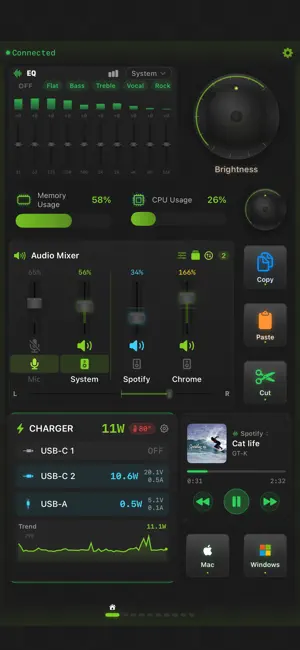
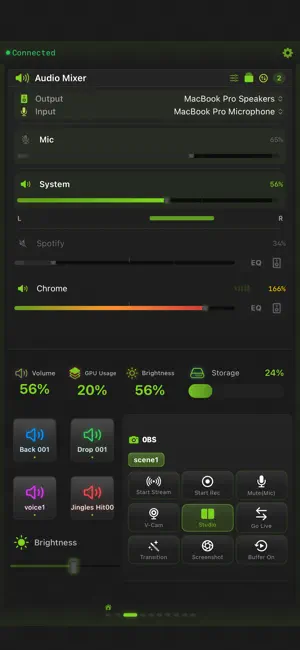
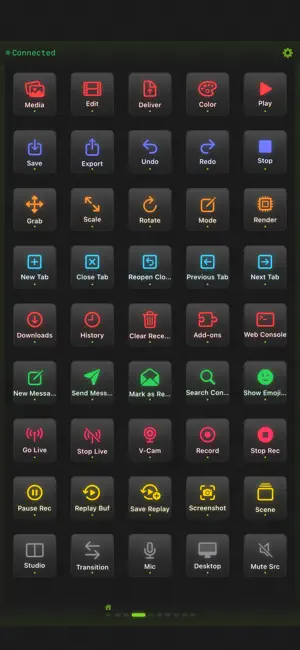
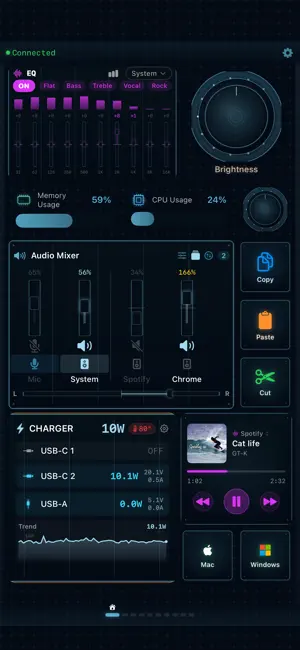
StreamPad — Transform your iPhone or iPad into a professional-grade control surface. Buttons, dials, sliders, gauges, sound pads, music widgets — 10+ widget types on a free-form grid. 890+ ready-to-use shortcuts for 40 pro apps across macOS and Windows. Streamer, editor, DJ, musician, developer — one tap, one twist, one slide is all it takes. ■ Pro Audio Mixer — Built In No extra hardware needed. Control each app's volume independently, from silent to 200% overdrive. Mute or boost any source in real time. Switch output devices on the fly. Adjust L/R stereo balance per channel. 10-band graphic EQ (31 Hz–16 kHz) with real-time spectrum analyzer and 6 presets (Flat / Bass / Treble / Vocal / Rock / Electro). Save your entire audio setup — volumes, EQ, device routing — with Quick Config. A mixer that rivals standalone apps — built right in. ■ 40 App Presets — 890+ Shortcuts, Zero Setup Shortcut packs for 40 pro apps across macOS and Windows, in 7 categories — just pick an app, no manual setup. • Video — Final Cut Pro, Premiere Pro, DaVinci Resolve, After Effects, OBS • Design — Photoshop, Lightroom, Blender • Music — Logic Pro, Ableton Live, Spotify, Apple Music • Browser — Safari, Chrome, Firefox • Comms — Discord, Zoom, Teams, Slack, Messages • Dev — VS Code, Xcode, Terminal • Productivity — Mail, Notes, Reminders, Photos, Finder, and more ■ Adaptive Grid — Up to 150+ Items Per Page Auto-adapts to your screen's pixel density. Place any-size widgets — 1×1 buttons, 2×2 dials, 4×1 sliders — wherever you want. Up to 10 pages for 1,000+ total controls. Your layout, your rules. * Capacity varies by device and screen size. ■ 13 Action Types Keyboard shortcuts, text input, app launch, URL, system control (volume / brightness / media), OBS commands, music control, sound board, macros, Apple Shortcuts, Webhook (GET/POST/PUT/DELETE), and more. ■ OBS Studio — 26 Commands Full WebSocket v4/v5 support. Scenes, streaming, recording, virtual cam, source visibility, filters, replay buffer, captions, chapter markers — all one tap. ■ Macro Automation Record keystrokes, add delays and loops, replay complex workflows with one tap. Turn repetitive tasks into one-button operations. ■ Sound Board Trigger audio clips instantly. Switch between local preview and Mac/Windows playback. Perfect for streams, calls, and presentations. ■ Dials & Touch Strips Rotary dials for volume, brightness, scroll, zoom — precise, tactile control. Touch strips switch between slider and Touch Bar modes. Vertical and horizontal supported. ■ System Monitor Live CPU, memory, GPU, storage, volume, brightness. 5 styles: circular, semicircle, linear, compact, vertical bar. ■ Music Widget Apple Music, Spotify, Chrome (YouTube). Track, artist, album art, position — view and control in one place. ■ 18 Designer Themes Cyberpunk, Neon, Retro, Wood, Nixie Tube, Ice, DJ, and more. Rich themes with hand-crafted SVG assets for every widget. ■ Profiles & Auto-Switch Group settings into profiles. Auto-switch based on Mac's active app. ■ Folders & Custom Images Organize into folders. Set any photo as an icon. ■ Shortcuts & Webhook Run macOS Shortcuts. HTTP requests for smart home and services. ■ Free Companion App macOS/Windows Companion for shortcuts, audio mixing, OBS, and monitoring. Wi-Fi auto-discovery + USB for zero-latency control. ■ English / Japanese —————————— [Free] • 3 themes • 2 pages / 10 items • 1 profile • 3 macros • 3 sounds • Ads [Remove Ads — IAP] • Ad-free [StreamPad Pro — IAP] • All 18 themes • Unlimited pages, items, profiles + auto-switch • Pro Audio Mixer — per-app volume, 200% overdrive, EQ & spectrum • 40 presets / 890+ shortcuts • Unlimited macros & sound board • Folders, custom images, Shortcuts, Webhook • Power Monitor (Anker BLE) • Quick Config • Ad-free
What’s new
Version 1.3.1 · Updated June 15, 2026
v1.3.1 - Output Groups, your way Output Groups let you play to multiple speakers/headphones at once — now you can control volume and mute for each device individually. 【What's Improved】 ■ Per-device Volume (Pro) Adjust the volume of each device in an output group independently — from the mixer, touch strip, or volume gauge. When a group is the output, the UI automatically switches to per-device sliders. ■ Per-device Mute (Pro) Mute/unmute each device in a group while keeping its volume intact. Silence just one speaker, instantly. 【Important】 ・Requires Mac Companion v1.3.1 or later (free) Download: https://streampad-app.github.io/streampad-web/ ・Output Groups are macOS Companion only. 【Other】 ・UI stability improvements
App privacy
The developer, YUTA NAKAHAMA, reported these privacy practices to Apple.
Data Used to Track You
The following data may be used to track you across apps and websites owned by other companies:
- Identifiers: Device ID
Data Not Linked to You
The following data, which may be collected but is not linked to your identity, may be used for the following purposes:
- Identifiers: Device ID
Used for: Third-Party Advertising
Alternatives to StreamPad - Audio & Deck
Looking for apps like StreamPad - Audio & Deck? Here are 6 similar apps on the App Store.
-
 DeskTap Stream Deck
-
 Virtual Stream Deck
-
 Local Desk
-
 Klikor
-
 OBS Virtual Deck
-
 OBS Remote - Stream Control
| App | Rating | Price | Last updated | Compare |
|---|---|---|---|---|
| StreamPad - Audio & Deck | – | Free | June 15, 2026 | |
| DeskTap Stream Deck | – | Free | Sep 11, 2026 | Compare |
| Virtual Stream Deck | – | Free | Sep 2, 2026 | Compare |
| Local Desk | – | Free | Nov 23, 2025 | Compare |
| Klikor | – | Free | Jun 1, 2026 | Compare |
| OBS Virtual Deck | – | Free | Mar 19, 2024 | Compare |
| OBS Remote - Stream Control | – | Free | Oct 18, 2026 | Compare |