

PDF Editor: Scan & Sign Doc
Mustafa Toptas Productivity iPhoneiPadiPod touch
PDF Editor: Scan & Sign Doc is a free Productivity app for iPhone and iPad by Mustafa Toptas. Rated 5.0/5 from 7 ratings. Requires iOS 15.0.
- Rating
- 5.0
- 7 ratings
- Price
- Free
- on the App Store
- Size
- 15 MB
- Age 4+
- Updated
- Mar 12
- 2026 · v1.1
Screenshots

About PDF Editor: Scan & Sign Doc
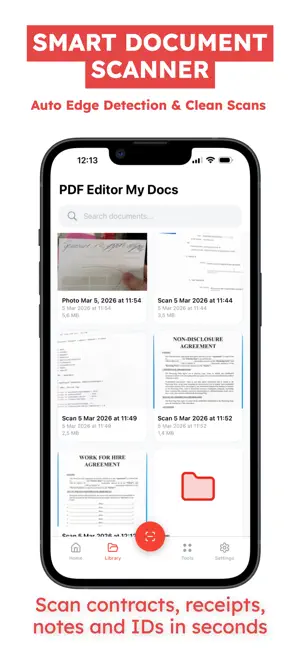
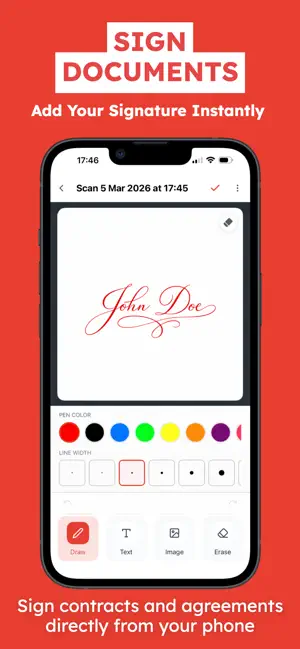
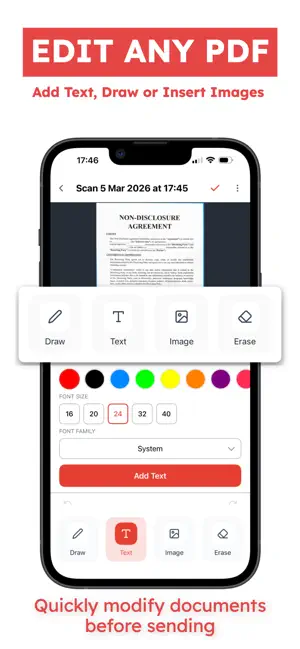
PDF Editor: Scan & Sign Doc is a fast and reliable document scanner that lets you scan documents, sign files, and convert photos to PDF directly from your iPhone. Turn paper into clean digital documents in seconds using a powerful mobile scanner built for everyday work. Scan Documents — Scan documents with your camera using a smart document scanner — Automatic edge detection and page adjustment — Create clear scans of contracts, receipts, notes, IDs, or forms — Scan single or multi-page documents easily — Professional scan to PDF results in seconds Sign & Edit Files — Add your signature to any document — Sign documents directly on your phone — Draw, add text, or insert images into PDF pages — Quickly prepare signed documents for sending — Perfect for contracts, agreements, and forms Convert to PDF — Convert photos to PDF using a built-in PDF converter — Create digital documents from images — Combine multiple scans into one PDF file — Clean and optimized export for sharing — Fast PDF scanner and document converter workflow Organize & Manage — Keep your files organized in folders — Store and manage scanned documents in one place — Rename and manage PDF files easily — Simple document manager for everyday productivity Share Anywhere — Instant PDF sharing via email, messages, or apps — Send documents to work, school, or clients — Export clean digital copies anytime PDF Editor: Scan & Sign Doc helps you go paperless with a simple document scanner, fast PDF converter, and easy document signing — all in one app. Subscription Plans: You can purchase an auto-renewing subscription for full access to all features. Payment will be charged to your iTunes account at confirmation. The subscription automatically renews unless canceled at least 24 hours before the end of the current period. You can manage or cancel your subscription anytime in your account settings. Prices may vary by region. Privacy Policy: https://telegra.ph/Privacy-Policy--PDF-Scanner-Scan--Sign-Doc-03-05 Terms of Use: https://www.apple.com/legal/internet-services/itunes/dev/stdeula/
Ratings & reviews
5.0
7 ratings
What’s new
Version 1.1 · Updated March 12, 2026
Small update to improve user experience
App privacy
The developer, Mustafa Toptas, reported these privacy practices to Apple.
Data Used to Track You
The following data may be used to track you across apps and websites owned by other companies:
- Purchases: Purchase History
Data Not Linked to You
The following data, which may be collected but is not linked to your identity, may be used for the following purposes:
- Purchases: Purchase History
Used for: Analytics
Alternatives to PDF Editor: Scan & Sign Doc
Looking for apps like PDF Editor: Scan & Sign Doc? Here are 6 similar apps on the App Store. The highest rated is MRS: PDF Editor, Scanner & OCR (5.0/5), and all 6 are free to download.
-
 MRS: PDF Editor, Scanner & OCR
5.0
-
 PDF Scan & Convert Pro
5.0
-
 Grocery List - Simple Shopping
5.0
-
 Hidden Camera Detector Tracker
4.6
-
 Optiq: AI Lens & Identifier
-
 PDF Converter: Sign, Creator
4.4
| App | Rating | Price | Last updated | Compare |
|---|---|---|---|---|
| PDF Editor: Scan & Sign Doc | 5.0 / 5 (7 ratings) | Free | March 12, 2026 | |
| MRS: PDF Editor, Scanner & OCR | 5.0 / 5 (2) | Free | Sep 30, 2026 | Compare |
| PDF Scan & Convert Pro | 5.0 / 5 (12) | Free | Mar 3, 2026 | Compare |
| Grocery List - Simple Shopping | 5.0 / 5 (5) | Free | Dec 13, 2025 | Compare |
| Hidden Camera Detector Tracker | 4.6 / 5 (33) | Free | Dec 19, 2025 | Compare |
| Optiq: AI Lens & Identifier | – | Free | May 18, 2026 | Compare |
| PDF Converter: Sign, Creator | 4.4 / 5 (7) | Free | Jul 18, 2026 | Compare |