

SView – Swipe Carousel Maker
壮 王 Photo & Video iPhoneiPadiPod touch
SView – Swipe Carousel Maker is a free Photo & Video app for iPhone and iPad by 壮 王. Rated 5.0/5 from 3 ratings. Requires iOS 18.0.
- Rating
- 5.0
- 3 ratings
- Price
- Free
- on the App Store
- Size
- 34 MB
- Age 4+
- Updated
- Sep 2
- 2026 · v1.2.1
Screenshots


About SView – Swipe Carousel Maker
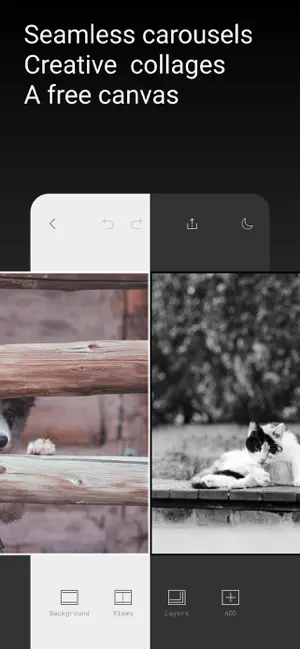
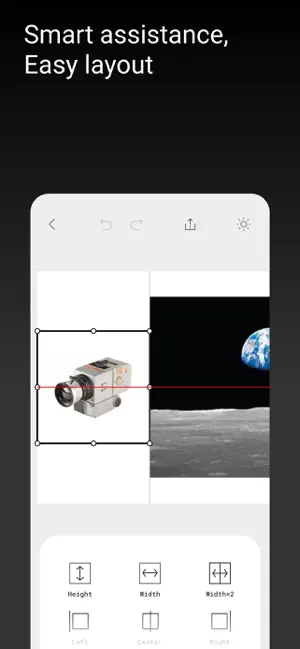
Create seamless swipe carousels, photo collages, grids, and framed layouts on one freeform canvas. SView gives photographers and creators precise control without forcing their work into templates. ■ SEAMLESS CAROUSELS Import any photo, choose your canvas ratio, and design across multiple slides. When you export, SView automatically splits the canvas into perfectly aligned carousel images. ■ FRAME & GRID Build clean photo grids or add minimalist and film-inspired frames. Create structured layouts while keeping full control over every image. ■ PHOTO TRAY Import multiple photos without covering the canvas. Your images stay organized in the Photo Tray until you tap or drag them onto the canvas, a Frame, or a Grid. Move them back whenever you want to keep your workspace clear. ■ FREESTYLE COLLAGES Arrange photos freely on the canvas. Adjust position, size, rotation, crop, borders, corner radius, opacity, and background to create a layout that is entirely your own. ■ TEXT & FONTS Add text anywhere on the canvas and choose from a curated font collection. S-Pro also lets you import your own fonts for a more personal visual style. ■ SMART ASSISTANCE Guides and snapping help you align every element precisely, so you can spend less time adjusting and more time creating. ■ HIGH-QUALITY EXPORT Export at HD 2160px with three quality settings or HEIC for free. S-Pro unlocks Ultra HD 4032px. At extreme aspect ratios, the long edge of each exported image is limited to 12,000px and adjusted automatically. SView does not define how you create. It gives you the space and tools to make the work your own. Terms of Use: https://sviewapp.com/terms.html Privacy Policy: https://sviewapp.com/privacy.html
What’s new
Version 1.2.1 · Updated September 2, 2026
bug fix
App privacy
The developer, 壮 王, reported these privacy practices to Apple.
Data Linked to You
The following data, which may be collected and linked to your identity, may be used for the following purposes:
- Identifiers: User ID
Used for: App Functionality
Data Not Linked to You
The following data, which may be collected but is not linked to your identity, may be used for the following purposes:
- Purchases: Purchase History
- Location: Coarse Location
- Identifiers: Device ID
- Usage Data: Product Interaction
- Diagnostics: Crash Data, Performance Data, Other Diagnostic Data
Used for: Analytics, App Functionality
Alternatives to SView – Swipe Carousel Maker
Looking for apps like SView – Swipe Carousel Maker? Here are 6 similar apps on the App Store. The highest rated is Seam: Carousel & Collage Maker (5.0/5), and all 6 are free to download.
-
 Seam: Carousel & Collage Maker
5.0
Seam: Carousel & Collage Maker
5.0
-
 FlowGrid: Seamless Carousel
-
 Ply — Carousel Creator
-
 Glassy: Carousel Maker
5.0
Glassy: Carousel Maker
5.0
-
 GridMakr: Carousel & Collage
-
 Echo: Share Your Story
5.0
Echo: Share Your Story
5.0
| App | Rating | Price | Last updated | Compare |
|---|---|---|---|---|
| SView – Swipe Carousel Maker | 5.0 / 5 (3 ratings) | Free | September 2, 2026 | |
| Seam: Carousel & Collage Maker | 5.0 / 5 (2) | Free | Oct 14, 2026 | Compare |
| FlowGrid: Seamless Carousel | – | Free | Oct 23, 2026 | Compare |
| Ply — Carousel Creator | – | Free | Oct 12, 2026 | Compare |
| Glassy: Carousel Maker | 5.0 / 5 (1) | Free | Oct 28, 2026 | Compare |
| GridMakr: Carousel & Collage | – | Free | Oct 17, 2026 | Compare |
| Echo: Share Your Story | 5.0 / 5 (2) | Free | Aug 6, 2024 | Compare |