

My Eyes Vision Simulator
Edbo Techologies LLC Education iPhoneiPadiPod touch
My Eyes Vision Simulator is a free Education app for iPhone and iPad by Edbo Techologies LLC. Rated 5.0/5 from 4 ratings. Requires iOS 16.0.
- Rating
- 5.0
- 4 ratings
- Price
- Free
- on the App Store
- Size
- 49 MB
- Age 4+
- Updated
- Oct 11
- 2026 · v1.3
Screenshots

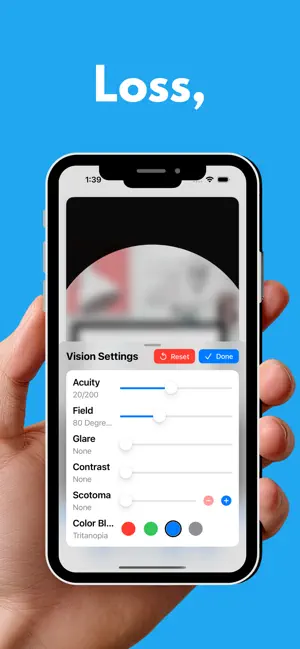
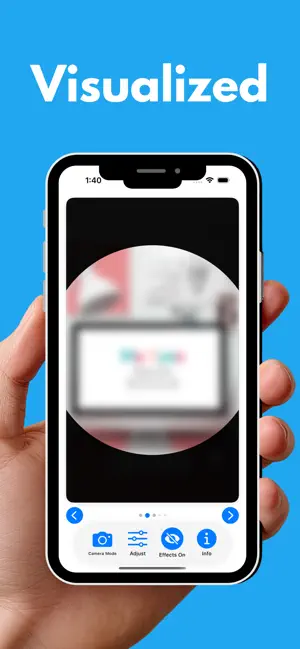
About My Eyes Vision Simulator
Vision Loss, Visualized. My Eyes Vision Simulator lets you experience what the world looks like through the eyes of someone living with a visual impairment. Designed as an advocacy tool for the visually impaired, educators (especially TCVIs & O&Ms), caregivers, rehabilitation professionals, family members and anyone who wants to better understand blindness and low vision. Apply real-time visual effects to sample photographs or your live camera feed and see firsthand how different eye conditions affect everyday activities like reading, navigating a street, riding the bus, or shopping for groceries. VISUAL EFFECTS YOU CAN SIMULATE: • Visual Acuity — Blur the image from 20/20 all the way to light perception, following the Snellen acuity scale • Contrast Sensitivity — Wash out the difference between light and dark, from mild to profound • Glare Difficulties — Simulate photophobia and light sensitivity • Peripheral Field Loss — Narrow the field of vision from a full 180 degrees down to just a few degrees • Central Field Loss — Add a blind area in the center of vision, measured in degrees, to simulate macular degeneration and other conditions • Draw Field Loss — Draw your own areas of vision loss with your finger to simulate hemianopias, blind spots away from center, or patchy field loss • Color Blindness — Simulate protanopia, deuteranopia, tritanopia, or achromatopsia (total color blindness) DESIGNED FOR ACCESSIBILITY: My Eyes was built from the ground up with VoiceOver support. Every slider, button, and control includes descriptive labels, hints, and real-time value announcements, and you can even draw field loss with VoiceOver. The app supports larger text sizes, including the largest accessibility sizes, and uses large, high-contrast slider controls. All 24 sample images include detailed accessibility descriptions, and the built-in guide includes VoiceOver tips for every feature. KEY FEATURES: • Live camera mode — apply vision simulation to your real environment in real time • 24 sample photographs showing real-world scenes • Combine multiple effects to simulate complex vision conditions • Saved profiles — save settings under a name, like a student's name, and use them again with one tap • Toggle effects on and off instantly to compare impaired and typical vision • Reset all settings with one tap • Built-in guide with short, easy-to-follow topics and VoiceOver tips • Works on iPhone and iPad Whether you are a teacher explaining vision loss at an IEP, a family member trying to understand a loved one's experience, or a professional training others in accessibility, My Eyes brings vision simulation to your fingertips.
What’s new
Version 1.3 · Updated October 11, 2026
New in 1.3: • Save settings as named profiles • Draw your own field loss • Central Field Loss • Support for larger text sizes • Redesigned Adjust screen, bigger sliders, and a simpler Info guide • VoiceOver improvements and bug fixes
App privacy
The developer, Edbo Techologies LLC, reported these privacy practices to Apple.
Data Not Collected
The developer does not collect any data from this app.
Alternatives to My Eyes Vision Simulator
Looking for apps like My Eyes Vision Simulator? Here are 6 similar apps on the App Store. The highest rated is See My Eyes (5.0/5), and all 6 are free to download.
-
 See My Eyes
5.0
See My Eyes
5.0
-
 Low Vision Simulator
3.3
Low Vision Simulator
3.3
-
 Quick and Easy ECC
5.0
Quick and Easy ECC
5.0
-
 BLV FirstSteps
-
 What They See
4.2
What They See
4.2
-
 CViConnect Pro
5.0
CViConnect Pro
5.0
| App | Rating | Price | Last updated | Compare |
|---|---|---|---|---|
| My Eyes Vision Simulator | 5.0 / 5 (4 ratings) | Free | October 11, 2026 | |
| See My Eyes | 5.0 / 5 (6) | Free | Aug 27, 2026 | Compare |
| Low Vision Simulator | 3.3 / 5 (3) | Free | Aug 23, 2026 | Compare |
| Quick and Easy ECC | 5.0 / 5 (2) | Free | Aug 19, 2026 | Compare |
| BLV FirstSteps | – | Free | Sep 15, 2025 | Compare |
| What They See | 4.2 / 5 (39) | Free | Sep 29, 2026 | Compare |
| CViConnect Pro | 5.0 / 5 (5) | Free | Sep 17, 2026 | Compare |