

Prompt Snap: AI Prompts
SEUNGHYUN LEE Productivity iPhoneiPadiPod touch
Prompt Snap: AI Prompts is a paid Productivity app for iPhone and iPad by SEUNGHYUN LEE. Requires iOS 17.0. Updated October 25, 2026.
- Price
- 2.99 USD
- on the App Store
- Size
- 16 MB
- Age 4+
- Updated
- Oct 25
- 2026 · v1.6
Screenshots



About Prompt Snap: AI Prompts
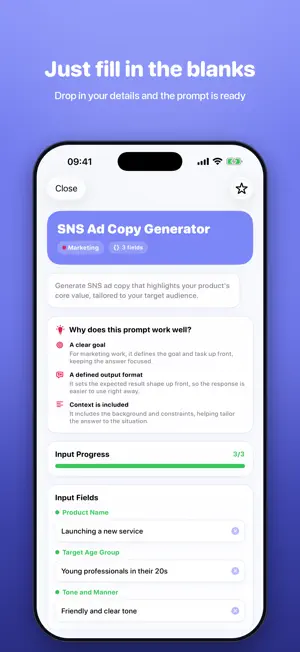
Know what to ask. Keep what works. You don't need to know prompt engineering to start. Describe what you want, add your details, and build a reusable request. Prompt Snap brings guided practice, templates, your own prompts, and saved AI results into one personal workspace. BUILD A REQUEST FOR YOUR TASK • Start with a goal, then add an audience, output format, and requirements. • Use optional questions for travel, marketing, study, writing, and coding. • Save the details with your prompt and restore them when you return. • Review a confirmation before rebuilding text you have edited. LEARN BY ADDING ONE DETAIL • Try short exercises for email, travel, and marketing. • Add your own requirement and compare the request before and after. • Explore how audience, tone, and constraints shape a prompt. • Take your practice request into Studio and keep working on it. START WITH 240+ TEMPLATES • Explore 10 categories covering writing, business, marketing, coding, careers, study, and more. • Fill in variables and preview your completed prompt before copying. • Before copying, choose an answer language: English, Korean, Japanese, German, French, Spanish, Brazilian Portuguese, or Traditional Chinese. This adds a language instruction; it does not translate the template. The AI tool determines the actual response. • Use beginner-friendly guidance, favorites, and copy history to find requests you use often. KEEP PROMPTS AND RESULTS TOGETHER • Paste your prompt into an AI tool you use, such as ChatGPT, Gemini, or Claude. • Paste back an answer you want to keep, then add a model name and feedback. • Compare prompt versions and results, and choose the versions you prefer. • Reopen your chosen versions from Home or restore an earlier version. REUSE YOUR CONTEXT • Save project, client, audience, and tone notes in workspaces. • Run prompt chains step by step, pasting an AI result to carry it into the next step. • Copy an improvement request with the original prompt, previous answer, and feedback for your next attempt in an AI tool. KEEP A PORTABLE COPY • Export prompts, drafting details, workspaces, versions, results, favorites, copy history, and chains as JSON. • Import missing records from a backup while keeping your existing records. One-time purchase. No subscription. No ads. Available in English, Korean, Japanese, and German. HOW AI FEATURES WORK Prompt drafting and organization work on your device. Answers to your tasks come from an external AI tool; paste back the results you want to save. That tool's access conditions and charges may apply separately. Optional on-device AI edits prompts on iOS 26 or later when your device supports Apple Intelligence, it is enabled, and a local model is ready for your selected language. Guided drafting, practice, saving, and reuse remain available without on-device AI. Prompt structure checks do not verify facts, sources, or freshness.
What’s new
Version 1.6 · Updated October 25, 2026
Meet your personal workspace for learning, building, and reusing prompts. • Prompt Studio: turn a goal, audience, format, and requirements into a reusable request. • Task-specific questions: add relevant details for travel, marketing, study, writing, and coding. • Quick practice: add your own detail to an email, travel, or marketing request, then continue in Studio. • Saved drafting details: restore the conditions behind a prompt or version, with confirmation before rebuilding edited text. • Versions and results: keep pasted answers, model names, and feedback together. Reopen your chosen versions from Home. • Workspaces and backups: reuse project context, and export or import your records as JSON. • Step-by-step chains: carry pasted output into the next step and resume your progress. • Improved localized variable inputs and English prompt copying. • Answer language: add your preferred response language to a prompt before copying. Optional on-device prompt editing is available on eligible devices running iOS 26 or later, with Apple Intelligence enabled and a local model ready for the selected language. • German support: localized screens, templates, variable inputs, exercises, and structure checks. • More relevant prompt recommendations based on purpose and description. • Undoing a deletion now preserves workspace and drafting details.
App privacy
The developer, SEUNGHYUN LEE, reported these privacy practices to Apple.
Data Not Collected
The developer does not collect any data from this app.
Alternatives to Prompt Snap: AI Prompts
Looking for apps like Prompt Snap: AI Prompts? Here are 6 similar apps on the App Store. The highest rated is SessionsAI (5.0/5), and 3 of the 6 are free to download.
-
 SessionsAI
5.0
-
 Polaris Office Mobile
4.6
-
 Blink - Quick Notes & Widget
4.3
-
 NoteCircle: To-Do List
4.6
-
 Blogging for Blogspot Blog
4.7
-
 Polaris Viewer - PDF, Document
4.6
| App | Rating | Price | Last updated | Compare |
|---|---|---|---|---|
| Prompt Snap: AI Prompts | – | 2.99 USD | October 25, 2026 | |
| SessionsAI | 5.0 / 5 (2) | 14.99 USD | Sep 24, 2026 | Compare |
| Polaris Office Mobile | 4.6 / 5 (532) | 39.99 USD | Apr 28, 2026 | Compare |
| Blink - Quick Notes & Widget | 4.3 / 5 (169) | 2.99 USD | Sep 26, 2026 | Compare |
| NoteCircle: To-Do List | 4.6 / 5 (1,227) | Free | Oct 17, 2026 | Compare |
| Blogging for Blogspot Blog | 4.7 / 5 (1,242) | Free | Sep 30, 2026 | Compare |
| Polaris Viewer - PDF, Document | 4.6 / 5 (74) | Free | Apr 28, 2026 | Compare |