

CPAP Analysis: Tracker & Log
Fellbeck Ltd Health & Fitness iPhoneiPadiPod touchMac
CPAP Analysis: Tracker & Log is a free Health & Fitness app for iPhone and iPad by Fellbeck Ltd. Rated 5.0/5 from 7 ratings. Requires iOS 26.2.
- Rating
- 5.0
- 7 ratings
- Price
- Free
- on the App Store
- Size
- 36 MB
- Age 17+
- Updated
- Oct 16
- 2026 · v1.15
Screenshots


About CPAP Analysis: Tracker & Log
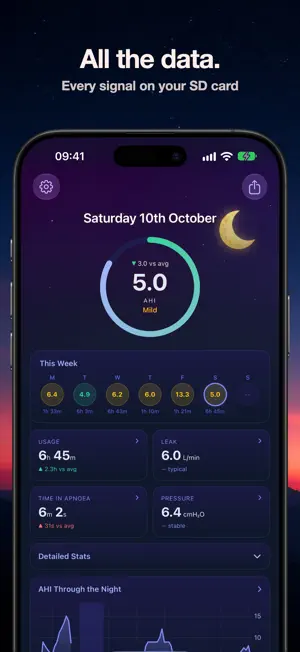
See what your CPAP recorded last night – right on your iPhone. Plug in your machine's SD card and see how you slept, how many times your breathing stopped and how your therapy is going, all explained in plain English. NEW TO CPAP? START HERE The first months of therapy bring a lot of questions. CPAP Analysis helps you find the answers: • How did last night go? See your AHI (breathing events per hour) and how it compares with your usual night. • Am I using it enough? Track your hours against the usage goal Medicare and many US insurers use – at least 4 hours a night on 70% of nights – and see whether you're on track. • Is it getting better? See how your therapy is trending over weeks and months. • No jargon. Every chart comes with a plain-English guide to what it shows and why it matters. YOUR NIGHT IN DETAIL • See when you stopped breathing and what kind of event it was, on a timeline of every breathing event • AHI through the night, pressure, leak and more • Keep a sleep journal: rate how you slept, add a note and see how you felt next to your numbers YOUR PROGRESS OVER TIME • A plain-English read on how your therapy is going, updated as you import • Focus areas that point out things worth a look, like missed nights or a change in your events • Trends that show how your therapy is progressing, and give you clear points to raise with your sleep team BLOOD OXYGEN AND PULSE FROM YOUR APPLE WATCH OR O2 RING Wear an Apple Watch or a Wellue O2Ring? See your overnight blood oxygen and pulse on the same night as your CPAP data, plus your sleep stages from Apple Health. Any ring that syncs to Apple Health works. SHARE AND GET A SECOND OPINION • Share a night's graphs with a CPAP community when you want a second opinion • Export a night, or your trends from 7 days up to a year, as a PDF report BUILT BY A CPAP USER When I started CPAP, my machine's app said I was doing well – but I kept waking up frustrated and tired. When I looked at the detailed data, I found clusters of breathing events waking me up that the summary never showed. That gave me something real to talk to my doctor about. I built CPAP Analysis so you can see that detail too, explained in a way that makes sense. YOUR DATA STAYS YOURS No account. Your therapy history lives on your iPhone and your own iCloud, and syncs to your iPad. We never see it. WHAT YOU NEED • A CPAP machine that records to an SD card: ResMed AirSense 10, AirSense 11, AirStart 10, AirCurve 10 and 11, Lumis or S9; Löwenstein Prisma Smart; or BMC G2S A20 • A USB-C SD card reader for your iPhone – easy to find online Also shows event types (obstructive, central, hypopnea, CSR, RERA), respiratory rate, tidal volume, minute ventilation, snore, flow limitation and mask-on sessions. SUBSCRIPTION Try CPAP Analysis Pro free, then choose a monthly or yearly plan. Your subscription renews automatically until you cancel in your Apple Account settings. CPAP Analysis is not a medical device. It displays the data your CPAP machine recorded and does not diagnose or treat any condition. Talk to your doctor or equipment supplier before changing your therapy. Not affiliated with or endorsed by ResMed, Löwenstein or BMC. EULA: https://www.apple.com/legal/internet-services/itunes/dev/stdeula/ Terms of Use: https://cpapanalysis.com/terms Privacy Policy: https://cpapanalysis.com/privacy
Ratings & reviews
5.0
7 ratings
What’s new
Version 1.15 · Updated October 16, 2026
NEW • Filter your nights, trends and report to one machine – for anyone who uses more than one • Compare your machines side by side: AHI, usage, leak and pressure • Give each machine its own name Plus minor fixes.
App privacy
The developer, Fellbeck Ltd, reported these privacy practices to Apple.
Data Linked to You
The following data, which may be collected and linked to your identity, may be used for the following purposes:
- Contact Info: Email Address
Used for: App Functionality
Data Not Linked to You
The following data, which may be collected but is not linked to your identity, may be used for the following purposes:
- Identifiers: Device ID, User ID
- Usage Data: Product Interaction
- Purchases: Purchase History
- Diagnostics: Performance Data
Used for: Analytics, App Functionality
Alternatives to CPAP Analysis: Tracker & Log
Looking for apps like CPAP Analysis: Tracker & Log? Here are 6 similar apps on the App Store. The highest rated is Sleep Scope (5.0/5), and all 6 are free to download.
-
 CPAP Dash
3.7
CPAP Dash
3.7
-
 CPAP Tracker
3.5
CPAP Tracker
3.5
-
 Sleep Scope
5.0
Sleep Scope
5.0
-
 CPAP Insight: AHI Tracker
2.0
CPAP Insight: AHI Tracker
2.0
-
 SleepHQ
4.7
SleepHQ
4.7
-
 Sleep Tracker, CPAP, Insomnia
4.8
Sleep Tracker, CPAP, Insomnia
4.8
| App | Rating | Price | Last updated | Compare |
|---|---|---|---|---|
| CPAP Analysis: Tracker & Log | 5.0 / 5 (7 ratings) | Free | October 16, 2026 | |
| CPAP Dash | 3.7 / 5 (3) | Free | Oct 19, 2026 | Compare |
| CPAP Tracker | 3.5 / 5 (8) | Free | May 27, 2026 | Compare |
| Sleep Scope | 5.0 / 5 (2) | Free | Aug 5, 2026 | Compare |
| CPAP Insight: AHI Tracker | 2.0 / 5 (1) | Free | Jul 19, 2026 | Compare |
| SleepHQ | 4.7 / 5 (617) | Free | Oct 9, 2026 | Compare |
| Sleep Tracker, CPAP, Insomnia | 4.8 / 5 (120) | Free | Oct 14, 2026 | Compare |