

Trais: Audio to Text
Mattia Intranova Productivity iPhoneiPadiPod touch
Trais: Audio to Text is a free Productivity app for iPhone and iPad by Mattia Intranova. Requires iOS 16.6. Updated October 23, 2026.
- Price
- Free
- on the App Store
- Size
- 34 MB
- Age 4+
- Updated
- Oct 23
- 2026 · v1.4.3
Screenshots

About Trais: Audio to Text
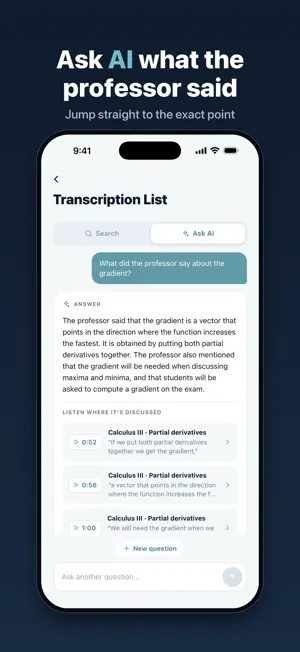
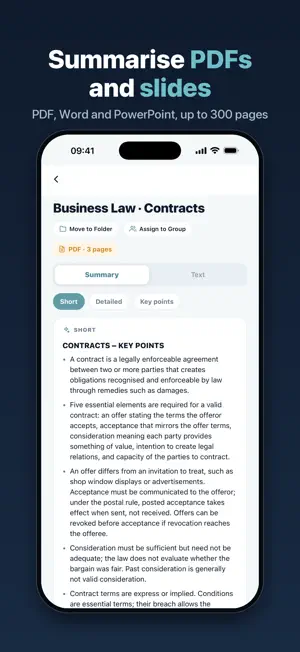
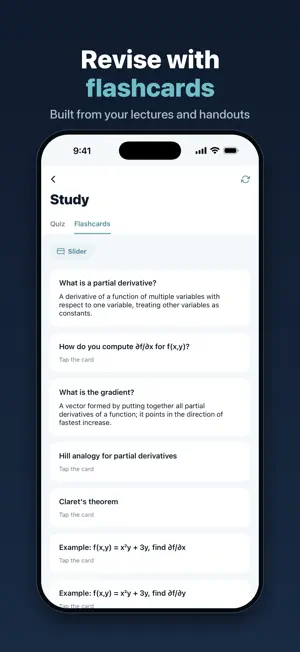
Trais turns lectures and handouts into study material. Record the lecture or upload the professor's slides, let the AI write and summarise everything, then revise with quizzes and flashcards or simply ask what was said. HOW IT WORKS 1. Record in the app, import audio or video, or upload a PDF, Word or PowerPoint file. 2. The AI transcribes recordings and summarises documents, in the language you pick. 3. You get a notification when everything is ready. SUMMARISE DOCUMENTS Upload slides, handouts and notes: get a short, detailed or key-points summary. The full text stays available page by page. ASK AI Ask a question about your lectures and documents, like "what did they say about the exam?". The answer comes with its sources: tap one and the audio plays from that minute, or the document opens on the quoted passage. REVISE Every lecture and every document turns into multiple-choice quizzes and flashcards, to flip one at a time or read as a list. WHAT YOU CAN DO • Record lectures, meetings, interviews and voice notes • Import audio and video: the audio track is extracted automatically • Summarise PDF, Word, PowerPoint and text files • Choose the transcription language, such as English or Italian • Play the audio next to the text, with 15-second jumps and up to 2x speed • Fix the transcript: the text is editable • Search for words inside all your transcriptions • Organise transcriptions into folders • Share a transcription with a link • Study in a group: members see shared transcriptions • Get an AI summary of the key points (Premium) • Export to PDF, Word or SRT subtitles (Premium) PERFECT FOR • Students — turn lectures into text, summarise handouts and quiz yourself before the exam • Professionals — record meetings without scribbling notes • Journalists and researchers — transcribe interviews and find the exact quote • Anyone who takes voice notes and never has time to replay them SUBSCRIPTION WITHOUT SURPRISES With Premium, transcriptions are unlimited: no per-hour billing, no credits to buy again. Start with a 7-day free trial and cancel anytime from your Apple ID settings. Premium summarises documents up to 300 pages, with detailed and key-points summaries. The free plan includes 720 transcription minutes per month, up to 3 transcriptions and 3 documents a day (documents up to 50 pages) and 3 folders. A short video unlocks extra transcriptions and documents, longer documents, quizzes and flashcards. Invite a friend and get 5 extra transcriptions that never expire. LANGUAGES Transcription in English, Italian and other languages. The app is available in English and Italian. Legal Terms of Use (EULA): https://trais-app.com/terms-of-service.html Privacy Policy: https://trais-app.com/privacy-policy.html
What’s new
Version 1.4.3 · Updated October 23, 2026
More reliable uploads: files no longer get stuck after the app has been open for a long time. Small improvements and fixes.
App privacy
The developer, Mattia Intranova, reported these privacy practices to Apple.
Data Used to Track You
The following data may be used to track you across apps and websites owned by other companies:
- Usage Data: Product Interaction, Advertising Data
- Diagnostics: Crash Data
Data Linked to You
The following data, which may be collected and linked to your identity, may be used for the following purposes:
- Usage Data: Advertising Data
- Contact Info: Email Address, Name
- User Content: Audio Data, Other User Content
- Identifiers: Device ID
Used for: Third-Party Advertising, Analytics, Product Personalization, App Functionality
Data Not Linked to You
The following data, which may be collected but is not linked to your identity, may be used for the following purposes:
- Usage Data: Product Interaction
- Diagnostics: Crash Data
Used for: App Functionality