

Scout: Room Scan & Reno Plan
Gurenter LLC Productivity iPhoneiPadiPod touch
Scout: Room Scan & Reno Plan is a free Productivity app for iPhone and iPad by Gurenter LLC. Rated 5.0/5 from 2 ratings. Requires iOS 18.1.
- Rating
- 5.0
- 2 ratings
- Price
- Free
- on the App Store
- Size
- 11 MB
- Age 4+
- Updated
- Sep 7
- 2026 · v1.05
Screenshots


About Scout: Room Scan & Reno Plan
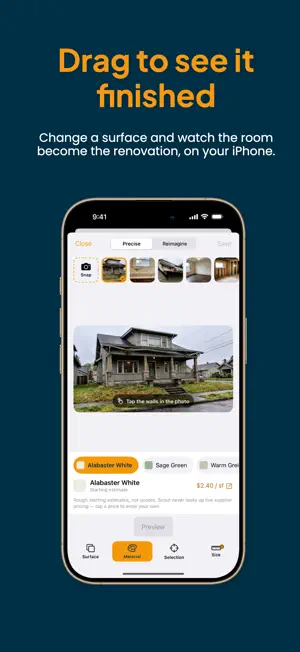
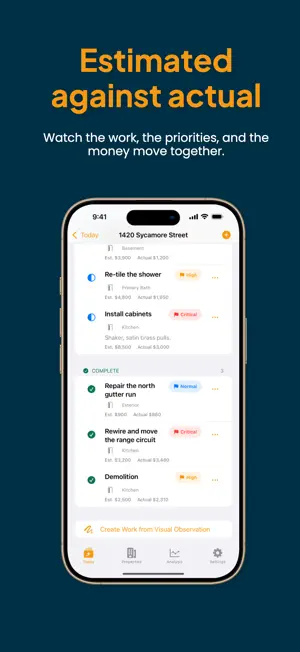
Walk a property, scan the rooms, and leave with the plan — and the numbers — already done. SCAN THE ROOM On supported iPhone models, scan a room and Scout keeps a measured floor plan: floor area, wall area, perimeter, and ceiling height. Attach it to the space you are planning so the measurements sit beside the work. SEE THE RENOVATION BEFORE YOU COMMIT Point Scout at a photo of the room and it renders the finished result. Change the flooring, the walls, the cabinets, the counters. Costs move as you go, so the picture and the budget are the same document — no more choosing a finish and guessing what it did to the number. It runs on your iPhone. Your photos are not uploaded anywhere. MARK WHAT YOU FIND Photograph the problem and mark it — an arrow, a shape, a note — right on the picture. Every mark can become a work item with the photograph still attached, so the reason for the line item never gets separated from the line item. PLAN THE WORK Rooms, work items, and costs that roll up into a total. Estimated against actual. What is committed and what is still a guess. Due dates and reminders for the things that cannot slip. RUN THE NUMBERS Cap rate, cash-on-cash return, monthly cash flow, ROI, and flip profit — from the purchase price, rehab budget, and rent you enter. Compare two properties side by side before you commit to either. SHOW YOUR WORK Export a report carrying the photographs, the marks, the before-and-after pairs, and the figures. The document that goes to a lender, a partner, or a client says the same thing your screen does. BUILT FOR THE WALKTHROUGH Capture stays on screen while you move. Widgets keep the active job in front of you. Everything is reachable one-handed, and the whole app works at the largest accessibility text sizes. EVERYTHING STAYS YOURS No account. No sign-up. No server. Your properties sync privately through your own iCloud, across your own devices, and nowhere else.
What’s new
Version 1.05 · Updated September 7, 2026
Scout has been rebuilt around the walkthrough. CONCEPT DESIGN, ON YOUR IPHONE Photograph a room and see it finished. Precise mode changes a surface at a time — flooring, walls, cabinets, counters — and prices the change while you look at it. Reimagine hands the room to Apple Intelligence on supported devices. Nothing leaves your phone. ROOM SCANNING Scan a room on supported iPhone models and keep a measured floor plan: floor area, wall area, perimeter, ceiling height. Link a scan to a space so the measurements sit beside the work you are planning, and keep an earlier scan as a before to compare against. A MARK IS AN OBSERVATION Photograph a problem, mark it with an arrow, a shape, or a note, and turn that mark into a work item that keeps the photograph attached. Work items now carry their evidence: you can see the picture on the task, add photos or video to any task, and take one off again without losing the photo. WORK ITEMS THAT NAME THEMSELVES A task made from a photograph is now named after what the photograph shows, read on your device rather than in the cloud. PLANNING AND MONEY Rooms, tasks, and costs that roll up into a total. Estimated against actual, committed against quoted. Due dates and reminders. Cap rate, cash-on-cash, monthly cash flow, ROI, and flip profit, all calculated the same way on every screen and in every report. REPORTS AND SHARING Export a report with the photographs, the marks, the before-and-after pairs, and the figures. Choose the currency it prints in. BUILT NATIVE Rebuilt on standard iOS controls, so swipe actions, selection, Dark Mode, and Dynamic Type all behave the way they do everywhere else. Widgets and a capture Live Activity keep the active job in front of you. ACCESSIBILITY The whole app now works at the largest accessibility text sizes, including the concept board, which previously put some tools out of reach. FIXES Creating a work item from a visual observation now works end to end. Floor plan previews and room areas are correct. Scanning a room no longer closes the form you were filling in.
App privacy
The developer, Gurenter LLC, reported these privacy practices to Apple.
Data Not Collected
The developer does not collect any data from this app.
Alternatives to Scout: Room Scan & Reno Plan
Looking for apps like Scout: Room Scan & Reno Plan? Here are 6 similar apps on the App Store. The highest rated is Pomodoro Timer - FocusKit (4.8/5), and all 6 are free to download.
-
 Prorenter: Property Management
-
 Bookmark Links: PostPocket
4.5
-
 Hour Tracker - Moons
4.3
-
 Pomodoro Timer - FocusKit
4.8
-
 Karo: Tasks, Todo List Planner
4.7
-
 Vista Property Management App
| App | Rating | Price | Last updated | Compare |
|---|---|---|---|---|
| Scout: Room Scan & Reno Plan | 5.0 / 5 (2 ratings) | Free | September 7, 2026 | |
| Prorenter: Property Management | – | Free | Oct 6, 2026 | Compare |
| Bookmark Links: PostPocket | 4.5 / 5 (31) | Free | Feb 1, 2026 | Compare |
| Hour Tracker - Moons | 4.3 / 5 (13) | Free | Sep 28, 2026 | Compare |
| Pomodoro Timer - FocusKit | 4.8 / 5 (53) | Free | Oct 3, 2026 | Compare |
| Karo: Tasks, Todo List Planner | 4.7 / 5 (36) | Free | Mar 25, 2025 | Compare |
| Vista Property Management App | – | Free | Sep 28, 2026 | Compare |