

Bit Scope - Converter
Lior Zukman Utilities iPhoneiPadiPod touch
Bit Scope - Converter is a free Utilities app for iPhone and iPad by Lior Zukman. Requires iOS 13.0. Updated August 3, 2026.
- Price
- Free
- on the App Store
- Size
- 38 MB
- Age 4+
- Updated
- Aug 3
- 2026 · v1.0.6
Screenshots



About Bit Scope - Converter
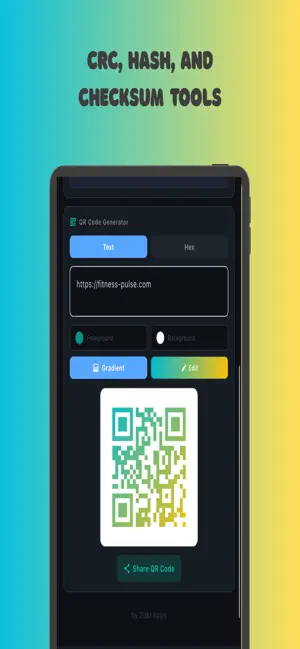
Bit Scope - The ultimate bit-level calculator and converter for developers, engineers, and students. Visualize, manipulate, and convert numbers at the bit level with precision and ease. CORE FEATURES Interactive Bit Calculator - Visual bit editor with toggle functionality - Support for 8-bit, 16-bit, 32-bit, and 64-bit integers - IEEE 754 floating-point formats (Float16, Float32, Float64) - Real-time conversion between Binary, Octal, Decimal, and Hexadecimal - Signed/Unsigned modes with two's complement visualization - Big Endian and Little Endian byte ordering - MSB/LSB bit order options - BCD (Binary Coded Decimal) and Gray Code conversion Bitwise Operations - AND, OR, XOR, NOT, NAND, NOR, XNOR operations - Left/Right shift with arithmetic and logical options - Rotate left/right with wrap-around - Bit counting (population count, leading/trailing zeros) - Interactive bit manipulation Advanced Converters - Base64 Encoder/Decoder - Color Picker with RGB to Hex conversion and RAL color system - Timestamp Converter (Unix epoch to Human-readable) - Value Comparator for side-by-side comparisons - Batch Converter for multiple values Developer Utilities - CRC Calculator (CRC8, CRC16, CRC32, Fletcher16, Adler32) - Hash Calculator (MD5, SHA-1, SHA-256) - ASCII/Unicode Viewer with code points and UTF-8/UTF-16 encoding - QR Code Generator with custom colors and gradients - Hex Dump viewer and import functionality Custom Widgets - Create your own widget collection from Converters and Utilities - Reorder and customize your workspace - Persistent preferences across sessions EDUCATIONAL FEATURES Comprehensive Learning Resources - 17+ interactive examples covering all features - Detailed conversion guides for number systems - Bitwise operations tutorials - IEEE 754 floating-point explanations - Practical use cases and examples INTERNATIONAL SUPPORT 12 Languages Available - English, Hebrew, Arabic, Chinese (Simplified and Traditional) - French, German, Italian, Japanese, Korean - Portuguese (Brazil and Portugal), Russian, Spanish - Plus 15+ regional variations - Full RTL support for Hebrew and Arabic USER EXPERIENCE - Clean, modern interface with light/dark themes - Responsive design for iPhone and iPad - Real-time calculations and instant feedback - Calculation history with export functionality - Ad-free option available - Optimized for iPhone and iPad PERFECT FOR - Software developers debugging low-level code - Embedded systems engineers - Computer science students learning number systems - Anyone working with binary data and bit manipulation - Network protocol developers - Reverse engineers and security researchers KEY HIGHLIGHTS - Precision calculations using BigInt and IEEE 754 standards - Visual bit grid with interactive editing - Real-time conversion across all number bases - Comprehensive bitwise operation suite - Professional developer tools in one app - No ads with premium option - Regular updates and improvements Download Bit Scope today and take control of your bit-level calculations! For support, feature requests, or bug reports, visit our website or contact us through the app. Terms of Use: https://zukiapps.com/bit-scope/terms
What’s new
Version 1.0.6 · Updated August 3, 2026
This update makes everyday bit work faster: an interactive bit canvas and copy buttons wherever you need them. Copy buttons • One-tap copy on calculator results—binary, octal, decimal, and hex. • Copy on tool outputs too: Base64, CRC, hash, hex dump, color codes, timestamps, and more. • Clean text goes to the clipboard; a checkmark confirms success. Interactive bit canvas • Open the bit grid and tap any bit to toggle it on or off. • All representations update instantly as you edit. • Signed mode, endianness, and bit order stay in sync with the canvas. Thank you for using Bit Scope. If you enjoy the app, a short App Store review helps other developers find it.
App privacy
The developer, Lior Zukman, reported these privacy practices to Apple.
Data Used to Track You
The following data may be used to track you across apps and websites owned by other companies:
- Identifiers: Device ID
- Usage Data: Product Interaction, Advertising Data
- Diagnostics: Other Diagnostic Data
Data Linked to You
The following data, which may be collected and linked to your identity, may be used for the following purposes:
- Usage Data: Advertising Data
- Diagnostics: Crash Data
Used for: Third-Party Advertising, Analytics, App Functionality
Data Not Linked to You
The following data, which may be collected but is not linked to your identity, may be used for the following purposes:
- Identifiers: User ID, Device ID
- Usage Data: Product Interaction
- Diagnostics: Performance Data, Other Diagnostic Data
- Purchases: Purchase History
Used for: Third-Party Advertising, Analytics, App Functionality, Other Purposes
Alternatives to Bit Scope - Converter
Looking for apps like Bit Scope - Converter? Here are 6 similar apps on the App Store. The highest rated is Emojis Keyboard (3.0/5), and all 6 are free to download.
-
 FLConvert
-
 Next Level Take 5
-
 Quick Barcode Lookup-scanner
-
 图钉轨迹
图钉轨迹
-
 Absolute Humidity – Calculator
-
 Emojis Keyboard
3.0
Emojis Keyboard
3.0
| App | Rating | Price | Last updated | Compare |
|---|---|---|---|---|
| Bit Scope - Converter | – | Free | August 3, 2026 | |
| FLConvert | – | Free | Jun 14, 2026 | Compare |
| Next Level Take 5 | – | Free | Feb 26, 2025 | Compare |
| Quick Barcode Lookup-scanner | – | Free | Jul 10, 2025 | Compare |
| 图钉轨迹 | – | Free | Mar 22, 2025 | Compare |
| Absolute Humidity – Calculator | – | Free | Dec 19, 2025 | Compare |
| Emojis Keyboard | 3.0 / 5 (2) | Free | Feb 2, 2024 | Compare |