

XML to PDF: Code Printer
Muhammad Mujahid Khan Productivity iPhoneiPadiPod touch
XML to PDF: Code Printer is a free Productivity app for iPhone and iPad by Muhammad Mujahid Khan. Requires iOS 17.6. Updated May 28, 2026.
- Price
- Free
- on the App Store
- Size
- 2 MB
- Age 4+
- Updated
- May 28
- 2026 · v1.2
Screenshots


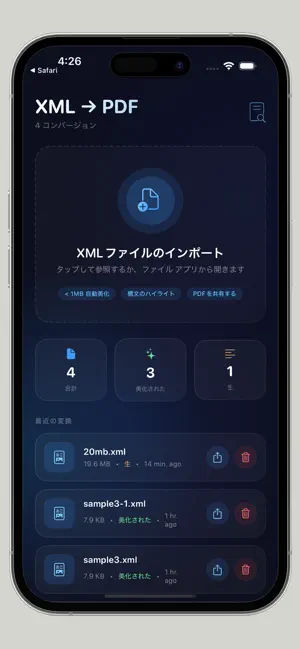

About XML to PDF: Code Printer
FREE VERSION: 1 XML to PDF conversion per day PRO VERSION: Unlimited conversions (subscription) Convert XML Code to Beautiful PDFs with Syntax Highlighting Perfect for developers, students, and anyone who needs to print XML with syntax highlighting and line numbers. Transform raw XML code into professionally formatted PDF documents - completely offline with no uploads and no tracking. WHAT MAKES THIS APP DIFFERENT Most XML to PDF tools just dump raw text. This app adds syntax highlighting, line numbers, and beautiful formatting so your code is actually readable when printed or shared. KEY FEATURES Syntax Highlighting Tags, attributes, values, and comments appear in different colors - just like your favorite code editor. Green for values, blue for tags, orange for attributes. Line Numbers Every line of XML is numbered for easy reference during code reviews, documentation, or team discussions. Auto-Beautify (Files Under 1MB) Small XML files are automatically formatted with proper indentation. No more messy, unreadable XML. Just clean, structured code. Dark Theme PDF Output PDFs use a dark background with light text - easier on the eyes when reviewing code on screen or printing. 100% Offline Processing Everything happens on your device. No internet connection required. No uploads to any server. Your data never leaves your phone. No Tracking. No Accounts. Zero data collection. No sign-up required. No email requests. Just download and use. Fast Rendering Engine Handles large XML files efficiently with real-time progress indicators. You always know how much longer the conversion will take. Share Anywhere Export PDFs via AirDrop, Mail, Messages, Files app, or any app that accepts PDFs. Open From Files App Convert any XML file directly using the Open In menu. Works seamlessly with the iOS Files app. Conversion History Every PDF you create is saved automatically. Access previously converted files anytime without reconverting. PERFECT USE CASES Code Reviews Review XML structure on paper or iPad. Line numbers make team discussions precise and efficient. Student Assignments Students learning XML can print their code with proper syntax highlighting for submission. Data Archiving Save important XML data as PDFs for long-term storage. No need to keep raw XML files. Developer Portfolios Showcase your XML work in a professional PDF format that non-technical people can review. Business Reports Convert XML data exports into readable PDFs for stakeholders who don't understand raw XML. HOW IT WORKS Step 1: Open XML File Tap the import button or use Open In from the Files app. Your app supports XML files of any size. Step 2: Auto-Beautify Files under 1MB are automatically beautified with proper indentation. Larger files process as-is for speed. Step 3: Preview with Colors See your XML with syntax highlighting before converting. Tags, attributes, values, and comments are color-coded. Step 4: Export as PDF Tap the share button. Your PDF is generated instantly with line numbers, syntax highlighting, and dark theme. FREE VS PRO Free Version (Always Available) - 1 conversion per day - All features included (syntax highlighting, line numbers, beautify, sharing) - No time limit on the app itself Pro Version (Subscription) - Unlimited conversions per day - Same great features, no daily limit - Priority support if you need help SUBSCRIPTION DETAILS Weekly Subscription: $2.99 Monthly Subscription: $6.99 Yearly Subscription: $17.99 (best value) SUPPORT & LEGAL Support: https://justclack.blogspot.com Privacy Policy: https://justclack.blogspot.com/p/privacy-policy.html Terms of Use (EULA): https://www.apple.com/legal/internet-services/itunes/dev/stdeula ABOUT THE DEVELOPER This app was built for developers by a developer. No corporate tracking. No hidden agendas. Just a tool that solves a real problem - printing XML code with proper syntax highlighting and line numbers.
What’s new
Version 1.2 · Updated May 28, 2026
PRO VERSION ADDED • Unlimited conversions with Pro subscription • Daily limit: 1 free conversion (always available) • Syntax highlighting in PDF output • Line numbers for code reviews • Auto-beautify for files under 1MB • 100% offline processing • Dark theme PDF with colors • Conversion history saved automatically • Share PDFs via AirDrop, Mail, Files • Open XML files directly from Files app • Performance improvements and bug fixes
App privacy
The developer, Muhammad Mujahid Khan, reported these privacy practices to Apple.
Data Not Collected
The developer does not collect any data from this app.
Alternatives to XML to PDF: Code Printer
Looking for apps like XML to PDF: Code Printer? Here are 6 similar apps on the App Store. The highest rated is JSON Master: Editor & Viewer (4.6/5), and all 6 are free to download.
-
 eFactura Xml Pdf
-
 JSON Master: Editor & Viewer
4.6
JSON Master: Editor & Viewer
4.6
-
 PDF to XML Converter
-
 衛生キロク|飲食店のHACCP記録
-
 Turni di Lavoro
-
 Yama Corp - Gestor de Vendas
| App | Rating | Price | Last updated | Compare |
|---|---|---|---|---|
| XML to PDF: Code Printer | – | Free | May 28, 2026 | |
| eFactura Xml Pdf | – | Free | Apr 17, 2026 | Compare |
| JSON Master: Editor & Viewer | 4.6 / 5 (5) | Free | Aug 13, 2026 | Compare |
| PDF to XML Converter | – | Free | Oct 23, 2026 | Compare |
| 衛生キロク|飲食店のHACCP記録 | – | Free | Oct 15, 2026 | Compare |
| Turni di Lavoro | – | Free | Oct 21, 2026 | Compare |
| Yama Corp - Gestor de Vendas | – | Free | Oct 24, 2026 | Compare |