

HalluProof - Spot AI Errors
Hyun-Su Kim Education iPhoneiPadiPod touch
HalluProof - Spot AI Errors is a free Education app for iPhone and iPad by Hyun-Su Kim. Requires iOS 18.0. Updated October 17, 2026.
- Price
- Free
- on the App Store
- Size
- 7 MB
- Age 4+
- Updated
- Oct 17
- 2026 · v2.1.0
Screenshots

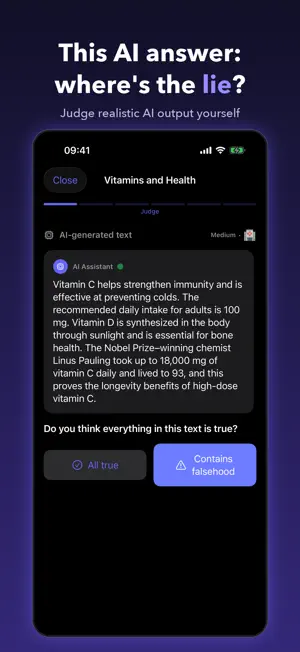

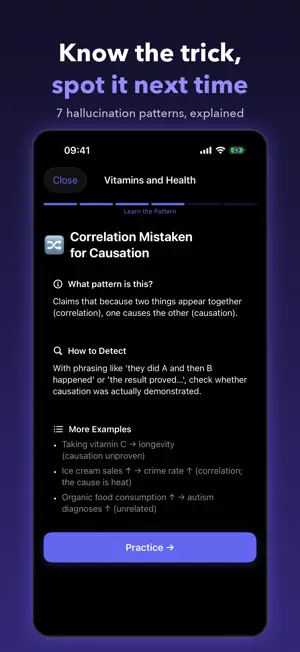
About HalluProof - Spot AI Errors
AI is confidently wrong. It cites papers that were never written, invents numbers, and flips relationships backwards. The trouble is that the falsehood sits among true statements. Reading alone won't catch it. HalluProof trains you to find it yourself. ■ 5–10 minutes a day, with new real-world cases added over time Each day you read a passage written like real AI output and decide for yourself what is false. Once you commit, the hallucinated spans are highlighted, and you see why they are wrong alongside the actual facts and their sources. ■ Six steps per challenge Judge → Reveal → Think deeper → Learn the pattern → Practise → Insight It doesn't just hand you the answer. You say out loud why you were taken in, and the trick gets filed as a pattern you'll recognise next time. ■ Seven hallucination patterns Reversed facts · Fabricated sources · Distorted figures · Overstatement Outdated claims · Misapplied context · Hidden risks and limits Your proficiency is tracked per pattern, so you train the weakest one first. ■ Practice modes • Daily Challenge: one a day, the same for everyone • Quick Random: one random challenge — judge it, see the answer • Free Study: every day, in any order Daily and random practice are kept apart from your course progress but still count toward your streak. ■ Habits that outlast the app Where to verify what — scholarly databases for research, medical literature for health, official registries for law. The aim is a habit you use outside the app. ■ Learn More Links to AI lessons for kids, families and classrooms, and to research and seminar updates for professionals. They open in an in-app browser. ■ Everything stays on your device No account, no sign-in, no uploads. Lessons work fully offline; a web page opens only when you tap a Learn More link. Your progress never leaves your phone. ■ Home screen widget Your streak and today's challenge on the Home Screen and Lock Screen. Tap to jump straight in. ■ iPhone and iPad On iPad, the AI passage and its verification sources sit side by side. This is not an app against using AI. It's an app for using it properly — by learning to doubt it first.
What’s new
Version 2.1.0 · Updated October 17, 2026
• New practice modes, under Practice on the Home tab: – Daily Challenge: one a day, the same for everyone. – Quick Random: one random challenge — judge it and see the answer. – Free Study: every day, in any order. • Weeks 7 and 8 (Days 43–56) are now open. • Learn More: AI lessons for kids, families and classrooms, plus research and seminar updates for professionals. • The small widget now shows the opening words of today's AI answer. • Result screens now remind you to check the answers and explanations yourself. • Answers, explanations and sources in existing lessons were re-checked and corrected. • The notification badge now clears when you open the app.
App privacy
The developer, Hyun-Su Kim, reported these privacy practices to Apple.
Data Not Collected
The developer does not collect any data from this app.
Alternatives to HalluProof - Spot AI Errors
Looking for apps like HalluProof - Spot AI Errors? Here are 6 similar apps on the App Store. The highest rated is 사고 연습 - AI 시대의 생각 근육 (5.0/5), and all 6 are free to download.


| App | Rating | Price | Last updated | Compare |
|---|---|---|---|---|
| HalluProof - Spot AI Errors | – | Free | October 17, 2026 | |
| 사고 연습 - AI 시대의 생각 근육 | 5.0 / 5 (2) | Free | Apr 2, 2026 | Compare |
| 글랑 GLANG | – | Free | Sep 10, 2025 | Compare |
| 2830 기초 영문법 | – | Free | Mar 3, 2026 | Compare |
| OtheReality | – | Free | Oct 18, 2025 | Compare |
| 인천바로알기 | – | Free | Jul 29, 2026 | Compare |
| 毒物劇物取扱責任者-試験対策-国家資格 | – | Free | Jan 13, 2026 | Compare |