

Photo Compress Resize HEIC JPG
宝锋 吴 Photo & Video iPhoneiPadiPod touch
Photo Compress Resize HEIC JPG is a free Photo & Video app for iPhone and iPad by 宝锋 吴. Requires iOS 15. Updated March 29, 2026.
- Price
- Free
- on the App Store
- Size
- 13 MB
- Age 4+
- Updated
- Mar 29
- 2026 · v1.1.0
Screenshots

About Photo Compress Resize HEIC JPG
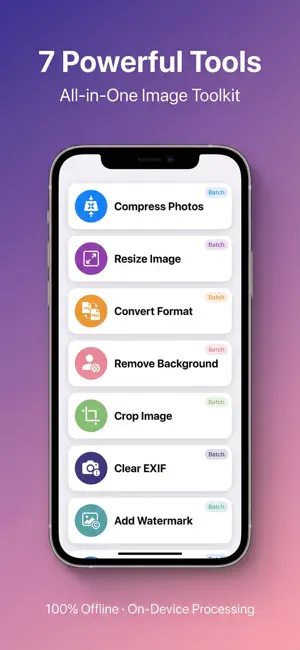
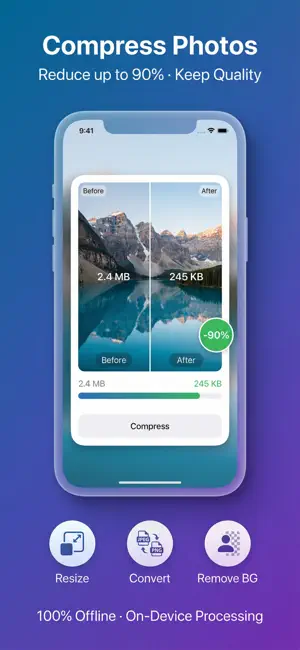
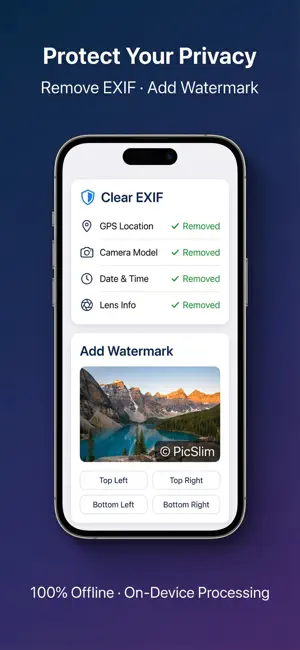
Photo Compress is the all-in-one image toolkit you've been looking for. Compress, resize, convert, crop, remove backgrounds, strip EXIF data, and add watermarks — editing runs on your device, and we do not upload your photos to our servers for processing. COMPRESS PHOTOS - Reduce file size up to 90% while maintaining visual quality - Adjustable quality slider (High / Medium / Low) - Output to JPEG, HEIC, or PNG - Batch process up to 20 images at once - See before/after comparison with compression ratio RESIZE IMAGES - Set custom width and height in pixels - Smart presets: Instagram (1080x1080), Facebook (1200x630), Twitter (1200x675), Profile Photo (400x400), Wallpaper (1170x2532) - Preserve aspect ratio option - Batch resize multiple images CONVERT FORMAT - Convert between JPEG, PNG, and HEIC - Lossless conversion with maximum quality - Batch convert multiple files REMOVE BACKGROUND - AI-powered person segmentation using Apple Vision - Export as transparent PNG - Perfect for profile photos and product images CROP IMAGE - Crop with preset aspect ratios: Free, 1:1, 4:5, 16:9, 4:3 - Ideal for social media platforms - Batch crop multiple images CLEAR EXIF DATA - Remove GPS location, camera info, and metadata - Protect your privacy before sharing - Choose output format (JPEG, PNG, HEIC) ADD WATERMARK - Add custom text watermark to protect your work - 5 position options: Center, Top Left, Top Right, Bottom Left, Bottom Right - Batch add watermark to multiple images WHY PHOTO COMPRESS? - Seven tools in one workflow: compress, resize, convert, crop, EXIF cleanup, watermark, and AI background removal - Edits happen on your device — we don’t upload your photos to our servers to process them - Smart presets for social sizes, batch tools, and before/after feedback where available - 20 languages with in-app switching, a clear interface, and history so you can pick up where you left off - Universal app — optimized for both iPhone and iPad Perfect for social media managers, photographers, designers, students, and anyone who needs to optimize images quickly. PRO (OPTIONAL IN-APP PURCHASES) Photo Compress is free to download. Optional Pro is available through auto-renewing subscriptions or a one-time lifetime purchase. Prices below are approximate USD references only; the App Store shows the exact price in your currency and region. • Weekly subscription — about US$1.99/week • Monthly subscription — about US$3.99/month • Yearly subscription — about US$19.99/year (best value for most users) • Lifetime — about US$29.99 one-time (non-consumable) SUBSCRIPTION & LEGAL Subscription automatically renews unless auto-renew is turned off at least 24 hours before the end of the current period. Payment will be charged to your Apple ID account at confirmation of purchase. You can manage or cancel your subscription in your App Store account settings. Privacy Policy: https://sites.google.com/view/compressimageprivacy/imagecompress/privacy Terms of Use: https://sites.google.com/view/compressimageprivacy/imagecompress/agreement **What's New:** Welcome to Photo Compress 1.0! - Compress photos with adjustable quality - Resize images with smart presets - Convert between JPEG, PNG, and HEIC - Remove backgrounds with AI - Crop with aspect ratio presets - Strip EXIF metadata for privacy - Add text watermarks - Batch process up to 20 images - Support for 20 languages
What’s new
Version 1.1.0 · Updated March 29, 2026
Performance optimization
App privacy
The developer, 宝锋 吴, reported these privacy practices to Apple.
Data Used to Track You
The following data may be used to track you across apps and websites owned by other companies:
- Identifiers: Device ID
Data Not Linked to You
The following data, which may be collected but is not linked to your identity, may be used for the following purposes:
- Identifiers: Device ID
- Usage Data: Advertising Data
- Diagnostics: Crash Data
Used for: Third-Party Advertising, Analytics
Alternatives to Photo Compress Resize HEIC JPG
Looking for apps like Photo Compress Resize HEIC JPG? Here are 6 similar apps on the App Store. The highest rated is PixelResize: Photo Resizer (5.0/5), and all 6 are free to download.
-
 Photo Cleaner & Compressor
-
 AI Photo Compressor & Resizer
-
 Photo Compressor: Resize to KB
-
 PixelResize: Photo Resizer
5.0
PixelResize: Photo Resizer
5.0
-
 Compress Photos - MB to KB
4.2
Compress Photos - MB to KB
4.2
-
 Compress Photos - PixFit
5.0
Compress Photos - PixFit
5.0
| App | Rating | Price | Last updated | Compare |
|---|---|---|---|---|
| Photo Compress Resize HEIC JPG | – | Free | March 29, 2026 | |
| Photo Cleaner & Compressor | – | Free | Jul 20, 2026 | Compare |
| AI Photo Compressor & Resizer | – | Free | Nov 22, 2024 | Compare |
| Photo Compressor: Resize to KB | – | Free | Sep 23, 2026 | Compare |
| PixelResize: Photo Resizer | 5.0 / 5 (1) | Free | Oct 16, 2026 | Compare |
| Compress Photos - MB to KB | 4.2 / 5 (5) | Free | Sep 8, 2026 | Compare |
| Compress Photos - PixFit | 5.0 / 5 (1) | Free | Sep 5, 2026 | Compare |