

Photo Resizer - Resize Image
Asad Ahsan Photo & Video iPhoneiPadiPod touchMac
Photo Resizer - Resize Image is a free Photo & Video app for iPhone and iPad by Asad Ahsan. Rated 3.7/5 from 3 ratings. Requires iOS 15.6.
- Rating
- 3.7
- 3 ratings
- Price
- Free
- on the App Store
- Size
- 61 MB
- Age 4+
- Updated
- Oct 14
- 2026 · v1.0.3
Screenshots



About Photo Resizer - Resize Image
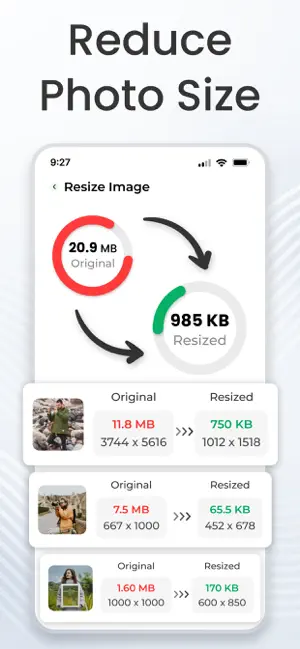
Image Resizer app allows you to reduce image size by width and height, change image dimension by percentage, and convert large images. Whether you’re preparing photos for online forms, social media uploads, email attachments, or freeing up device storage, the app provides precise image resizing and file size control in one place. Key features of image resizer app: - Resize images by Width & Height: This app lets you resize photos by width and height. You can set the exact dimensions you need, whether for personal use or a presentation. No more guessing or cropping images manually just enter your desired width and height, and the app will automatically downsize image or enlarge photo size. This ensures your image size always fit in any space. - Resize photos by Percentage: This feature lets you change the size of your pictures by percentage using an advanced photo resizer. It’s quickly scaling an image up or down without worrying about exact measurements. Simply choose the percentage, and your images will be resized proportionally through the picture resizer app. It’s an easy way to resize photos ready for social media. - Batch resizer (multiple photos resize): For users who deal with multiple images at once, this batch image resizer includes a powerful batch resize feature that saves time. Instead of resize images one by one, you can select a whole folder or multiple files and resize them all at the same time. - Adjust file size : Photo resizer app can easily convert image file resizer from MB to KB, exactly the way you want. This is especially useful when you need to reduce image size without changing the quality, allowing for faster uploads, sending via email, or saving storage space on your device. You have complete control over the file size without compromising too much on image quality. How to use our image resizer app? Our app is designed to be simple and easy for anyone to use. First, select the images you want to resize. Next, choose the resizing method and set the dimensions or percentage you need to change image dimension. If you want, you can also adjust the file size. Finally, tap Resize photos, and your images will be ready in few seconds with high quality. Benefits : - Advanced compression options – Reduce image size without changing the quality and reduce photo size in kb while achieving even smaller file sizes. - Resize photos – resize image for your website or e-commerce page or resize photo for official documents like passport,visa etc. - Priority batch processing – Resize images and hundreds of files faster with optimized performance. - Save your favorite settings – Use your preferred resizing options anytime with one tap. - Save storage – Photo Resizer helps to save space on your device by reducing the storage size of photos. Whether you need to resize photo files for a profile or resize hundreds of photos for a project, this image resizer app makes it effortless. It is fast, flexible, and easy to use, letting you adjust dimensions, scale by percentage, use it as a batch resizer, and control image size and file sizes without any difficulty. Download now reduce image size and resize your photos anytime with ease. Disclaimer: Our Photo resizer app is independently developed, unique and respects your privacy. We never share your data with third parties. Privacy Policy https://theonlineconverter.com/privacy-policy Terms of Service https://theonlineconverter.com/terms Need help or have feedback? Contact us at [email protected]!
What’s new
Version 1.0.3 · Updated October 14, 2026
- More functionalities added - Support for new devices - User friendly Interface - Performance Enhancement - Bug Fixed
App privacy
The developer, Asad Ahsan, reported these privacy practices to Apple.
Data Used to Track You
The following data may be used to track you across apps and websites owned by other companies:
- Location: Precise Location
Data Linked to You
The following data, which may be collected and linked to your identity, may be used for the following purposes:
- Location: Precise Location
Used for: Third-Party Advertising
Alternatives to Photo Resizer - Resize Image
Looking for apps like Photo Resizer - Resize Image? Here are 6 similar apps on the App Store. The highest rated is Photo Resizer: resize image (4.7/5), and all 6 are free to download.
-
 PhotoResizing - Resize Image
3.6
PhotoResizing - Resize Image
3.6
-
 Photo Resizer & Compressor
4.3
Photo Resizer & Compressor
4.3
-
 Photo Resizer: resize image
4.7
Photo Resizer: resize image
4.7
-
 ReSIZER - Simple Photo Resizer
3.4
ReSIZER - Simple Photo Resizer
3.4
-
 NoCrop Photo - Picture Resizer
4.5
NoCrop Photo - Picture Resizer
4.5
-
 Image Resizer & Photo Resizer
4.6
Image Resizer & Photo Resizer
4.6
| App | Rating | Price | Last updated | Compare |
|---|---|---|---|---|
| Photo Resizer - Resize Image | 3.7 / 5 (3 ratings) | Free | October 14, 2026 | |
| PhotoResizing - Resize Image | 3.6 / 5 (16) | Free | Aug 25, 2026 | Compare |
| Photo Resizer & Compressor | 4.3 / 5 (252) | Free | May 13, 2025 | Compare |
| Photo Resizer: resize image | 4.7 / 5 (700) | Free | Jul 17, 2026 | Compare |
| ReSIZER - Simple Photo Resizer | 3.4 / 5 (29) | Free | Sep 4, 2026 | Compare |
| NoCrop Photo - Picture Resizer | 4.5 / 5 (91) | Free | Jan 31, 2026 | Compare |
| Image Resizer & Photo Resizer | 4.6 / 5 (336) | Free | Jun 19, 2024 | Compare |