

FluidFlow: Photo to Video
Wai Hoow Swee Photo & Video iPhoneiPadiPod touch
FluidFlow: Photo to Video is a free Photo & Video app for iPhone and iPad by Wai Hoow Swee. Requires iOS 17.0. Updated September 28, 2026.
- Price
- Free
- on the App Store
- Size
- 81 MB
- Age 4+
- Updated
- Sep 28
- 2026 · v1.1.11
Screenshots
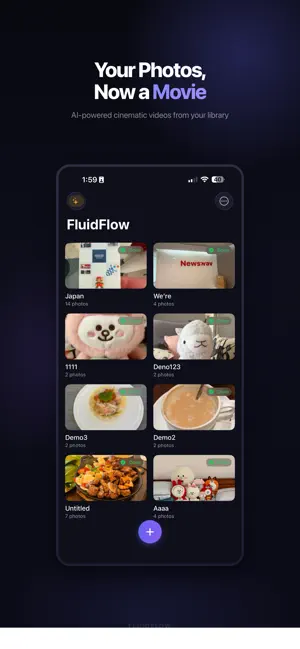

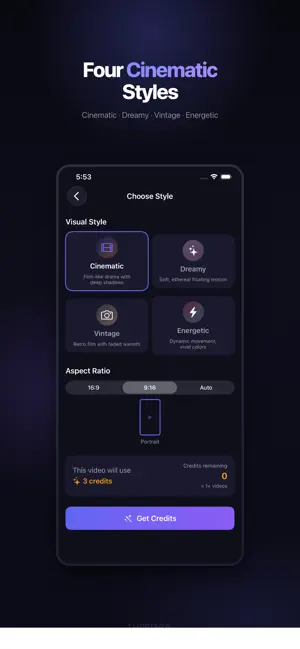

About FluidFlow: Photo to Video
FluidFlow transforms your photos into cinematic AI-generated videos — not boring slideshows with crossfades, but real cinematic transitions with 3D camera movement, parallax, and smooth motion. HOW IT WORKS 1. Select 2-20 photos from your library 2. Choose a visual style — Cinematic, Dreamy, Energetic, or Vintage 3. AI analyzes each photo pair and generates a unique 5-second transition clip 4. Pick from 20 curated music tracks to set the mood 5. Your finished video is ready to share WHAT MAKES FLUIDFLOW DIFFERENT • AI-powered transitions — Our AI understands what's in your photos and creates natural camera movements between them. No generic crossfades. • Cinematic quality — Every transition is crafted with parallax depth, smooth panning, and professional-grade motion. • 4 visual styles — Each style transforms the mood and color grading of your video. • 20 curated music tracks — Professionally selected tracks that match each visual style. • One-tap sharing — Save to your photo library or share directly. PERFECT FOR • Travel memories and vacation recaps • Family photo compilations • Social media content (Instagram Reels, TikTok, Stories) • Event highlights (weddings, birthdays, graduations) • Real estate and product showcases PRICING FluidFlow uses a simple token system. Each token creates one 5-second AI transition between two photos. • Monthly: $19.99/month (10 tokens) • Annual: $179.99/year (10 tokens/month — save 25%) • Token packs also available for one-time purchase Payment will be charged to your Apple ID account at confirmation of purchase. Subscriptions automatically renew unless canceled at least 24 hours before the end of the current period. You can manage and cancel subscriptions in your Apple ID account settings. Privacy Policy: https://fluidflow.app/privacy Terms of Service: https://fluidflow.app/terms
What’s new
Version 1.1.11 · Updated September 28, 2026
• You can now use up to 20 photos in one video. Before, only the first 8 photos were used. • Large videos now upload and get ready more smoothly.
App privacy
The developer, Wai Hoow Swee, reported these privacy practices to Apple.
Data Not Linked to You
The following data, which may be collected but is not linked to your identity, may be used for the following purposes:
- Identifiers: Device ID
- Diagnostics: Crash Data
- User Content: Photos or Videos
Used for: Analytics, Product Personalization, App Functionality
Alternatives to FluidFlow: Photo to Video
Looking for apps like FluidFlow: Photo to Video? Here are 6 similar apps on the App Store. The highest rated is Picture to Video AI Generator (5.0/5), and all 6 are free to download.
-
 Photo to Video - Pic Motion
2.3
Photo to Video - Pic Motion
2.3
-
 Photo to Video:Slideshow Maker
-
 Picture to Video AI Generator
5.0
Picture to Video AI Generator
5.0
-
 Vido AI: UGC Video Ads Maker
5.0
Vido AI: UGC Video Ads Maker
5.0
-
 Image to Video | Vidifier
5.0
Image to Video | Vidifier
5.0
-
 SeeScene Studio - AI Video
5.0
SeeScene Studio - AI Video
5.0
| App | Rating | Price | Last updated | Compare |
|---|---|---|---|---|
| FluidFlow: Photo to Video | – | Free | September 28, 2026 | |
| Photo to Video - Pic Motion | 2.3 / 5 (3) | Free | Mar 23, 2026 | Compare |
| Photo to Video:Slideshow Maker | – | Free | Oct 16, 2026 | Compare |
| Picture to Video AI Generator | 5.0 / 5 (1) | Free | Oct 18, 2026 | Compare |
| Vido AI: UGC Video Ads Maker | 5.0 / 5 (4) | Free | Oct 8, 2026 | Compare |
| Image to Video | Vidifier | 5.0 / 5 (2) | Free | Sep 2, 2026 | Compare |
| SeeScene Studio - AI Video | 5.0 / 5 (1) | Free | Oct 16, 2026 | Compare |