

PCBAtlas
Shanghai Astroform Software Ltd. Graphics & Design iPhoneiPadiPod touchMac
PCBAtlas is a free Graphics & Design app for iPhone and iPad by Shanghai Astroform Software Ltd. Rated 5.0/5 from 2 ratings. Requires iOS 17.0.
- Rating
- 5.0
- 2 ratings
- Price
- Free
- on the App Store
- Size
- 160 MB
- Age 4+
- Updated
- Oct 26
- 2026 · v1.3.1
Screenshots


About PCBAtlas
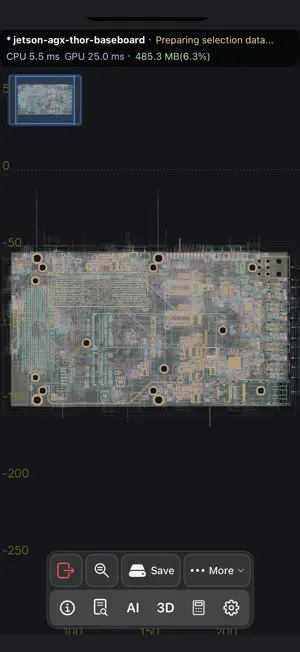
Open and review PCB design and manufacturing files locally on iPhone, iPad, and Mac. PCBAtlas is a local-first PCB viewer and review workspace for hardware teams, PCB designers, firmware engineers, QA reviewers, and anyone who needs to inspect real board data away from a full EDA station. Import supported KiCad projects, schematics, board files, DSN, IPC-2581 XML, ODB++ archives or directories, and recognized manufacturing packages. Keep board revisions in managed PCB workspaces, inspect layouts in 2D, browse project and schematic context where available, and use board-level 3D when spatial context helps. What PCBAtlas helps with: - Open supported PCB design and manufacturing files without uploading them to a web viewer - Organize board revisions in a local library - Inspect dense boards with pan, zoom, layer controls, search, object details, and selection tools - Review project data, schematic context, statistics, and import status in Data views - Use board-level 3D for supported board sessions - Export PNG/PDF captures, original source packages, converted board outputs, and shareable handoff materials with PCBAtlas Plus The free tier lets you import and review boards with up to three PCB workspaces. PCBAtlas Plus is a one-time in-app purchase that unlocks unlimited workspaces, export, source delivery, converted outputs, and sharing workflows. PCBAtlas is built for review, inspection, QA, and delivery workflows.
What’s new
Version 1.3.1 · Updated October 26, 2026
- Move tracks and vias with Slide without waiting for automatic rule checks or copper refill. Refill copper manually when ready, with separate undo support. - Fixed missing Slide controls and kept connected traces attached to vias after saving and reopening native documents. - Improved Allegro board import compatibility, including pad layer ranges, surface pads, and legacy annotations. - Enjoy a steadier toolbar, better landscape 3D layouts, and consistent menu colors when switching themes. - Fixed a crash during repeated schematic-to-PCB navigation.
App privacy
The developer, Shanghai Astroform Software Ltd., reported these privacy practices to Apple.
Data Not Collected
The developer does not collect any data from this app.
Alternatives to PCBAtlas
Looking for apps like PCBAtlas? Here are 6 similar apps on the App Store. The highest rated is 3D modeling: Design my model (4.6/5), and 5 of the 6 are free to download.
-
 Protoboard Designer: PCB CAD
-
 KiCAD PCB Viewer
1.0
KiCAD PCB Viewer
1.0
-
 Electrical Panel Designer
3.9
Electrical Panel Designer
3.9
-
 Qlone 3D Scanner
3.9
Qlone 3D Scanner
3.9
-
 3D modeling: Design my model
4.6
3D modeling: Design my model
4.6
-
 MagiScan - AI 3D Scanner app
4.5
MagiScan - AI 3D Scanner app
4.5
| App | Rating | Price | Last updated | Compare |
|---|---|---|---|---|
| PCBAtlas | 5.0 / 5 (2 ratings) | Free | October 26, 2026 | |
| Protoboard Designer: PCB CAD | – | Free | Nov 1, 2026 | Compare |
| KiCAD PCB Viewer | 1.0 / 5 (3) | 1.99 USD | Oct 31, 2026 | Compare |
| Electrical Panel Designer | 3.9 / 5 (15) | Free | Oct 26, 2026 | Compare |
| Qlone 3D Scanner | 3.9 / 5 (1,585) | Free | Aug 5, 2026 | Compare |
| 3D modeling: Design my model | 4.6 / 5 (14,706) | Free | Aug 31, 2026 | Compare |
| MagiScan - AI 3D Scanner app | 4.5 / 5 (1,440) | Free | Oct 16, 2026 | Compare |
Compare PCBAtlas with the top alternatives: ratings, updates, ASO score and keyword gaps →