

KlarityOS
SVE Sacramento LLC Productivity iPhoneiPadiPod touchApple Watch
KlarityOS is a free Productivity app for iPhone and iPad by SVE Sacramento LLC. Rated 5.0/5 from 1 ratings. Requires iOS 26.0. Updated April 23, 2026.
- Rating
- 5.0
- 1 ratings
- Price
- Free
- on the App Store
- Size
- 9 MB
- Age 4+
- Updated
- Apr 23
- 2026 · v1.3
Screenshots

About KlarityOS
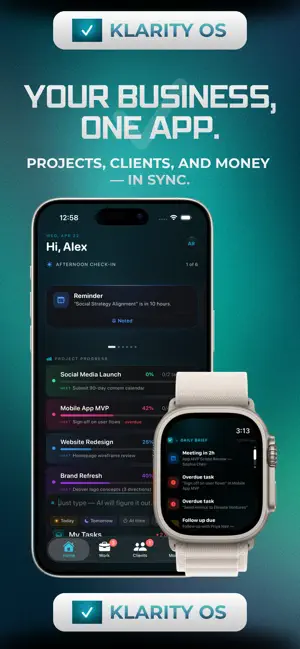
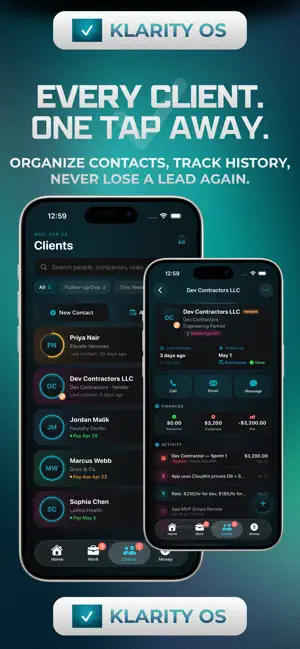
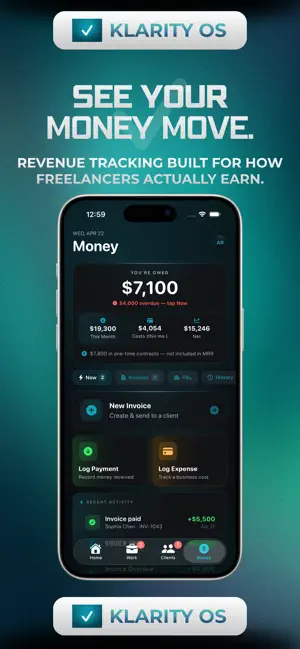
Klarity — The OS for Freelancers Running a freelance business means wearing every hat. You're the strategist, the account manager, the accountant, and the closer — all before lunch. Klarity is built for exactly that reality: one focused workspace that keeps your clients, projects, tasks, and money in sync so you can spend less time managing your business and more time doing the work you're actually good at. Your Morning Brief, Built by Klarity Every morning, Klarity surfaces what actually matters. Overdue tasks, upcoming meetings, invoices that need attention, clients you haven't heard from in too long — all organized into a smart, actionable stack. Work through it, dismiss it, and start your day with clarity. Clients That Stay Warm Every client gets a full timeline: meetings, tasks, invoices, notes, communication logs, and expenses — all in one view. Set follow-up reminders so no relationship goes cold. Get nudged when you haven't touched a client in weeks. Know exactly where every relationship stands. Projects Without the Chaos Track active projects from pitch to payment. Set budgets, attach tasks, log expenses, create invoices, and see your profitability at a glance — without switching between five different tools. When a project closes, you get a full financial recap including contract value and net profit. Invoicing That Actually Gets You Paid Create professional invoices in seconds. Import your completed tasks as line items with one tap. Use AI to auto-generate service descriptions. Send, track, and mark paid — all inside the app. See everything outstanding sorted by urgency: overdue, awaiting payment, drafts ready to send. Money You Can Actually Understand The Money tab gives you a real-time picture of your freelance finances. See what you're owed, your monthly revenue and costs, and your net margin — without spreadsheets. The P&L view breaks down profitability project by project. The History view tracks how your business is growing over time. Built for Speed Quick Capture lets you log a task, expense, note, or meeting from anywhere in the app with one tap. No navigation required. Just type and go — Klarity's AI parses the context and files it automatically. Works Everywhere You Do Klarity syncs across all your devices via iCloud. The widget keeps your most urgent items on your Home Screen. The Apple Watch companion gives you a brief of the day, your active projects, and your top tasks — on your wrist. Private by Design Your data lives in iCloud. No subscriptions, no data selling, no accounts to create beyond your Apple ID. One flat purchase. Yours forever. Klarity Pro Start free with up to 3 clients, 5 projects, 5 invoices, access to Klarity Tools. Upgrade once for $24.99 — unlimited everything, forever. No subscriptions. Klarity is designed for independent consultants, designers, developers, photographers, coaches, and anyone running a solo or small client-based business.
What’s new
Version 1.3 · Updated April 23, 2026
What's New in Version 1.3 A completely redesigned experience. Every sheet, card, and panel has been rebuilt with Klarity's signature dark aesthetic — The whole app now feels more cohesive. Dedicated Invoice management. Invoices have their own tab in Money. See everything — overdue, awaiting payment, drafts, and recently paid — filtered and sorted at a glance. Mark as paid, export PDFs, and manage your AR without digging. Quick Capture, now smarter. Log a task, expense, note, or meeting from anywhere without breaking your flow. The keyboard clears automatically after you submit, and the AI parses context so Klarity files it in the right place. Simplified. Focused. Less noise. We removed Time Tracking and the Tools section entirely. Everything in Klarity now points at one thing: getting your client work done and getting paid for it. Updated widgets and Apple Watch. The Home Screen widget and Watch app have been refreshed with the latest data and cleaner layouts. Your most urgent items, finances, and tasks are always one glance away. The little things. Consistent typography across every tab. Dates are properly capitalized everywhere. Invoice sheets center above the keyboard instead of hiding behind it. Navigation from the Home page works the way you'd expect.
App privacy
The developer, SVE Sacramento LLC, reported these privacy practices to Apple.
Data Not Collected
The developer does not collect any data from this app.