

Find My Everything
Seungjae YU Lifestyle iPhoneiPadiPod touch
Find My Everything is a free Lifestyle app for iPhone and iPad by Seungjae YU. Requires iOS 18.0. Updated March 11, 2026.
- Price
- Free
- on the App Store
- Size
- 84 MB
- Age 4+
- Updated
- Mar 11
- 2026 · v1.0.1
Screenshots

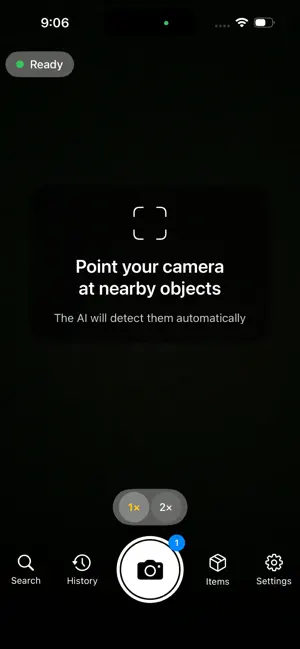

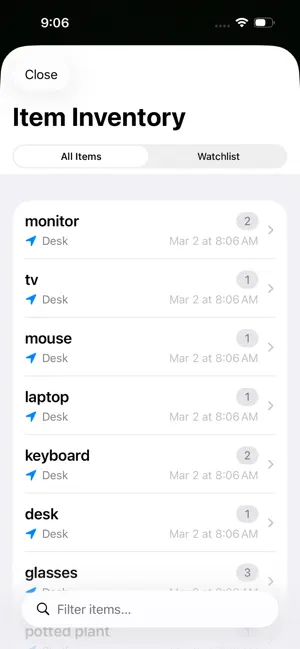
About Find My Everything
Find My Everything — AI-Powered Object Detection Camera Point your camera at anything and let AI identify every object in real time. Capture a photo to save a detailed inventory of everything detected — with location, time, and smart search. KEY FEATURES • Real-Time Detection: On-device YOLO-World AI identifies objects through your camera in real time — no internet required for live preview. • Smart Capture Analysis: Tap the shutter to analyze the scene with Gemini AI (online) or enhanced on-device models (offline) for deeper, more accurate detection. • Inventory Management: Every capture is saved with detected objects, GPS location, and timestamp. Browse, search, and organize your findings. • Inventory Highlight: Tap any item to instantly see it highlighted in orange on the original photo. • Smart Search: Search across all your captures by object name. Find when and where you last saw any item. • 9 Languages: Full support for Korean, English, Japanese, Chinese (Simplified/Traditional), German, Spanish, French, and Hindi. • Localized Addresses: Capture locations display in your device language with locale-appropriate formatting. • Privacy First: Real-time detection runs entirely on-device. Online capture analysis uses Gemini AI via secure Firebase connection. Your photos stay on your device. HOW IT WORKS 1. Open the app and point your camera — objects are detected in real time. 2. Tap the shutter button to capture and run detailed AI analysis. 3. Review detected objects with bounding boxes on your photo. 4. Browse your inventory to find any object across all captures. 5. Search by name to find when and where you last saw something. ONLINE & OFFLINE MODES • Online (default): Uses Gemini 2.5 Flash AI for capture analysis — recognizes virtually any object with high accuracy. • Offline: Uses on-device YOLO-World + MobileCLIP — works without internet, recognizes 80+ common object categories and more. • Automatic fallback: If network is unavailable, the app seamlessly switches to offline analysis. Perfect for home inventory, organization, moving, insurance documentation, finding lost items, or simply exploring what AI can see around you.
What’s new
Version 1.0.1 · Updated March 11, 2026
v1.0.1 Update - Improved Capture Analysis: Upgraded AI model for more reliable object detection. - Reduced Analysis Failures: Photos with people or household items are now analyzed more consistently. - Automatic Retry: If the initial analysis returns no results, the app automatically retries once before falling back to offline analysis. - Informative Fallback Messages: When online analysis is restricted, you'll now see a specific reason before offline analysis is used. - 9 Languages Supported: All new messages fully translated across all supported languages.
App privacy
The developer, Seungjae YU, reported these privacy practices to Apple.
Data Not Collected
The developer does not collect any data from this app.
Alternatives to Find My Everything
Looking for apps like Find My Everything? Here are 6 similar apps on the App Store. The highest rated is SeekLens (5.0/5), and all 6 are free to download.


| App | Rating | Price | Last updated | Compare |
|---|---|---|---|---|
| Find My Everything | – | Free | March 11, 2026 | |
| FindIT-AI | – | Free | Aug 13, 2026 | Compare |
| SeekLens | 5.0 / 5 (11) | Free | Sep 13, 2026 | Compare |
| Learndry | 5.0 / 5 (2) | Free | May 18, 2025 | Compare |
| Foundit – Home Inventory | – | Free | Oct 3, 2026 | Compare |
| La La Maids | 2.0 / 5 (1) | Free | Jul 11, 2024 | Compare |
| OrthodoxPrayerRope | 5.0 / 5 (1) | Free | Feb 20, 2026 | Compare |
Compare Find My Everything with the top alternatives: ratings, updates, ASO score and keyword gaps →