

Stash: Calculator Photo Vault
Eduard Bruch Utilities iPhoneiPadiPod touch
Stash: Calculator Photo Vault is a free Utilities app for iPhone and iPad by Eduard Bruch. Rated 4.8/5 from 6 ratings. Requires iOS 13.0.
- Rating
- 4.8
- 6 ratings
- Price
- Free
- on the App Store
- Size
- 64 MB
- Age 4+
- Updated
- Sep 29
- 2026 · v2.22
Screenshots


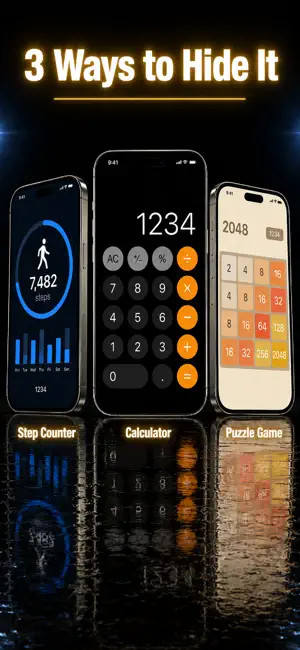

About Stash: Calculator Photo Vault
Your private files deserve real protection. Stash encrypts every photo, video, document, and file with AES-256 — the same standard used by banks and governments. HIDE IT YOUR WAY Choose how Stash looks on your phone. Switch between a working calculator, step tracker, or puzzle game — all fully functional. Only your secret PIN reveals the vault inside. ENCRYPT ANYTHING PRIVATE - Photos & Videos - PDFs & Documents - MP3s & Audio files - Any file — any format Every file is instantly encrypted on your device. Optional encrypted backup to iCloud or Google Drive — your backup, your key, your control. GUEST MODE Set up a second PIN that opens a separate, empty vault. If someone asks to see your app — show them the guest vault. Your real files stay hidden. INTRUDER DETECTION Someone trying to guess your PIN? Stash silently snaps a photo with the front camera. Check your intruder log anytime to see exactly who tried. CHANGE YOUR APP ICON Match your app icon to your chosen theme. Stash can look like a calculator, fitness app, or game right on your home screen. MORE FEATURES - Secure Notes — encrypted notepad for passwords, journals, private text - Albums — organize your vault into folders - Face ID & Touch ID — unlock instantly - Auto-lock — vault locks the moment you switch apps - Cloud Backup — encrypted backup to iCloud & Google Drive - Recovery Key — never lose access to your vault YOUR PRIVACY, YOUR RULES No ads. No analytics. No data collection. Zero tracking. Everything stays on your device. We can't see your files — even if we wanted to. Privacy Policy: https://www.eduardbruch.com/vault/privacy Terms of Service: https://www.eduardbruch.com/vault/terms
Ratings & reviews
4.8
6 ratings
What’s new
Version 2.22 · Updated September 29, 2026
What's New in v2.22: • AD-FREE EXPERIENCE — All ads have been removed. Enjoy a cleaner, faster app. • REFRESHED DESIGN — Classic app icon and screenshots are back by popular demand. • FLEXIBLE SUBSCRIPTIONS — Choose between monthly, yearly (with free trial), or lifetime access. • IMPROVED PERFORMANCE — Faster vault loading and smoother animations. • BUG FIXES — Various stability improvements.
App privacy
The developer, Eduard Bruch, reported these privacy practices to Apple.
Data Linked to You
The following data, which may be collected and linked to your identity, may be used for the following purposes:
- Contact Info: Email Address
Used for: App Functionality
Data Not Linked to You
The following data, which may be collected but is not linked to your identity, may be used for the following purposes:
- Purchases: Purchase History
- User Content: Emails or Text Messages
- Identifiers: User ID
Used for: App Functionality
Alternatives to Stash: Calculator Photo Vault
Looking for apps like Stash: Calculator Photo Vault? Here are 6 similar apps on the App Store. The highest rated is Calculator Vault - Photo Vault (4.8/5), and all 6 are free to download.
-
 OnyxCalc – Private Photo Vault
4.6
-
 Calculator Vault・Hide Photos
4.4
-
 Calculator Vault - Photo Vault
4.8
-
 Black Box - Lock Restrict Apps
4.7
-
 KCalc Lock: Lock Apps & Photos
4.5
-
 Hide pictures. Secret locker
4.6
| App | Rating | Price | Last updated | Compare |
|---|---|---|---|---|
| Stash: Calculator Photo Vault | 4.8 / 5 (6 ratings) | Free | September 29, 2026 | |
| OnyxCalc – Private Photo Vault | 4.6 / 5 (20) | Free | Jun 8, 2026 | Compare |
| Calculator Vault・Hide Photos | 4.4 / 5 (24) | Free | Jul 25, 2026 | Compare |
| Calculator Vault - Photo Vault | 4.8 / 5 (11) | Free | Sep 3, 2026 | Compare |
| Black Box - Lock Restrict Apps | 4.7 / 5 (41) | Free | Sep 7, 2024 | Compare |
| KCalc Lock: Lock Apps & Photos | 4.5 / 5 (44) | Free | Oct 20, 2026 | Compare |
| Hide pictures. Secret locker | 4.6 / 5 (491) | Free | Jul 1, 2024 | Compare |