

Magic AI Photo Editor Simple
Vadym Bohdan Photo & Video iPhoneiPadiPod touch
Magic AI Photo Editor Simple is a free Photo & Video app for iPhone and iPad by Vadym Bohdan. Requires iOS 18. Updated April 7, 2026.
- Price
- Free
- on the App Store
- Size
- 6 MB
- Age 4+
- Updated
- Apr 7
- 2026 · v1.1
Screenshots
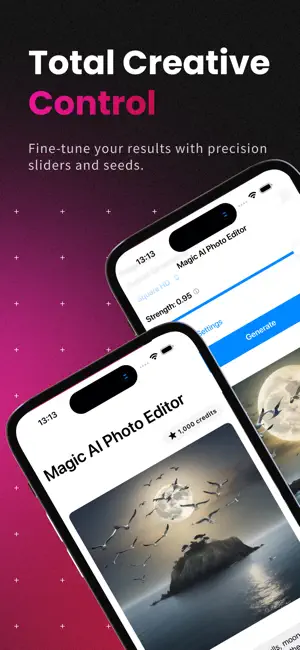


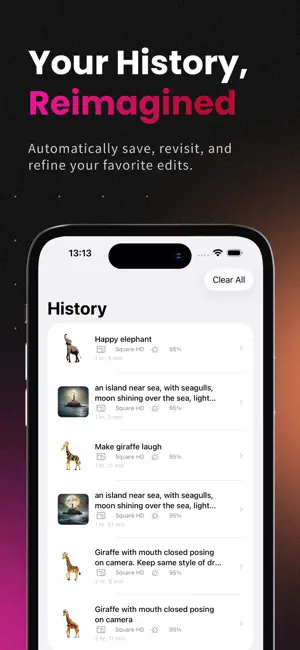
About Magic AI Photo Editor Simple
Transform your photos with the power of AI — fast, intuitive, and private. Magic AI Photo Editor Simple lets you select a photo, describe the edit you want, and generate stunning results in seconds. Whether you’re enhancing portraits, changing backgrounds, or exploring creative styles, the app gives you full control with simple sliders and advanced options when you need them. Why you’ll love it • AI-powered editing with natural language prompts • Clean, SwiftUI-native design that’s fast and responsive • Local history of your edits so you can revisit and refine • Subscription-backed credits for predictable, high‑quality generations Key features • Edit with prompts: Type what you want to see — “add golden hour lighting,” “remove background,” “cinematic look,” or “vintage film grain” — and generate results instantly. • Fine-grained control: Adjust strength, guidance, and steps to dial in quality and creativity. Reuse a seed for consistent results. • Flexible sizes: Choose from common aspect ratios or set custom dimensions for social, print, or product shots. • Photo picker & export: Select from your library and save final images back to Photos with a single tap. • Edit history: Automatically save your inputs and results so you can revisit past edits, reopen them in the editor, or clear them anytime. • Smart credits: Track available credits, see credits used per generation, and top up via subscription. • Subscription support: Simple, transparent plans powered by StoreKit, with restore purchases built in. How it works 1. Pick a photo from your library. 2. Describe your edit (and optionally what to avoid). 3. Choose size and tweak advanced settings if desired. 4. Generate and save your result — or reopen later from History. Built for iOS • SwiftUI interface for a smooth, modern experience • Secure account handling and subscription management • Local persistence for fast, reliable history Whether you’re a creator, small business, or just love great photos, AI Photo Editor helps you go from idea to image — beautifully and effortlessly. Magic AI Photo Editor Simple — Subscription • 100 credits per week • Use credits to generate AI images with customizable parameters • Subscription renews automatically every week • Manage or cancel anytime in your App Store account settings • Terms of Use: https://www.apple.com/legal/internet-services/itunes/dev/stdeula/ • Privacy Policy: https://docs.google.com/document/d/e/2PACX-1vQZ_5fMA-itGNNqYlzYzTkwBrEJgA9wyuutsoGHOhboM-9Z15a68OBUpIIslRXEt8LudHCNgVbAqvkF/pub
What’s new
Version 1.1 · Updated April 7, 2026
New localization and app improvements
App privacy
The developer, Vadym Bohdan, reported these privacy practices to Apple.
Data Not Linked to You
The following data, which may be collected but is not linked to your identity, may be used for the following purposes:
- User Content: Photos or Videos
Used for: Other Purposes
Alternatives to Magic AI Photo Editor Simple
Looking for apps like Magic AI Photo Editor Simple? Here are 6 similar apps on the App Store. The highest rated is NoX Effect: AI Video Generator (5.0/5), and all 6 are free to download.
-
 Magic Eraser AI - PureErase
-
 Magic AI Photo & Video Editor
-
 PhotoFix: Restore Old Photos
3.4
PhotoFix: Restore Old Photos
3.4
-
 NoX Effect: AI Video Generator
5.0
NoX Effect: AI Video Generator
5.0
-
 ImageChat AI - AI Photo Editor
-
 ImageEditor: AI Photo Enhancer
| App | Rating | Price | Last updated | Compare |
|---|---|---|---|---|
| Magic AI Photo Editor Simple | – | Free | April 7, 2026 | |
| Magic Eraser AI - PureErase | – | Free | Jun 27, 2026 | Compare |
| Magic AI Photo & Video Editor | – | Free | Dec 18, 2025 | Compare |
| PhotoFix: Restore Old Photos | 3.4 / 5 (5) | Free | May 18, 2026 | Compare |
| NoX Effect: AI Video Generator | 5.0 / 5 (2) | Free | Jan 20, 2026 | Compare |
| ImageChat AI - AI Photo Editor | – | Free | Oct 1, 2026 | Compare |
| ImageEditor: AI Photo Enhancer | – | Free | Sep 9, 2026 | Compare |