

SLO - Slow motion, just swipe.
Yosuke Wainai Photo & Video iPhoneiPadiPod touch
SLO - Slow motion, just swipe. is a free Photo & Video app for iPhone and iPad by Yosuke Wainai. Requires iOS 26.2. Updated July 12, 2026.
- Price
- Free
- on the App Store
- Size
- 5 MB
- Age 4+
- Updated
- Jul 12
- 2026 · v2.0
Screenshots

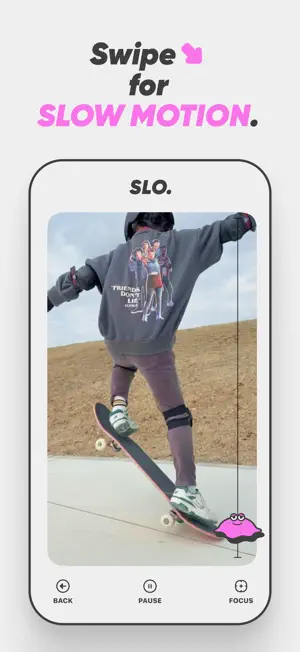


About SLO - Slow motion, just swipe.
## 1. Key Features - Import videos: Shoot with the camera or pick a video from your photo library - Change playback speed: Just swipe to go from 0.2x (slow motion) to 2.0x (fast forward), applied in real time while the video plays - Focus zoom: As you slow down, the video automatically zooms in on a center point you set in advance — and the zoom is baked into the exported video - Save & share: Save videos to your photo library or share them to other apps via the share sheet ## 2. Home Screen - TAKE: Record a video with the camera and edit it right away - PICK: Choose one video from your photo library - ABOUT: Open a sheet with the Terms of Use, Privacy Policy, and version info ## 3. Editing Screen - Back: Stop editing and return to the home screen (to pick another video) - Start: Start playback - Pause: Pause playback - Focus: Toggle the focus zoom feature on or off (shown before playback starts) ### How to Change the Speed (during playback only) - Swipe Slowee (the character on the right edge) up or down - Swipe up → fast forward (up to 2.0x) - Swipe down → slow motion (down to 0.2x) - Release your finger to return to normal speed (1.0x) - When the video finishes playing, a new video reflecting your speed changes is exported automatically ### Focus Zoom (Focus) - Turn on the Focus button before playback to show a center-point icon on the video - Tap or drag to place the zoom center anywhere you like - During playback, the slower you go, the closer the video zooms in on the center point (up to 2.0x at 0.2x speed) - No zoom is applied when playing at 1.0x or faster - The zoom is baked into the exported video ## 4. After Export - Undo: Discard the exported video and edit the same video again - Play / Pause: Preview the exported video - Save: Save to your photo library or share via the share sheet
What’s new
Version 2.0 · Updated July 12, 2026
We have added a new feature: Focus. - Before playback, set the zoom center anywhere on your video (tap or drag to position it) - The slower the playback speed, the closer the video zooms in on your chosen point (up to 2.0x at 0.2x speed) - The zoom is baked into the exported video - Toggle the feature on or off with the Focus button on the editing screen This update also includes minor bug fixes and usability improvements. Thank you for using Slo.
App privacy
The developer, Yosuke Wainai, reported these privacy practices to Apple.
Data Not Collected
The developer does not collect any data from this app.
Alternatives to SLO - Slow motion, just swipe.
Looking for apps like SLO - Slow motion, just swipe.? Here are 6 similar apps on the App Store. The highest rated is VideoTrimAndSqueeze (5.0/5), and 5 of the 6 are free to download.
-
 VideoTrimAndSqueeze
5.0
VideoTrimAndSqueeze
5.0
-
 Fine Art Lab
-
 Video Photo Compare
-
 Glitchforge: Datamosh Studio
-
 Snowing Camera
-
 Fever.Dream
3.7
Fever.Dream
3.7
| App | Rating | Price | Last updated | Compare |
|---|---|---|---|---|
| SLO - Slow motion, just swipe. | – | Free | July 12, 2026 | |
| VideoTrimAndSqueeze | 5.0 / 5 (1) | Free | Feb 7, 2026 | Compare |
| Fine Art Lab | – | Free | Jul 5, 2026 | Compare |
| Video Photo Compare | – | Free | Oct 16, 2026 | Compare |
| Glitchforge: Datamosh Studio | – | Free | Sep 24, 2026 | Compare |
| Snowing Camera | – | 0.99 USD | Apr 11, 2024 | Compare |
| Fever.Dream | 3.7 / 5 (3) | Free | Aug 28, 2026 | Compare |