

PTZ-P
Hector Hinojosa Utilities iPhoneiPadiPod touch
PTZ-P is a free Utilities app for iPhone and iPad by Hector Hinojosa. Rated 5.0/5 from 2 ratings. Requires iOS 15.1. Updated October 11, 2026.
- Rating
- 5.0
- 2 ratings
- Price
- Free
- on the App Store
- Size
- 83 MB
- Age 4+
- Updated
- Oct 11
- 2026 · v2.5.0
Screenshots


About PTZ-P
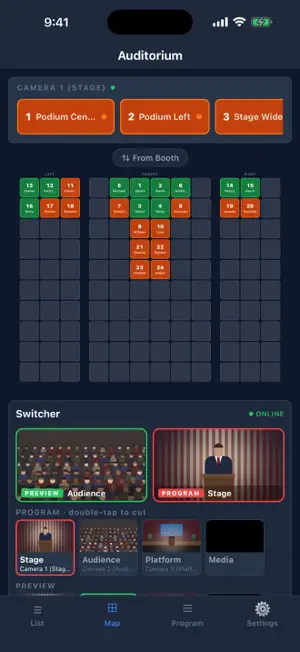
PTZ-P is the production tool built for live event camera operators. Map your audience to seats, assign PTZ preset numbers, recall shots instantly and run your video switcher — all from your iPhone or iPad. It is a focused tool for live production teams who run PTZ cameras and need to know exactly which shot is ready for every seat in the room. KEY FEATURES Auditorium Map Visually place people in your venue layout. Color-coded seats show who's seated, which presets are ready, and who still needs to be shot. Moving someone to another seat never changes their preset number. Camera Control Pan, tilt, zoom and focus with a live preview of each camera, then call or save presets with one tap. Works with VISCA over IP, Panasonic AW-series, PTZOptics, Canon and Pelco-D cameras. PTZ-P detects your camera model and shows only the controls it supports. Video Switcher Control a Blackmagic ATEM or OSEE GoStream switcher from the same screen as your cameras: Preview and Program monitors, CUT, AUTO, Fade to Black, transitions, keyers, picture-in-picture and the audio mixer. Available controls depend on the switcher model. Stills Library & Playlists Import pictures from Photos or Files, or use the built-in test pictures. Build named playlists, share them with your team, and cue the next picture onto an ATEM media player and preview without touching what's on air. Camera Presets per Camera Every camera keeps its own preset numbers, and every person belongs to one camera, so numbers never collide. Add as many cameras as you need, or bulk add a whole list of names at once. Venue Areas Name the shots that matter — stage, podium, wide — and recall each camera's view of an area with one tap. Live Session Collaboration Start a session and your whole tech team joins over your local network. Assign roles (Host, Backup, Director, Tech), broadcast program updates, and chat in real time — no internet required. Program Details Build a complete running order — songs, speakers, announcements, and media cues. Broadcast the program to your whole team the moment it changes. Preset Status Tracking Orange = not yet shot. Green = ready. Statuses reset each morning so your slate is clean before every event. Custom Layouts Design your venue from scratch with sections, curved rows, floors and auxiliary rooms, with a live preview as you resize. Profiles & Sharing Save complete setups as named profiles and restore any of them in one tap. Share a .ptzsetup file over AirDrop or Messages and open it on another device to restore everything. Troubleshooting Built In Auto Test checks every camera function by reading the camera back, and audit recording captures exactly what happened when something didn't work. Designed for Real Production Environments Dark interface built for low-light rooms. Works entirely on your local network — no account, no internet, no subscription required. Your data stays on your device. Built for churches, theaters, conference centers, and any venue that needs reliable, fast PTZ recall. ATEM is a trademark of Blackmagic Design. GoStream is a trademark of OSEE. PTZ-P is not affiliated with either company.
What’s new
Version 2.5.0 · Updated October 11, 2026
Video switcher control, stills, smarter camera setup VIDEO SWITCHER • Run a Blackmagic ATEM or OSEE GoStream switcher right from the map: Preview and Program monitors, CUT, AUTO and Fade to Black, and double-tap Program to hot cut • Audio mixer: on / off / audio-follow-video and gain for every input • Upstream keyer and downstream keys: picture-in-picture, green screen, luma and pattern keys — on ATEM, save your favourite looks and load them during the program • Find the switcher on the network with one tap • Put the switcher in its own side panel, choose the button order and panel size STILLS (Blackmagic ATEM) • Stills Library: import pictures from Photos or Files, plus eight built-in test pictures (bars, black, framing grid, safe areas and more) • Named playlists you can share with your team; NEXT plays through them and Cue loads any picture onto preview without touching what's on air • Link pictures to program items and cue them onto an ATEM media player from the rundown CAMERAS • Camera catalog with automatic model detection, including PTZOptics models • Only the controls your camera actually supports are shown • In-app Auto Test checks every camera function and confirms it by reading the camera back • Faster, more reliable camera preview that recovers on its own when a camera stalls • Preset recall speed is now adjustable per camera • Network search hides devices that aren't cameras and can move a saved camera to its new IP address • Bulk add or delete people and presets for a camera TEAM & DATA • Sessions are found reliably on larger venue networks • Profiles now back up every setting • Open .ptzsetup files straight into PTZ-P • Audit recording with a "Didn't work" button to capture problems for troubleshooting • Deleting a preset removes it from map area shots
App privacy
The developer, Hector Hinojosa, reported these privacy practices to Apple.
Data Not Collected
The developer does not collect any data from this app.
Alternatives to PTZ-P
Looking for apps like PTZ-P? Here are 6 similar apps on the App Store. The highest rated is GoBag+ Emergency Prep Kit (5.0/5), and all 6 are free to download.
-
 GoBag+ Emergency Prep Kit
5.0
-
 RAID Calc2
-
 IQCCTV
-
 Lumens Camera Controller
-
 VMMS
-
 BZBGEAR Pro PTZ Camera Control
5.0
| App | Rating | Price | Last updated | Compare |
|---|---|---|---|---|
| PTZ-P | 5.0 / 5 (2 ratings) | Free | October 11, 2026 | |
| GoBag+ Emergency Prep Kit | 5.0 / 5 (1) | Free | Sep 3, 2026 | Compare |
| RAID Calc2 | – | Free | Oct 15, 2026 | Compare |
| IQCCTV | – | Free | Apr 23, 2026 | Compare |
| Lumens Camera Controller | – | Free | Sep 4, 2024 | Compare |
| VMMS | – | Free | Sep 9, 2024 | Compare |
| BZBGEAR Pro PTZ Camera Control | 5.0 / 5 (1) | Free | Dec 17, 2025 | Compare |
Compare PTZ-P with the top alternatives: ratings, updates, ASO score and keyword gaps →