

Rewind - Reverse Your Videos
Tapansinh Solanki Photo & Video iPhoneiPadiPod touch
Rewind - Reverse Your Videos is a free Photo & Video app for iPhone and iPad by Tapansinh Solanki. Rated 4.0/5 from 1 ratings. Requires iOS 17.6.
- Rating
- 4.0
- 1 ratings
- Price
- Free
- on the App Store
- Size
- 10 MB
- Age 4+
- Updated
- Mar 13
- 2026 · v1.0.1
Screenshots



About Rewind - Reverse Your Videos
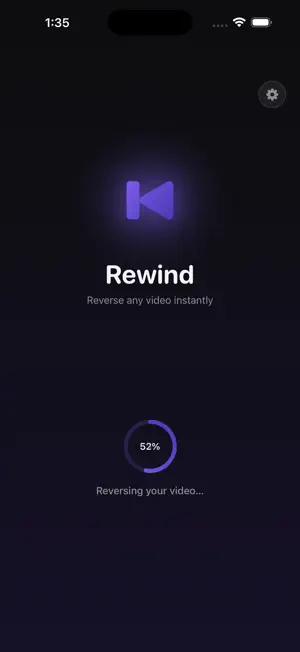
Rewind is the fastest, cleanest way to reverse any video on your iPhone - entirely on-device, with no uploads, no watermarks, and no subscriptions required. Simply pick a video from your Photos library, hit Reverse, and Rewind processes it right on your device. When it's done, preview it and save it back to Photos in full quality. --- WHAT REWIND DOES --- - Reverses any video from your Photos library - Processes fully on-device - your videos never leave your iPhone - Saves the reversed clip directly to Photos - Supports videos of any length (up to 60 seconds for fastest results) - Clean preview player before saving --- WHY REWIND --- - Zero watermarks. Ever. - No account required. No sign-in. - No subscription. Free to use. - Fast - built with Apple's AVFoundation for native performance - Privacy-first: no video content is uploaded anywhere --- PERFECT FOR --- * Creating satisfying boomerang-style reverse clips * Making backwards video effects for Reels, TikTok, and Stories * Rewinding action shots to create viral moments * Reversing time-lapses for a dramatic effect * Fun and creative video experiments --- HOW IT WORKS --- 1. Tap the video picker and select any video from your Photos library 2. Rewind processes and reverses it on your device 3. Preview the result 4. Save to Photos - done! --- PRIVACY & PERMISSIONS --- Rewind only requests access to your Photos library to read the source video and write the reversed result. No data is collected beyond what Firebase Analytics and Crashlytics use to improve app stability (fully disclosed in our Privacy Policy). Ads are shown to keep the app free. We use Google AdMob, which may use your device's advertising identifier in accordance with your ATT (App Tracking Transparency) preferences. For full details, visit our Privacy Policy at https://tapansinhsolanki.github.io/rewind-ios/privacy.html
What’s new
Version 1.0.1 · Updated March 13, 2026
Minor Bugs Fixes
App privacy
The developer, Tapansinh Solanki, reported these privacy practices to Apple.
Data Used to Track You
The following data may be used to track you across apps and websites owned by other companies:
- Identifiers: Device ID
Data Not Linked to You
The following data, which may be collected but is not linked to your identity, may be used for the following purposes:
- Identifiers: Device ID
- Usage Data: Product Interaction
- Diagnostics: Crash Data
Used for: Third-Party Advertising, Analytics, App Functionality
Alternatives to Rewind - Reverse Your Videos
Looking for apps like Rewind - Reverse Your Videos? Here are 6 similar apps on the App Store. The highest rated is VideoReverser: Reverse Video (4.0/5), and all 6 are free to download.
-
 Rewindo - Reverse Video
-
 VideoReverser: Reverse Video
4.0
VideoReverser: Reverse Video
4.0
-
 ReverseSaver
-
 Video Trim, Flip, Reverse
-
 Reverse Video Maker: UndoCam
-
 Reverse Video: Rewind Editor
4.0
Reverse Video: Rewind Editor
4.0
| App | Rating | Price | Last updated | Compare |
|---|---|---|---|---|
| Rewind - Reverse Your Videos | 4.0 / 5 (1 rating) | Free | March 13, 2026 | |
| Rewindo - Reverse Video | – | Free | Sep 27, 2026 | Compare |
| VideoReverser: Reverse Video | 4.0 / 5 (1) | Free | Oct 5, 2026 | Compare |
| ReverseSaver | – | Free | Jun 28, 2026 | Compare |
| Video Trim, Flip, Reverse | – | Free | Sep 28, 2026 | Compare |
| Reverse Video Maker: UndoCam | – | Free | Oct 21, 2026 | Compare |
| Reverse Video: Rewind Editor | 4.0 / 5 (3) | Free | Sep 29, 2026 | Compare |