

TimeSee: Visual Timer for ADHD
HIDEKAZU YAMAOKA Productivity iPhoneiPadiPod touchApple Watch
TimeSee: Visual Timer for ADHD is a free Productivity app for iPhone and iPad by HIDEKAZU YAMAOKA. Rated 3.0/5 from 1 ratings. Requires iOS 18.
- Rating
- 3.0
- 1 ratings
- Price
- Free
- on the App Store
- Size
- 10 MB
- Age 4+
- Updated
- Sep 19
- 2026 · v2.8.0
Screenshots

About TimeSee: Visual Timer for ADHD
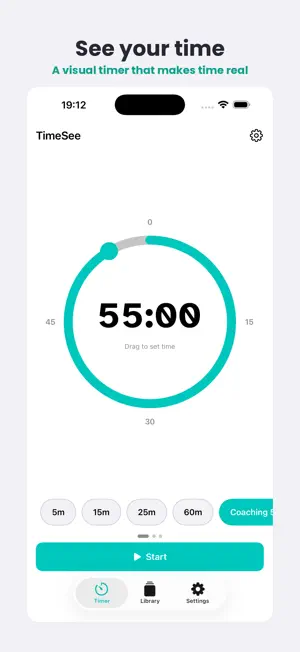
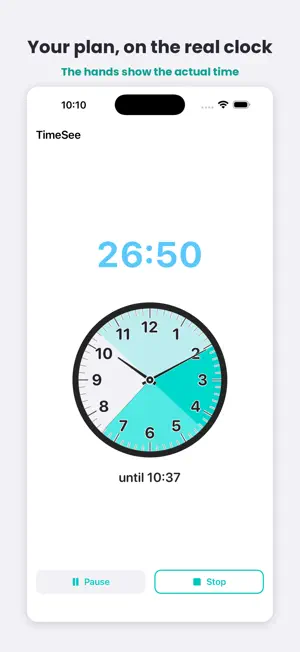
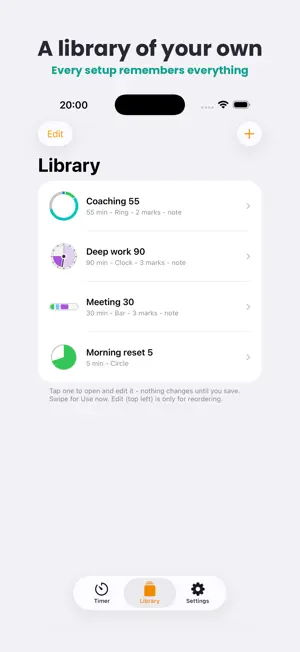
TIME BLINDNESS ENDS HERE If you have ADHD, you already know: time doesn't feel real. Minutes vanish, deadlines sneak up, and "just 5 more minutes" becomes an hour. TimeSee makes time something you can see - so your attention can stay on your life, not on the clock. FIVE WAYS TO SEE TIME A ring that shrinks. A filling circle. A slim bar. A clock face where the time you have spent stays visible in a lighter shade. And Wall Clock, where the hands show the actual time. Pick the one your eyes read fastest. WALL CLOCK Your session, drawn on a real clock face. The hands show the actual time, so the end of your session is a place on the clock - not a number counting down. The finish time is always written underneath: "until 4:30". Drag the end of the band to the minute you want to finish, or type the minutes. Pause, and your finish time moves with you - honestly. A LIBRARY OF YOUR OWN Build a session once and keep it. Its length, marks, finish message, colours and sounds - saved together under a name you will recognise. A 55-minute call and a 5-minute reset sit side by side, each remembering everything. PROGRESS MARKS Mark the parts of your session - say, 8 and 16 minutes of a 30-minute call. Up to 8 marks, shown on the dial before you start, so you see the whole plan as you set it. Passed marks quietly fade. No sounds, no pop-ups. Guidance, not judgement. A MESSAGE FOR YOUR FUTURE SELF Write a note before you start - "book the next appointment", "drink some water" - and it will be waiting when the timer ends. Not a celebration: a handover, from the you who planned to the you who has just finished. AN ENDING, NOT AN ALARM Instead of one alarm you have to kill, the finish sound comes back gently until you are ready. Snooze it - 5, 10, 15 or 20 minutes, your choice - or silence it; either can be undone with the same tap. Time being up should not feel like being told off. OVERTIME MODE When time's up, TimeSee keeps counting, so you can see how long your task actually took. Red is an option, never a rule. FEEL TIME PASSING An optional gentle tap as the timer passes each of your marks - five strengths, from a light touch to a long steady pulse you can feel with the phone on a stand. A quiet tap on the shoulder that does not break your focus. CALM BY DEFAULT TimeSee opens with the essentials, in the order you actually decide them: which timer, then your session, then sound. One switch at the top - "Show all settings" - reveals every option when you are ready. Nothing is removed; it waits until you ask. MADE FOR DIFFERENT BRAINS AND DIFFERENT SENSES 15 colour themes plus any custom colour, 11 colours for the digits, and 5 fonts including Atkinson Hyperlegible and Lexend. Adjust letter spacing, ring thickness, mark sizes and text size. Or turn the numbers off and keep only the shape, if counting down is the part that stresses you. 15 COMPLETION SOUNDS From a Japanese wind chime to a singing bowl or a retro beep. Or turn sound off for silent meetings - the ending still arrives as a gentle vibration. APPLE WATCH COMPANION Your timer syncs to your wrist, following the colours, style and marks you chose on your iPhone. SMALL THINGS THAT HELP Keep the screen on while the timer runs. Question marks beside settings that need explaining. A preview card you can tap to see the finish screen. Confetti when you finish - unless Reduce Motion is on. BUILT WITH ITS USERS The Clock style, Wall Clock, Progress Marks, the Library, the finish message, the gentler ending and the settings screen itself all began as user reviews and emails. The app is still growing, and you can help shape it: [email protected] PRIVACY FIRST Zero data collection. Zero tracking. No account. Everything stays on your device. Your focus is your business - and nobody else's. 100% FREE Every feature. Every sound. Every theme. No in-app purchases, no subscriptions, no hidden fees. TimeSee is built to help - not to monetize your attention.
What’s new
Version 2.8.0 · Updated September 19, 2026
=== PROMOTIONAL TEXT (169 / 170) === 2.8: the settings screen, rebuilt from a tester's line-by-line review. Decisions in the order you actually make them - timer first, then session, then sound. Still free. === WHAT'S NEW IN THIS VERSION === Settings, reorganised - with thanks to a tester who read every line. - Decisions come in the order you actually make them: timer style first, then what happens during and after a session, then sound, then warnings. - Plain names. "Set time by dragging" (it was never only about the ring). "Count extra time after the end". "Keep the screen on" - now visible without "Show all settings". - Settings that can't do anything right now stay out of the way: Section shades only appears when there are marks to shade, Drag step only when dragging is on. - A "Vibration" switch that did nothing is gone. Haptic feedback is the real master switch, and it works. - Fixed: the timer numbers no longer change height between 59 and 60 minutes.
App privacy
The developer, HIDEKAZU YAMAOKA, reported these privacy practices to Apple.
Data Not Collected
The developer does not collect any data from this app.
Alternatives to TimeSee: Visual Timer for ADHD
Looking for apps like TimeSee: Visual Timer for ADHD? Here are 6 similar apps on the App Store. The highest rated is ADHD Timer: End Time Blindness (5.0/5), and all 6 are free to download.
-
 ADHD Timer: End Time Blindness
5.0
ADHD Timer: End Time Blindness
5.0
-
 iWorkUntil: ADHD Visual Timer
-
 InControl - ADHD Daily Planner
4.8
InControl - ADHD Daily Planner
4.8
-
 Lily pad - visual timer
3.6
Lily pad - visual timer
3.6
-
 ADHD Organizer: Llama Life
4.5
ADHD Organizer: Llama Life
4.5
-
 ADHD Schedule Planner: Weel
4.4
ADHD Schedule Planner: Weel
4.4
| App | Rating | Price | Last updated | Compare |
|---|---|---|---|---|
| TimeSee: Visual Timer for ADHD | 3.0 / 5 (1 rating) | Free | September 19, 2026 | |
| ADHD Timer: End Time Blindness | 5.0 / 5 (1) | Free | Sep 18, 2026 | Compare |
| iWorkUntil: ADHD Visual Timer | – | Free | Sep 19, 2026 | Compare |
| InControl - ADHD Daily Planner | 4.8 / 5 (63) | Free | Sep 11, 2026 | Compare |
| Lily pad - visual timer | 3.6 / 5 (9) | Free | Nov 20, 2024 | Compare |
| ADHD Organizer: Llama Life | 4.5 / 5 (117) | Free | Jun 13, 2026 | Compare |
| ADHD Schedule Planner: Weel | 4.4 / 5 (434) | Free | Sep 13, 2026 | Compare |