

MangaPeek
Egehan Karakose Utilities iPhoneiPadiPod touch
MangaPeek is a free Utilities app for iPhone and iPad by Egehan Karakose. Requires iOS 18.0. Updated October 12, 2026.
- Price
- Free
- on the App Store
- Size
- 13 MB
- Age 4+
- Updated
- Oct 12
- 2026 · v1.1
Screenshots


About MangaPeek
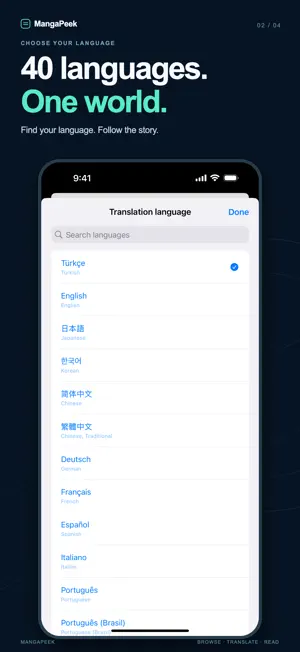
MangaPeek helps you read manga, comics and webtoons in your language. Start from the home screen to browse a page, import a photo or screenshot, or type and paste text. Recognize image text on your device, preview it, and translate when you choose. Translate the visible browser area or a selected image region and view translations over the content. Features: • 40 translation target languages, including Turkish, English, Japanese, Korean, Chinese, Arabic, Hindi, Persian, Ukrainian and Vietnamese • Search languages by their names and native names • Source image languages based on your device's text-recognition support • Standard and manga reading profiles • Copy translations, hear them spoken and save words • Optional account-scoped local translation history • Private browsing and favorite pages • Share images and links to a local inbox • Account token balance and transaction history • Support for larger text and light or dark appearance Translation requires an account and character tokens. Purchases are consumable character packages. OCR runs on your device; recognized or entered text is sent to the translation service when you request a translation. Images are not sent to the translation server. Image text recognition and speech support vary by device and language. Vertical or stylized text recognition can vary. Check recognized text before translating.
What’s new
Version 1.1 · Updated October 12, 2026
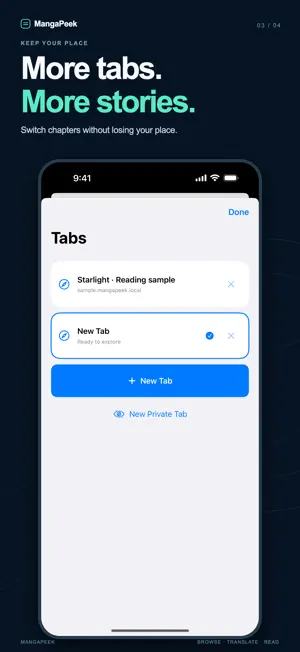
New in 1.1: • A new home screen with quick access to images, text translation and browsing. • 40 translation languages with a searchable language picker. • Type or paste text to translate. • Import comic images and screenshots with on-device text recognition. • Translate selected image areas and preview recognized text before translating. • Save images or links to MangaPeek from the iOS Share sheet. • Copy, listen to and save translations and words. • Optional local history, private browsing and account token history. • Improved navigation, accessibility, login and pending-purchase recovery. • Multiple browser tabs with independent navigation and translation sessions. • Redesigned sign-in and registration screens. • Improved manga translation overlay tracking and text grouping.
App privacy
The developer, Egehan Karakose, reported these privacy practices to Apple.
Data Linked to You
The following data, which may be collected and linked to your identity, may be used for the following purposes:
- Purchases: Purchase History
- Contact Info: Email Address
- User Content: Other User Content
- Identifiers: User ID
Used for: App Functionality
Alternatives to MangaPeek
Looking for apps like MangaPeek? Here are 6 similar apps on the App Store. The highest rated is EasyComix: Manga Translator (4.7/5), and all 6 are free to download.
-
 Suki - Screen Translator
-
 Sumi: AI Manga Translator
4.2
Sumi: AI Manga Translator
4.2
-
 Manga Translator: Screen OCR
3.0
Manga Translator: Screen OCR
3.0
-
 EasyComix: Manga Translator
4.7
EasyComix: Manga Translator
4.7
-
 Manga Translator – Mangra
4.2
Manga Translator – Mangra
4.2
-
 IchigoReader - Translate Manga
4.6
IchigoReader - Translate Manga
4.6
| App | Rating | Price | Last updated | Compare |
|---|---|---|---|---|
| MangaPeek | – | Free | October 12, 2026 | |
| Suki - Screen Translator | – | Free | Jun 25, 2026 | Compare |
| Sumi: AI Manga Translator | 4.3 / 5 (4) | Free | Oct 22, 2026 | Compare |
| Manga Translator: Screen OCR | 3.0 / 5 (2) | Free | Sep 12, 2026 | Compare |
| EasyComix: Manga Translator | 4.7 / 5 (51) | Free | Oct 23, 2026 | Compare |
| Manga Translator – Mangra | 4.2 / 5 (98) | Free | Oct 23, 2026 | Compare |
| IchigoReader - Translate Manga | 4.6 / 5 (18) | Free | Oct 16, 2026 | Compare |
Compare MangaPeek with the top alternatives: ratings, updates, ASO score and keyword gaps →