

Trading AI - Chart Analysis
PAUL EDMOND JEAN MERLIN Finance iPhoneiPadiPod touch
Trading AI - Chart Analysis is a free Finance app for iPhone and iPad by PAUL EDMOND JEAN MERLIN. Rated 5.0/5 from 2 ratings. Requires iOS 26.0.
- Rating
- 5.0
- 2 ratings
- Price
- Free
- on the App Store
- Size
- 38 MB
- Age 17+
- Updated
- Oct 18
- 2026 · v2.2.0
Screenshots

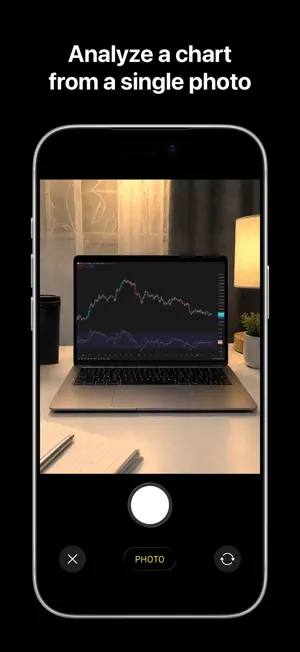

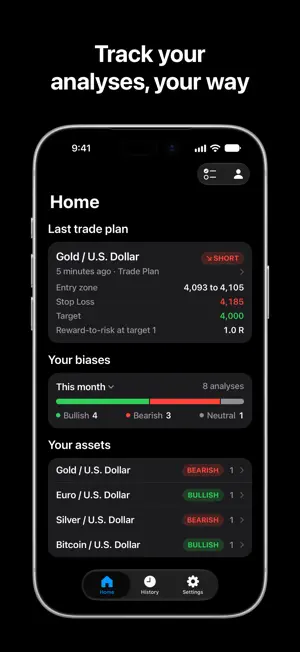
About Trading AI - Chart Analysis
Trading AI empowers investors worldwide to act on the financial markets, whatever their level, with market intelligence driven by artificial intelligence. The analysis adapts to your experience and reads in one tap as a summary or in full, your choice. How it works 1. Take a photo of your financial asset's chart, or import a screenshot from your photos. Stocks, forex, crypto, indices, commodities, futures: the AI reads them all. 2. The AI reads the asset, the timeframe, the structure, and the levels where price has already reacted, using advanced technical analysis methods. 3. The app computes every ratio and checks the plan before delivering it to you. A checked plan, matched to your chart - The AI identifies your chart's horizon on its own and adapts its result to it: triggers for scalping, a session plan for day trading, a trade plan for swing trading, a long-term framework for investing. - For a position: entry, stop loss, one or two targets, an expiry, and reward-to-risk computed at the worst entry price. - Its stop loss is compared with the chart's volatility, and a time stop limits its duration. - The share of winning trades needed to break even, costs included. - A plan that fails a check is removed, with the reason: a stop loss inside the noise, costs too high, a target too slow to reach. When nothing is clean, the analysis says so, and why. An analysis that weighs its evidence - Two concrete scenarios, each with the level that would invalidate it. Their likelihood is written in words, never as a made-up percentage. - Every argument is weighted by what finance research has actually shown. - The Method and sources page explains the method the AI applies and cites its sources: the Federal Reserve Bank of New York on support and resistance, the Journal of Finance, and the volatility research awarded the 2003 Nobel Prize in Economics. The instructions given to the AI are designed and tested by our prompt engineering team. Built for the Apple ecosystem - On iPhone, follow your analysis on the Lock Screen and in the Dynamic Island, and get a notification as soon as it is ready. - Widgets that bring back your last trade plan and the market sessions, even outside the app. - Controls in Control Center and on the Lock Screen. - An interface fully designed and optimized for iPad. - A Home interface you can arrange and customize your way. - A targeted search by asset in your history, sharing your analyses with friends, all synced with iCloud across your devices, with no account to create. What it does, and what it doesn't - Trading AI analyzes charts. It connects to no broker, places no orders, and promises no results. - Your image is sent encrypted to our server, then to Anthropic's AI, which reads it to produce your analysis. Our server deletes it within 24 hours; Anthropic applies its own retention policy. Subscription: analysis requires Pro or Max, monthly or yearly, or analyses bought in packs, which never expire. Max offers 2.5 times more weekly usage than Pro. Pro Yearly starts with a 7-day free trial for eligible new subscribers. Prices are shown in the app before purchase. Payment is charged to your Apple Account at purchase or when the trial ends, then within 24 hours before each renewal. Subscriptions renew automatically unless canceled at least 24 hours before the end of the period, in your Apple Account settings. For informational and educational purposes only. Trading AI does not provide investment advice. Terms of Use (EULA): https://usetradingai.com/legal/term_condition Privacy Policy: https://usetradingai.com/legal/privacy_policy
What’s new
Version 2.2.0 · Updated October 18, 2026
Trading AI is back with many new features, fixes and improvements: our biggest update is finally here. - Trading AI is now powered by the latest generation of Claude models, with deep reasoning for every analysis. - On iPhone Duo, a version fully optimized for every position: closed, open, or folded. - On iPad, a fully redesigned version optimized for the big screen. - Every plan is checked before you see it: reward-to-risk at the worst entry price, costs, the stop loss against volatility, a time stop. A plan that fails a check is removed, with the reason. - The AI identifies your chart's horizon on its own: triggers for scalping, a session plan for day trading, a trade plan for swing trading, a long-term framework for investing. - Follow your analysis on the Lock Screen and in the Dynamic Island. - New widgets, controls for Control Center and the Action button, and quick actions on the app icon. - Share your analyses with friends as a polished image. - Two concrete scenarios, each with the level that would invalidate it, and a likelihood written in words. - Essentials or Full Report: the same analysis, as a summary or in full, one tap away. - A Home tab you can customize, a history you can search by asset, date, or horizon, and your settings synced with iCloud. - The Method and sources page now explains the AI's method and cites its new sources. - Pro and Max: Pro includes weekly usage, Max offers 2.5 times more, and your usage is shown as a percentage of your week. Snap or import your next chart to see the new analysis.
App privacy
The developer, PAUL EDMOND JEAN MERLIN, reported these privacy practices to Apple.
Data Linked to You
The following data, which may be collected and linked to your identity, may be used for the following purposes:
- Purchases: Purchase History
- User Content: Photos or Videos, Other User Content
- Identifiers: Device ID
- Usage Data: Product Interaction
Used for: App Functionality
Alternatives to Trading AI - Chart Analysis
Looking for apps like Trading AI - Chart Analysis? Here are 6 similar apps on the App Store. The highest rated is Chart AI - Trading Analysis (4.8/5), and all 6 are free to download.
-
 Trading AI: Any Chart Analysis
3.0
Trading AI: Any Chart Analysis
3.0
-
 Trading AI: AI Chart Analyzer
4.6
Trading AI: AI Chart Analyzer
4.6
-
 AI Trading Bot - TradeGPT
4.3
AI Trading Bot - TradeGPT
4.3
-
 Trade AI: Chart Analysis
4.4
Trade AI: Chart Analysis
4.4
-
 Quant AI: Stock Chart Analysis
4.6
Quant AI: Stock Chart Analysis
4.6
-
 Chart AI - Trading Analysis
4.8
Chart AI - Trading Analysis
4.8
| App | Rating | Price | Last updated | Compare |
|---|---|---|---|---|
| Trading AI - Chart Analysis | 5.0 / 5 (2 ratings) | Free | October 18, 2026 | |
| Trading AI: Any Chart Analysis | 3.0 / 5 (2) | Free | Oct 13, 2026 | Compare |
| Trading AI: AI Chart Analyzer | 4.6 / 5 (39) | Free | Jul 27, 2026 | Compare |
| AI Trading Bot - TradeGPT | 4.3 / 5 (44) | Free | Sep 7, 2026 | Compare |
| Trade AI: Chart Analysis | 4.4 / 5 (18) | Free | Aug 31, 2026 | Compare |
| Quant AI: Stock Chart Analysis | 4.6 / 5 (73) | Free | Oct 20, 2026 | Compare |
| Chart AI - Trading Analysis | 4.8 / 5 (34) | Free | Jan 6, 2026 | Compare |