

SubsTracker AI: Subscriptions
Pavel Plotnikov Finance iPhoneiPadiPod touchMac
SubsTracker AI: Subscriptions is a free Finance app for iPhone and iPad by Pavel Plotnikov. Requires iOS 17.0. Updated October 31, 2026.
- Price
- Free
- on the App Store
- Size
- 13 MB
- Age 4+
- Updated
- Oct 31
- 2026 · v1.0.15
Screenshots
Save to Pinterest

About SubsTracker AI: Subscriptions
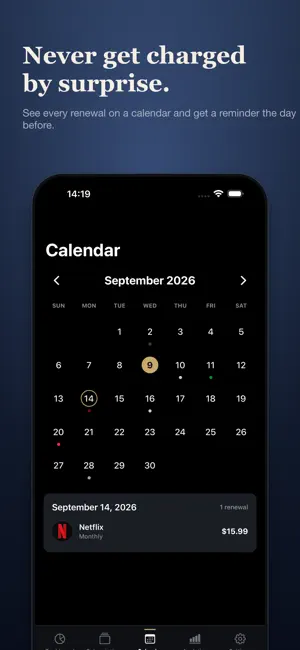
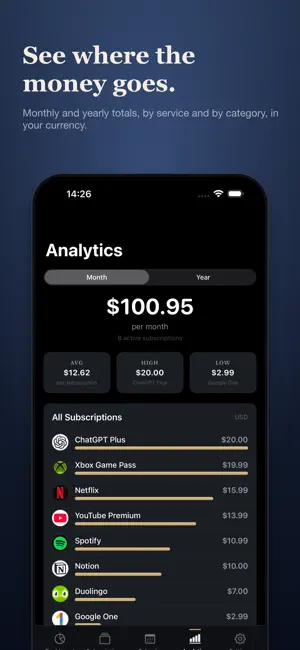
SubsTracker AI is a refined subscription tracker for people who want to know — to the cent — what their recurring spending really looks like. ADD A SUBSCRIPTION IN SECONDS Pick from the built-in catalog of common services or type your own. Pre-loaded with sensible billing cycles, currencies, and category icons. Auto-categorization recognizes hundreds of services without an internet round-trip. Logos are found and stored automatically. PROFILES FOR EVERY PART OF YOUR LIFE (Pro) Keep Personal, Work, Family and more apart. Switch profiles from the title on Home and Subscriptions, Calendar and Analytics follow. Reminders keep working for every profile. ANY BILLING SCHEDULE Daily to yearly, or your own: every 2 months, every 10 days. PREPAID BALANCES (Pro) Paid from a phone or hosting balance? Enter what is on it and link the subscriptions that draw from it: see what is left, when it runs out, and get a top-up reminder. SUBSCRIPTIONS THAT END Cancelled something? Turn off "Renews automatically" and pick the end date. It leaves your monthly total right away and waits in its own Ending list on Home; on the end date it moves to Archive and you get a notification that it has ended. SEE THE WHOLE PICTURE • A monthly cockpit with a spending trend and a 3-month forecast of what will actually renew. • Calendar view with renewal dots so you can spot upcoming charges weeks ahead. • Analytics with AVG / HIGH / LOW per subscription, ranked spending bars, and category breakdown (Pro). • Budget alerts when monthly spend crosses your limit. • Your payment days in Apple Calendar, synced through iCloud to all your devices (Pro). REMINDERS YOU CAN RELY ON Renewal reminders the day before a charge, or as many days ahead as you like. The next reminders are queued in advance and refreshed in the background, so they arrive even if you don't open the app for weeks. AI THAT ACTUALLY DOES THE WORK (Pro) • Natural-language chat: "Add Netflix at $15.99 monthly", "I cancelled Netflix", "Move Notion to Work". The AI executes — it doesn't just describe. • Bulk edits in one sentence: "Set all my reminders to 1 day before" updates every subscription at once. • Add several services in one message, with schedules, trials and balances understood as you wrote them. • AI Insights: totals, categories and the next 30 days of charges worked out in your currency, with tips on overlapping services and cheaper plans. MULTI-CURRENCY DONE RIGHT 12 currencies including RUB, USD, EUR, GBP, JPY, CNY, TRY, KZT, BYN, UAH, GEL, AMD. Live exchange rates with smart caching. Default currency auto-inferred from your locale. SYNCED EVERYWHERE Your SubsTracker account keeps subscriptions, profiles, trials, price history and chat history in sync on every device. Chat history is encrypted with AES-GCM 256-bit before it is stored in the cloud. You can delete your account and everything synced to it at any time in Settings. THOUGHTFUL DETAILS • Refined dark UI with brass accents — no neon, no nonsense. • Spotlight search and Siri Shortcuts ("Hey Siri, how much am I spending?"). • Widgets for the Home Screen and Lock Screen: monthly total, upcoming renewals and the next one due, active count. Each widget shows all profiles or just one. • Crafted alternate app icons for Pro subscribers. • Available in 12 languages. FREE Track up to 5 subscriptions with renewal reminders, the calendar, multi-currency totals, budget alerts, cloud sync and the monthly-total widget. PRO — TRY IT FREE FOR 7 DAYS Unlimited subscriptions, the AI assistant and AI insights, AI auto-categorize, full analytics, profiles, prepaid balances, every widget, CSV export, Apple Calendar, Face ID lock, and custom logos and app icons. Monthly or yearly; new subscribers start with a 7-day free trial and can cancel any time before it ends. NO ADS. NO TRACKERS. YOUR DATA STAYS YOURS. Terms of Use (EULA): https://www.apple.com/legal/internet-services/itunes/dev/stdeula/
What’s new
Version 1.0.15 · Updated October 31, 2026
- Add all your subscriptions at once from a screenshot of your subscriptions list, a bank statement or a receipt. It's read on your device. - A charge due today or tomorrow shows on your Lock Screen and in the Dynamic Island. - A reminder the day before your free Pro trial ends. - Siri and Shortcuts fill in the price and billing period when you add a subscription. - Keyboard shortcuts on Mac and iPad: Command-N adds a subscription, Command-1 to 5 switch tabs. - A much lighter app that downloads faster. The old on-device AI model is removed to free up space.
App privacy
The developer, Pavel Plotnikov, reported these privacy practices to Apple.
Data Linked to You
The following data, which may be collected and linked to your identity, may be used for the following purposes:
- Contact Info: Email Address
- User Content: Other User Content
Used for: App Functionality
Alternatives to SubsTracker AI: Subscriptions
Looking for apps like SubsTracker AI: Subscriptions? Here are 6 similar apps on the App Store. The highest rated is Subscription Tracker: Sublimit (5.0/5), and all 6 are free to download.
-
 Kashiko: Expense Tracker
-
 Sublee — Subscription Tracker
-
 Subscription Manager: Bill
-
 Daily Spend - Expense Tracker
-
 Suby: Subscription Tracker
-
 Subscription Tracker: Sublimit
5.0
| App | Rating | Price | Last updated | Compare |
|---|---|---|---|---|
| SubsTracker AI: Subscriptions | – | Free | October 31, 2026 | |
| Kashiko: Expense Tracker | – | Free | Jun 9, 2026 | Compare |
| Sublee — Subscription Tracker | – | Free | May 11, 2026 | Compare |
| Subscription Manager: Bill | – | Free | Sep 28, 2025 | Compare |
| Daily Spend - Expense Tracker | – | Free | Mar 20, 2026 | Compare |
| Suby: Subscription Tracker | – | Free | Oct 28, 2026 | Compare |
| Subscription Tracker: Sublimit | 5.0 / 5 (13) | Free | May 12, 2026 | Compare |