

NostalgAI: AI Photo Enhancer
Md Nasib Shahriar Akash Photo & Video iPhoneiPadiPod touch
NostalgAI: AI Photo Enhancer is a free Photo & Video app for iPhone and iPad by Md Nasib Shahriar Akash. Rated 5.0/5 from 3 ratings. Requires iOS 16.0.
- Rating
- 5.0
- 3 ratings
- Price
- Free
- on the App Store
- Size
- 168 MB
- Age 4+
- Updated
- Sep 24
- 2026 · v1.1.0
Screenshots

About NostalgAI: AI Photo Enhancer
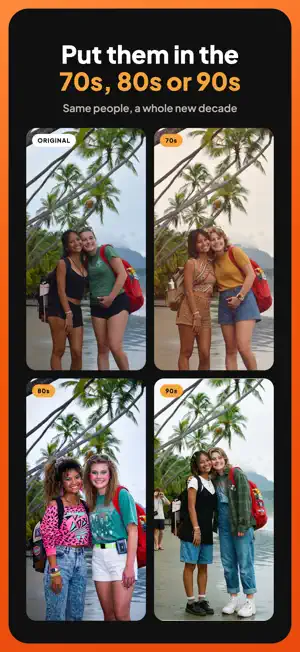
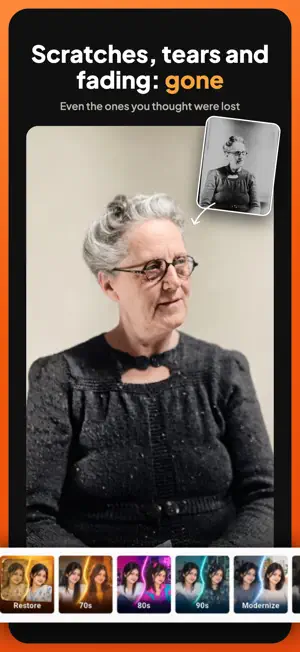
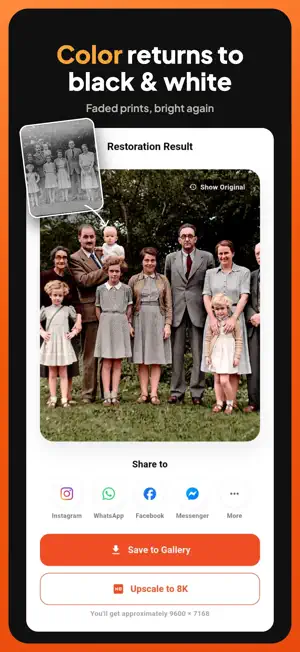
Nostalgai is an AI photo editor that gives your pictures a new era. Send a photo back to the 70s, 80s or 90s, give an old shot a clean modern look, or go full cinematic — in one tap. Then finish it with a complete set of editing tools, and come back to change any of it later. MAGIC — AI LOOKS IN ONE TAP Pick a look, tap once, and let the AI restyle your photo. • 70s: warm tones, soft grain and the feel of a faded family album • 80s: bold color, bright flash and pure retro energy • 90s: the disposable-camera look you remember • Modernize: bring an old picture into the present day • Cinematic: moody, film-grade color and light • New looks arrive over time — no app update needed • Free Magic edits every day, and a short ad gets you one more AI UPSCALING Small, soft or low-resolution photo? Make it bigger and sharper. • Enlarge photos while keeping detail crisp • See the approximate final size before you start • Upscaling runs in the background — keep editing and pick it up later from History • Up to 4K with Nostalgai Pro 70+ FILTERS From soft pastels and milky monochromes to bold cinema tones. Tap through them, compare, and stack a filter with every other tool. ADJUST — FULL MANUAL CONTROL Twelve precise sliders for when you want it exactly right: • Brightness, contrast, saturation and exposure • Highlights, shadows, whites and blacks • Temperature, clarity, sharpness and gamma FOCUS Make your subject stand out with adjustable blur: radial, linear, mirrored or gaussian. TRANSFORM Crop, rotate and straighten. Your text and stickers stay pinned to the photo, and you can reopen the crop and change it whenever you like. TEXT • One-tap style presets • A library of fonts, with bold, italic and alignment controls • Solid colors or gradients • Outlines, backgrounds, borders, padding and rounded corners • Opacity control for subtle captions or loud headlines STICKERS Add stickers from the library or upload your own image, then resize, replace and fade them to fit. EDITS THAT STAY EDITABLE Most editors flatten your work the moment you save. Nostalgai saves every edit as a project. Reopen it days later and change any single setting — the filter, the crop, one line of text — without starting over and without losing quality. Your photo is only composed at full resolution when you download it. HISTORY Every photo you have made is kept in History on your device, ready to reopen, re-save or share again. SAVE AND SHARE Save to your photo library in high resolution, or share straight to Instagram, WhatsApp, Facebook and Messenger. GREAT FOR • Giving family photos a fresh retro or modern look • Throwback posts and decade-themed party invites • Sharpening small, old or compressed pictures • Captioned photos, quotes and social posts • Anyone who wants strong results without learning a pro tool YOUR PHOTOS, YOUR CALL Filters, adjustments, focus, text and stickers all work on your device. AI tools ask for your agreement before a photo is sent for processing, and you can withdraw that agreement at any time in Settings. Magic needs an internet connection; the rest of the editor does not. Available in English, Spanish and French. NOSTALGAI PRO • Unlimited Magic edits • 4K upscaling • No ads • No watermark Nostalgai is free to use with daily Magic edits. Free users can watch a short ad for an extra edit or to remove the watermark from a photo. Pro is an auto-renewing subscription. Payment is charged to your Apple ID at confirmation of purchase. Your subscription renews automatically unless it is cancelled at least 24 hours before the end of the current period. Manage or cancel anytime in your App Store account settings. Terms of Use: https://www.nostalgai.art/terms Privacy Policy: https://www.nostalgai.art/privacy-policy Support: https://www.nostalgai.art/support
What’s new
Version 1.1.0 · Updated September 24, 2026
Nostalgai 1.1 is our biggest update yet. NEW: MAGIC LOOKS Restore is now Magic. Alongside Restore you get one-tap AI looks — 70s, 80s, 90s, Modernize and Cinematic — right from the Home screen or inside the editor. New looks will arrive without an app update. NEW: A FULL TEXT TOOL Style presets, a font library, gradients, outlines, backgrounds and borders. Resize, rotate and delete captions with on-photo handles. NEW: EDITS YOU CAN REOPEN Your edits are saved as projects. Open one from Home and change any setting without starting over. NEW: EDITABLE CROP Crop, rotate, flip and straighten are now one setting you can go back and change. Text and stickers stay pinned to the photo. NEW: OPEN PHOTOS FROM OTHER APPS Share a photo to Nostalgai from Photos or any other app and it opens straight in the editor. ALSO NEW • Compare before and after on the result screen • Free users can watch a short ad for an extra Magic edit or to remove the watermark • Clear control over AI processing: Nostalgai asks before a photo is sent, and you can change your choice in Settings • Privacy, terms and support links in Settings • Stickers: tap to select, corner handles, delete FIXES AND POLISH • Saving to your photo library is more reliable and tells you when it fails • Sharper editor preview • Recent photos on Home no longer stretch • Many smaller fixes across the editor
App privacy
The developer, Md Nasib Shahriar Akash, reported these privacy practices to Apple.
Data Used to Track You
The following data may be used to track you across apps and websites owned by other companies:
- Location: Coarse Location
- Identifiers: Device ID
- Usage Data: Product Interaction, Advertising Data
Data Not Linked to You
The following data, which may be collected but is not linked to your identity, may be used for the following purposes:
- Location: Coarse Location
- Identifiers: Device ID
- Usage Data: Product Interaction, Advertising Data
- Diagnostics: Crash Data, Performance Data, Other Diagnostic Data
- Purchases: Purchase History
- User Content: Photos or Videos
Used for: Third-Party Advertising, Analytics, App Functionality
Alternatives to NostalgAI: AI Photo Enhancer
Looking for apps like NostalgAI: AI Photo Enhancer? Here are 6 similar apps on the App Store. The highest rated is Restore Old Photos AI - Pics (5.0/5), and all 6 are free to download.
-
 Restore Old Photos AI - Pics
5.0
-
 Retouchly: AI Photo Editor
5.0
-
 UnTint - Photo Enhancer
-
 RevivePix: AI Photo Enhancer
-
 CartoonifAI: Anime Photo AI
-
 Colorate - Restore Old Photos
5.0
| App | Rating | Price | Last updated | Compare |
|---|---|---|---|---|
| NostalgAI: AI Photo Enhancer | 5.0 / 5 (3 ratings) | Free | September 24, 2026 | |
| Restore Old Photos AI - Pics | 5.0 / 5 (1) | Free | Jul 25, 2026 | Compare |
| Retouchly: AI Photo Editor | 5.0 / 5 (3) | Free | Jul 12, 2026 | Compare |
| UnTint - Photo Enhancer | – | Free | Jun 25, 2025 | Compare |
| RevivePix: AI Photo Enhancer | – | Free | Mar 27, 2026 | Compare |
| CartoonifAI: Anime Photo AI | – | Free | Oct 26, 2026 | Compare |
| Colorate - Restore Old Photos | 5.0 / 5 (3) | Free | Oct 22, 2026 | Compare |