

QR Toolkit: Scanner, Generator
DJUMP, MB Utilities iPhoneiPadiPod touch
QR Toolkit: Scanner, Generator is a free Utilities app for iPhone and iPad by DJUMP, MB. Requires iOS 15.1. Updated September 26, 2026.
- Price
- Free
- on the App Store
- Size
- 48 MB
- Age 4+
- Updated
- Sep 26
- 2026 · v1.3.4
Screenshots
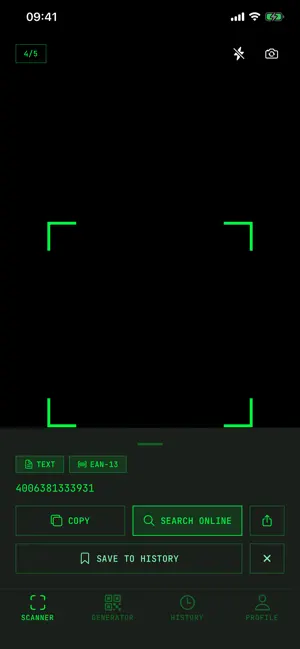


About QR Toolkit: Scanner, Generator
Scan a QR code or a barcode and QR Toolkit shows you the whole content first. Nothing opens until you tap Open. Then make your own WiFi, contact, link and text QR codes — no ads, no account required. QR Toolkit is a QR code scanner, a barcode reader and a QR code generator in one app, in a clean terminal-style interface with nothing in it trying to sell you something. READ THE LINK BEFORE YOU OPEN IT Most scanners jump straight to whatever page the code points at. QR Toolkit does not. It decodes the code, prints the full content on screen, and waits. Copy it, share it, save it to your history, or open it — your call. QR phishing (people call it "quishing") works precisely because the destination stays hidden until it is too late. Reading the address first is the simplest defense there is. SCAN QR CODES AND BARCODES • Point the camera at a QR code or a barcode • Product barcodes: EAN-13, EAN-8, UPC-A and UPC-E, each with a one-tap web search • Code 128, Code 39, Code 93, ITF and Codabar • 2D codes: QR, Data Matrix, PDF417 and Aztec • Or tap From image to decode a code in a screenshot or a saved photo — the system picker hands over only the image you choose • The decoded content appears in a preview panel before anything happens • Decoding runs on your device, not on a server CREATE QR CODES • Website link — turn any URL into a code • WiFi network — network name, password and encryption type, so guests join by scanning instead of typing a twenty-character password • Contact — name, phone and email • Plain text — a note, a serial number, a table number, anything at all • vCard business card with company, job title and website (Premium) Creating and previewing codes is free and unlimited. Save or share one finished image a day for free; Premium removes the limit and adds SVG export, custom colors and your logo in the middle. The generator makes QR codes — the app reads barcodes but does not create them. HISTORY, WITH OR WITHOUT AN ACCOUNT • Every code you scan and every code you make, in one list • No account? Your history is kept on this device • Sign in and it syncs, so it is waiting on your next phone • The free plan shows your last 10 items; Premium unlocks the full list, plus search WHAT WE ACTUALLY DO WITH YOUR DATA We would rather be specific than say "private" and leave it there. • No ads. No advertising SDKs. There is no ad network in this app at all. • Decoding happens on your device. • No account is required — you can scan, create and keep a history as a guest. • We do not sell your data. • If you do sign in, your history is stored in our database so it can sync between your devices, protected by row-level security so that only your account can read it. We say that plainly instead of claiming everything stays on your phone, because that would not be true. • The app uses product analytics to see which features get used, and a crash reporter so we hear about bugs. Neither is connected to advertising. PREMIUM — $1.99 a month, $9.99 a year, or $19.99 once • Unlimited scanning (the free plan includes 5 scans a day) • Save and share every code as an image, plus SVG export for print • Custom QR code colors and your logo in the middle of the code • vCard business cards • Your full history instead of the last 10 items, with search The one-time option is exactly that: pay once, no subscription, nothing to cancel later. Available in English, Arabic, Dutch, French, German, Italian, Japanese, Korean, Lithuanian, Polish, Spanish and Swedish. Subscriptions renew automatically unless cancelled at least 24 hours before the current period ends. Manage or cancel anytime in your App Store account settings. Privacy Policy: https://qrtoolkit.app/privacy Terms: https://qrtoolkit.app/terms Questions? [email protected]
What’s new
Version 1.3.4 · Updated September 26, 2026
v1.3.4 • Barcodes. Scan EAN, UPC, Code 128, Code 39, ITF, Data Matrix, PDF417, Aztec and more — with the camera or from a saved image. Product barcodes come with a one-tap web search. • History without an account. Codes you save are kept on this device; sign in to sync them to your other phones. • Arabic. The app now speaks Arabic, laid out right to left. • One free image export a day. Save or share a finished QR code as a PNG without Premium. • Restore Purchases in Settings now tells you what happened instead of doing it silently. No ads, ever. Questions? [email protected]
App privacy
The developer, DJUMP, MB, reported these privacy practices to Apple.
Data Linked to You
The following data, which may be collected and linked to your identity, may be used for the following purposes:
- Identifiers: User ID, Device ID
- Usage Data: Product Interaction
- Purchases: Purchase History
- Contact Info: Email Address, Name
- User Content: Other User Content
Used for: Analytics, App Functionality
Data Not Linked to You
The following data, which may be collected but is not linked to your identity, may be used for the following purposes:
- Diagnostics: Crash Data, Performance Data
Used for: App Functionality
Alternatives to QR Toolkit: Scanner, Generator
Looking for apps like QR Toolkit: Scanner, Generator? Here are 6 similar apps on the App Store.
-
 AppToolKit
-
 Remote Mouse by Sidrion Labs
-
 QR Scanner: No Ads. Just Works
-
 Scanio : QR Scanner
-
 QR Lens
-
 GeoMoov Spot
| App | Rating | Price | Last updated | Compare |
|---|---|---|---|---|
| QR Toolkit: Scanner, Generator | – | Free | September 26, 2026 | |
| AppToolKit | – | Free | Jun 30, 2026 | Compare |
| Remote Mouse by Sidrion Labs | – | Free | Sep 4, 2026 | Compare |
| QR Scanner: No Ads. Just Works | – | Free | Jul 16, 2026 | Compare |
| Scanio : QR Scanner | – | Free | Mar 24, 2026 | Compare |
| QR Lens | – | Free | May 28, 2026 | Compare |
| GeoMoov Spot | – | Free | Nov 27, 2025 | Compare |