

Space Designer 3D - Capture
Baris Saricoglu Graphics & Design iPhoneiPadiPod touch
Space Designer 3D - Capture is a free Graphics & Design app for iPhone and iPad by Baris Saricoglu. Requires iOS 17.0. Updated July 8, 2026.
- Price
- Free
- on the App Store
- Size
- 15 MB
- Age 4+
- Updated
- Jul 8
- 2026 · v1.0
Screenshots


About Space Designer 3D - Capture
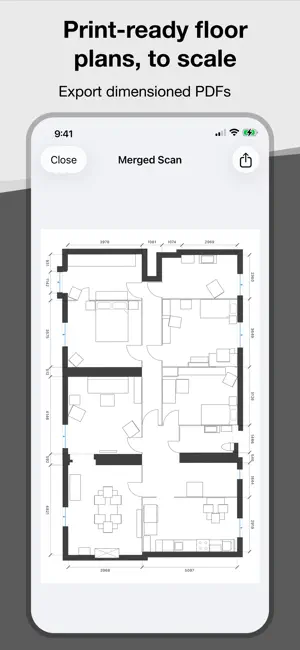
Built for Space Designer 3D Scan a room, generate a 6-character share code, and open the project in Space Designer 3D on the web with a single tap. Walls, openings, and furniture are preserved so you can start editing, furnishing, and rendering immediately — no remodeling required. Print-ready PDF floor plans, to scale Export dimensioned 2D plans directly from your iPhone. Every wall, door, window, and furnishing is rendered as a clean technical drawing with measurements in metric or imperial. Choose your scale (1:50, 1:100, 1:200) and share a PDF ready for clients, contractors, or permit submissions. Scan rooms in minutes Point your iPhone and watch the room build in real time. LiDAR automatically detects walls, doors, windows, openings, and common furnishings. Each scan is saved as a 3D model you can preview on the spot. Merge rooms into a full home Scan room by room and combine captures into a single, connected floor plan. Ideal for apartments, houses, offices, and any multi-room project where one big scan isn't practical. Organize scans into projects Group scans by property, job site, or client. Add an address, operator name, and notes so every project stays clear, searchable, and ready to revisit. Preview in 3D before exporting Rotate and zoom through a clean 3D view of each scan to verify accuracy before you export a PDF or share with Space Designer 3D. Works offline, syncs when you're back Scans are saved locally and sync automatically in the background. Capture confidently on-site, basement to attic, even without a connection. Sign in with Apple or email — your projects stay in sync across iPhone and iPad. Requirements iPhone or iPad with a LiDAR sensor. iOS 17 or later.
App privacy
The developer, Baris Saricoglu, reported these privacy practices to Apple.
Data Linked to You
The following data, which may be collected and linked to your identity, may be used for the following purposes:
- Contact Info: Email Address
- Identifiers: User ID
- Surroundings: Environment Scanning
- Other Data: Other Data Types
Used for: App Functionality
Alternatives to Space Designer 3D - Capture
Looking for apps like Space Designer 3D - Capture? Here are 6 similar apps on the App Store. The highest rated is Spacings (5.0/5), and all 6 are free to download.
-
 Acraspeda - AI Property Design
-
 Color Picker Camera
-
 AI Room Planner - Baytee
-
 Spacings
5.0
Spacings
5.0
-
 Syntina: AI Render & Interior
-
 BIM Scanner
5.0
BIM Scanner
5.0
| App | Rating | Price | Last updated | Compare |
|---|---|---|---|---|
| Space Designer 3D - Capture | – | Free | July 8, 2026 | |
| Acraspeda - AI Property Design | – | Free | Jul 31, 2026 | Compare |
| Color Picker Camera | – | Free | Jul 29, 2026 | Compare |
| AI Room Planner - Baytee | – | Free | Apr 5, 2026 | Compare |
| Spacings | 5.0 / 5 (6) | Free | Nov 13, 2023 | Compare |
| Syntina: AI Render & Interior | – | Free | Oct 12, 2026 | Compare |
| BIM Scanner | 5.0 / 5 (2) | Free | Oct 19, 2026 | Compare |