

Senra - Listening Flashcards
QI ZHAN Education iPhoneiPadiPod touch
Senra - Listening Flashcards is a free Education app for iPhone and iPad by QI ZHAN. Requires iOS 18.0. Updated October 1, 2026.
- Price
- Free
- on the App Store
- Size
- 17 MB
- Age 4+
- Updated
- Oct 1
- 2026 · v1.9.2
Screenshots
About Senra - Listening Flashcards
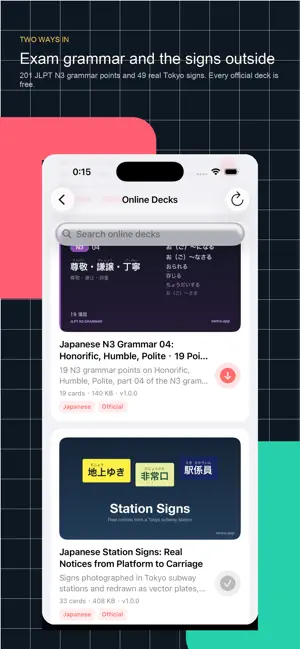
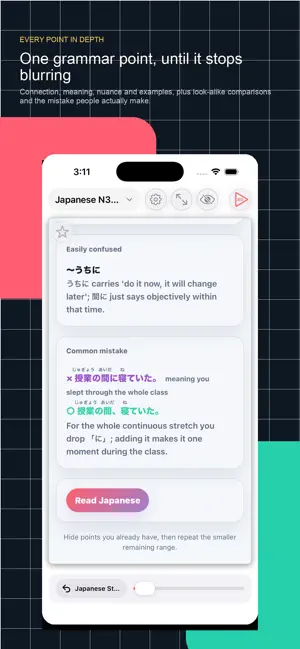
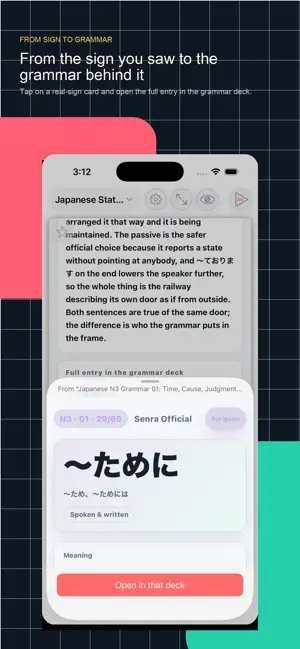
Senra is an app for learning Japanese with the Senra Method. From kana to JLPT N5 and N3, to real signs photographed in Tokyo — define a scope, split it into cards, drill it, hide what you already know, and spend your time only on what is left, until nothing remains. The Senra Method Define the scope. Split it into cards. Drill it. Hide what you have mastered. Concentrate on what is left. After every round, less remains unlearned. Official decks, all free · Japanese kana: 46 hiragana, 46 katakana, 25 voiced and plosive kana, 33 contracted sounds · JLPT N3 grammar: time, cause and judgment / hearsay, state and scope / contrast, means and keigo / honorific, humble and polite — 201 points across four decks · JLPT N5 core vocabulary and high-frequency sentence patterns · Real Tokyo signs: 33 from inside stations, 16 from the streets, redrawn as vector plates true to the measured colours and layout · 9 Tokyo Metro lines and 185 stations, with kanji, readings, station numbers and transfers · The names and readings of Tokyo's 23 wards, plus the 14 kanji that keep coming back in place names · Japanese dates: weekdays, months and days, 53 cards Online decks are searchable by name and tag, and work offline once downloaded. Main features · Rich cards: furigana, grammar notes, images, audio and video · Autoplay for continuous drilling, on both rich cards and media cards · Hide mastered cards so the remaining range shrinks round by round · Jump from one card to a specific card in another deck, with a preview before switching · Import your own local decks · Eight interface languages Senra is not about seeing more cards. It is about managing a whole scope until nothing is left unlearned. Terms of Use (EULA): https://www.apple.com/legal/internet-services/itunes/dev/stdeula/
What’s new
Version 1.9.2 · Updated October 1, 2026
Video decks now support Picture in Picture · Leave the app and the video keeps playing in a small window, moving on to the next video card along with autoplay. Text-only decks have no small window and stop when the app goes to the background. · A new "When you leave the app" setting: Picture in Picture, audio only, or stop. Picture in Picture is the default. · Skip forward and back 10 seconds from the lock screen and Control Centre. With autoplay on, skipping past the end of the current video moves to the next card; with autoplay off, skipping stays inside the current video. · Closing the small window stops autoplay. Tapping the small window to return to the app keeps playback going — the same behaviour as common video apps. Autoplay interruption rules rebuilt Until now, lifting your finger during autoplay stopped it no matter what, so starring a card, toggling full screen or tapping the card face all stopped playback by accident. Now only actions that clearly mean "stop" switch autoplay off. · Stops autoplay: the autoplay button, swiping between cards, picking a page from the bottom bar, switching decks, hiding a card, opening settings, leaving the home screen, viewing an image full screen, and jumps inside a web card. · Does not stop autoplay: starring, the full-screen toggle, collapsing the control bar, tapping the card face, replaying audio or video, and buttons or quizzes inside a web card. · A new "suspended" state: phone calls, Siri, pausing the media yourself, unplugging headphones, and while a web card is being read aloud. In these cases autoplay is no longer switched off — it simply stops advancing, and resumes on its own once the reason is gone. Previously, after a call or after unplugging headphones, it would sit there showing as playing but never advancing. · Pages no longer turn while a web card is being read aloud, and a card you swipe away stops reading immediately — no more hearing the previous card after the deck has moved on. Also · The repeat-mode description in autoplay settings only explained "repeat one card" and said nothing at all about the other three. All four are now explained. · The four repeat-mode options are now a vertical list. They used to share a single row four ways, which cut off the option names in Indonesian and Vietnamese.
App privacy
The developer, QI ZHAN, reported these privacy practices to Apple.
Data Not Linked to You
The following data, which may be collected but is not linked to your identity, may be used for the following purposes:
- Usage Data: Product Interaction
- Diagnostics: Crash Data
Used for: Analytics, App Functionality
Alternatives to Senra - Listening Flashcards
Looking for apps like Senra - Listening Flashcards? Here are 6 similar apps on the App Store. The highest rated is Word Crown: Flashcards (5.0/5), and all 6 are free to download.
-
 Chinese: Hanzi Daily
-
 Word Crown: Flashcards
5.0
Word Crown: Flashcards
5.0
-
 ManabitAI: Japanese Vocab
-
 LingoDeck: Language Flashcards
-
 Nana Pinyin Tutor
-
 AniSpeak: Learn Japanese
5.0
AniSpeak: Learn Japanese
5.0
| App | Rating | Price | Last updated | Compare |
|---|---|---|---|---|
| Senra - Listening Flashcards | – | Free | October 1, 2026 | |
| Chinese: Hanzi Daily | – | Free | Sep 3, 2026 | Compare |
| Word Crown: Flashcards | 5.0 / 5 (1) | Free | May 16, 2026 | Compare |
| ManabitAI: Japanese Vocab | – | Free | Oct 2, 2026 | Compare |
| LingoDeck: Language Flashcards | – | Free | Feb 7, 2025 | Compare |
| Nana Pinyin Tutor | – | Free | Mar 19, 2026 | Compare |
| AniSpeak: Learn Japanese | 5.0 / 5 (1) | Free | Sep 14, 2026 | Compare |