

Inbox Zero: AI Email Assistant
Inbox Zero Inc. Productivity iPhoneiPadiPod touch
Inbox Zero: AI Email Assistant is a free Productivity app for iPhone and iPad by Inbox Zero Inc. Requires iOS 18.0. Updated October 21, 2026.
- Price
- Free
- on the App Store
- Size
- 35 MB
- Age 4+
- Updated
- Oct 21
- 2026 · v2.0.4
Screenshots



About Inbox Zero: AI Email Assistant
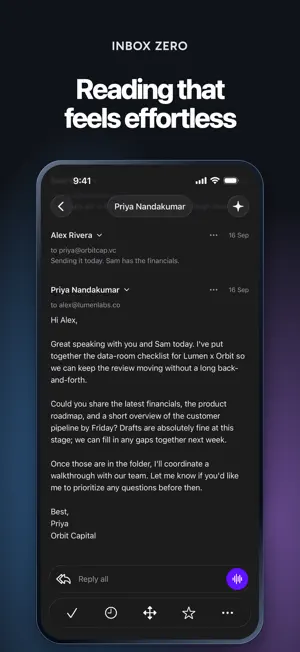
Inbox Zero is a fast, native email app for Gmail and Outlook, with an AI assistant built in. FAST, EVEN OFFLINE Your mail is stored on your iPhone, so your inbox opens instantly and stays usable without a connection. Changes sync in the background. SPLIT INBOX Split your inbox into tabs for the mail you care about. Each tab shows its unread count, so you know where to look first. UNSUBSCRIBE IN SECONDS See who keeps emailing you and choose Keep, Auto-archive or Unsubscribe for each sender, one by one or in bulk. Unsubscribing is free. ASK AI Chat with the Inbox Zero assistant from your inbox or any email. Ask about your mail, or tell it how your email should be handled. NEVER MISS A REPLY Get a notification when an email needs your reply, and tap straight into the conversation. TRIAGE WITHOUT FRICTION Swipe to mark done or read, and jump straight to the next email after you archive. Mark a whole list done at once, and choose your own swipe actions. WRITE AND REPLY Reply inline with attachments, photos and dictation. Drafts show up in your list and open right where you left off. Schedule messages with Send later, and undo a send for 30 seconds. ALL YOUR ACCOUNTS Connect several Gmail and Outlook accounts and read them together or one at a time. BUILT FOR IPHONE A Liquid Glass design, emails that stay readable in dark mode, and remote images loaded through a privacy proxy. Inbox Zero requires a paid subscription. New users receive a 7-day free trial. Monthly and annual plans renew automatically unless canceled at least 24 hours before the end of the current billing period. Manage or cancel your subscription in your Apple ID account settings. Privacy Policy: https://www.getinboxzero.com/privacy Terms of Use: https://www.apple.com/legal/internet-services/itunes/dev/stdeula/
What’s new
Version 2.0.4 · Updated October 21, 2026
• Opens instantly, with no loading spinner • Mail stays up to date in the background more reliably • New Edit splits button at the end of the tab bar • Tap the empty inbox picture to hide the controls • Tighter, more native top bar • Tap a collapsed email in a thread to expand it, with cleaner message summaries • Reply drafts open in one tap and show more lines • Smoother email rendering and better reply spacing • Sign in to your own self-hosted Inbox Zero server
App privacy
The developer, Inbox Zero Inc., reported these privacy practices to Apple.
Data Linked to You
The following data, which may be collected and linked to your identity, may be used for the following purposes:
- Identifiers: User ID
- Usage Data: Product Interaction
- Diagnostics: Crash Data, Performance Data
- Contact Info: Email Address, Name
- User Content: Emails or Text Messages
Used for: Analytics, App Functionality
Alternatives to Inbox Zero: AI Email Assistant
Looking for apps like Inbox Zero: AI Email Assistant? Here are 6 similar apps on the App Store. The highest rated is TopicFlow: AI Notes (5.0/5), and all 6 are free to download.
-
 TopicFlow: AI Notes
5.0
TopicFlow: AI Notes
5.0
-
 Inbox Zero: AI Mail Coach
-
 AI DREAM TEAM
5.0
AI DREAM TEAM
5.0
-
 Upstream - Email
3.7
Upstream - Email
3.7
-
 Slashy Mail
4.8
Slashy Mail
4.8
-
 Dove by Canary Mail
4.7
Dove by Canary Mail
4.7
| App | Rating | Price | Last updated | Compare |
|---|---|---|---|---|
| Inbox Zero: AI Email Assistant | – | Free | October 21, 2026 | |
| TopicFlow: AI Notes | 5.0 / 5 (1) | Free | Jun 29, 2026 | Compare |
| Inbox Zero: AI Mail Coach | – | Free | Jun 23, 2025 | Compare |
| AI DREAM TEAM | 5.0 / 5 (1) | Free | May 23, 2026 | Compare |
| Upstream - Email | 3.7 / 5 (3) | Free | Aug 18, 2026 | Compare |
| Slashy Mail | 4.8 / 5 (12) | Free | Oct 23, 2026 | Compare |
| Dove by Canary Mail | 4.7 / 5 (25) | Free | Oct 19, 2026 | Compare |