

Lunio — Daily Safety Check-In
HomeSeed Lifestyle iPhoneiPadiPod touch
Lunio — Daily Safety Check-In is a free Lifestyle app for iPhone and iPad by HomeSeed. Requires iOS 16.0. Updated October 22, 2026.
- Price
- Free
- on the App Store
- Size
- 58 MB
- Age 4+
- Updated
- Oct 22
- 2026 · v1.2.0
Screenshots
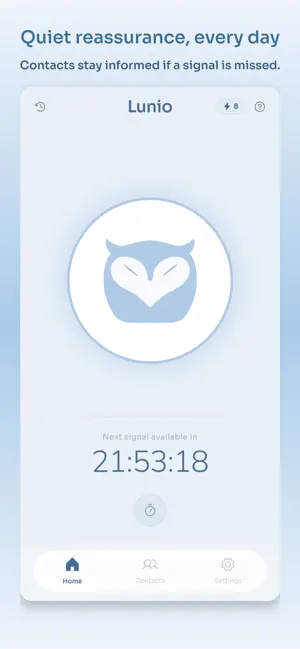
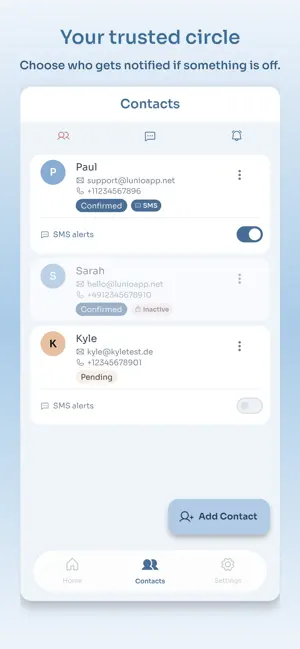
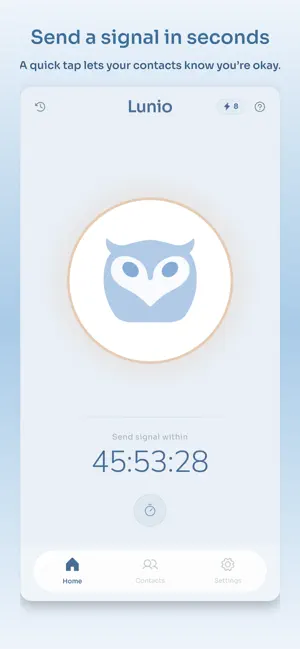
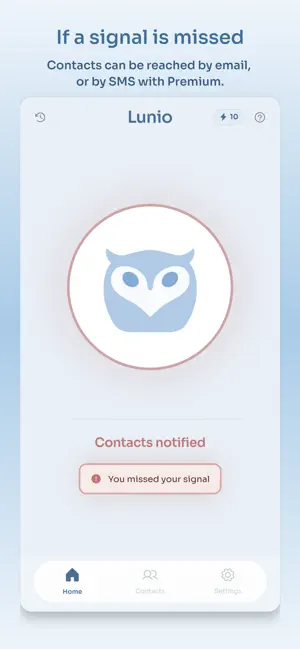
About Lunio — Daily Safety Check-In
Life keeps moving. Lunio keeps watch. Whether you live alone, travel solo, or work remotely — Lunio is your quiet daily safety net. Set your interval, tap once when you're fine. Miss it? Your trusted contacts are notified by email — or by SMS with a Premium plan. No panic button. No GPS. No location tracking. Just gentle, dependable reassurance — every day. HOW IT WORKS 1. Set your interval — daily, every 2 days, or every 3 days. 2. Check in — one tap when you're fine. 3. Miss it? Lunio notifies your contacts automatically. FEATURES - Customisable check-in interval (24h, 48h, 72h) - Trusted contacts notified by email if you miss a check-in - Timer — start a countdown for hikes, commutes or solo activities; contacts alerted if it expires - Home screen widget — see your status at a glance without opening the app - Push notification reminders before your check-in is due - Pause check-ins whenever you don't need them - Custom message sent to your contacts when they're notified - Full signal history - Offline support — signals sync when you're back online PREMIUM PLANS All plans include unlimited email alerts and up to 10 contacts. Pulse — 1 SMS contact, Timer, home screen widget Signal — 3 SMS contacts Beacon — 5 SMS contacts Subscriptions are managed in-app. Cancel anytime. PRIVATE BY DESIGN - EU-hosted servers - GDPR compliant - No location tracking - No data selling - Contacts must consent before they can be notified IMPORTANT Lunio is not an emergency service and cannot replace emergency responders. In an emergency, always call the relevant emergency number. Terms of Use: https://www.apple.com/legal/internet-services/itunes/dev/stdeula/
What’s new
Version 1.2.0 · Updated October 22, 2026
New in this version: • Your home screen now shows whether anyone would be alerted if you miss a signal, and lets you add someone or resend an invite right there. • Adding your first contact is quicker: just a name and an email, and the button stays visible while you type. • If you skip the contact step, Lunio tells you clearly that nobody will be alerted yet. • Small fixes and improvements.
App privacy
The developer, HomeSeed, reported these privacy practices to Apple.
Data Linked to You
The following data, which may be collected and linked to your identity, may be used for the following purposes:
- Purchases: Purchase History
- Contact Info: Email Address, Other User Contact Info
- Identifiers: User ID
Used for: Analytics, App Functionality
Alternatives to Lunio — Daily Safety Check-In
Looking for apps like Lunio — Daily Safety Check-In? Here are 6 similar apps on the App Store. The highest rated is Verixxa - Real Recommendations (5.0/5), and all 6 are free to download.
-
 Verixxa - Real Recommendations
5.0
Verixxa - Real Recommendations
5.0
-
 DayTap — Daily Check-In
-
 Just Checking In.
4.1
Just Checking In.
4.1
-
 Mapikids - Playgrounds
-
 Zuidwestwonen
5.0
Zuidwestwonen
5.0
-
 Groww by Willemse
| App | Rating | Price | Last updated | Compare |
|---|---|---|---|---|
| Lunio — Daily Safety Check-In | – | Free | October 22, 2026 | |
| Verixxa - Real Recommendations | 5.0 / 5 (9) | Free | Oct 8, 2026 | Compare |
| DayTap — Daily Check-In | – | Free | Mar 15, 2026 | Compare |
| Just Checking In. | 4.1 / 5 (87) | Free | Oct 10, 2026 | Compare |
| Mapikids - Playgrounds | – | Free | Sep 15, 2026 | Compare |
| Zuidwestwonen | 5.0 / 5 (6) | Free | Sep 9, 2026 | Compare |
| Groww by Willemse | – | Free | Oct 23, 2026 | Compare |