

Password Manager | Passkeys
GAMMA PASS LLC Productivity iPhoneiPadiPod touch
Password Manager | Passkeys is a free Productivity app for iPhone and iPad by GAMMA PASS LLC. Requires iOS 16.6. Updated September 28, 2026.
- Price
- Free
- on the App Store
- Size
- 146 MB
- Age 4+
- Updated
- Sep 28
- 2026 · v1.0.8
Screenshots

About Password Manager | Passkeys
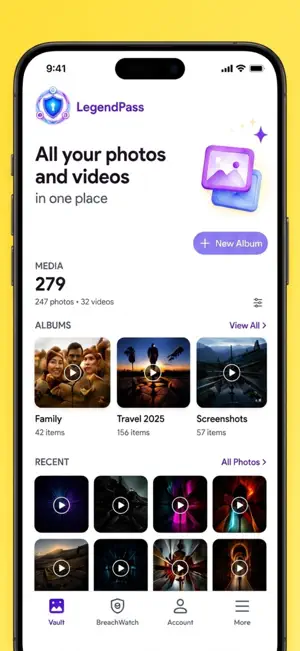
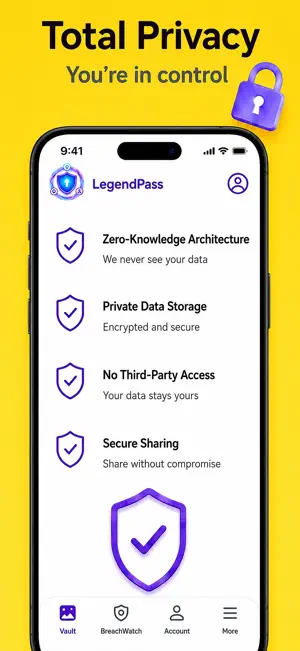
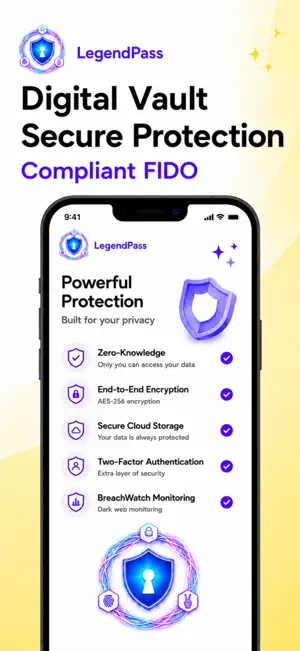
LegendPass offers the only quadratic biometrics & gesture blazing fast interactive login.Passkey and login manager built to protect your passwords and digital identity. Use autofill to fill passwords faster, manage autofill passwords across apps and websites, and keep password storage organized in one secure password vault. LegendPass combines password management, password storage, passkeys, autofill, secure notes, password generation, 2FA and biometric authentication in one encrypted vault. KEY FEATURES • PASSWORD MANAGER & PASSWORD VAULT Store passwords, usernames, login credentials, credit cards, bank accounts, Wi-Fi information and URLs in a secure password vault. LegendPass provides secure password storage for important accounts. • AUTOFILL PASSWORDS Use password autofill to fill usernames and passwords on websites, browsers and mobile apps. Save new passwords, update credentials and manage autofill passwords from your password manager. • PASSKEY & LOGIN MANAGER Store and manage passkeys with passwords and login credentials. Use LegendPass as a modern login manager for online accounts and simplify secure sign-in with passkey technology. • BIOMETRIC SECURITY Protect your password vault with face recognition, fingerprint, palmprint, hand geometry and custom gesture authentication. Use biometric authentication to access secure password storage. • PASSWORD GENERATOR Create strong, random passwords and replace weak or reused passwords. Save generated passwords directly to your password manager for convenient password storage. • PASSKEYS & 2FA Use passkey-based login and built-in TOTP codes for two-factor authentication. Keep passwords, passkeys and authentication codes together in your secure vault. • SECURE NOTES Store private notes, confidential information and important details in encrypted secure notes alongside passwords and login credentials. • ENCRYPTED PASSWORD STORAGE LegendPass uses AES-256-CBC encryption with HMAC-SHA256 integrity verification to protect stored information and password storage. • CLOUD SYNC Synchronize your encrypted password vault and secure notes across supported iOS devices. Keep your password manager available across devices. • BROWSER AUTOFILL Use Chrome, Firefox, Edge and Safari browser add-ons to import credentials, save passwords and autofill login forms. Autofill makes everyday logins faster. • GOOGLE & APPLE SIGN-IN Set up your LegendPass account using Google or Apple. • MEDIA & DOCUMENT VAULT Protect photos, videos and other files inside an encrypted vault. PRIVACY & SECURITY Your passwords and notes are encrypted before leaving your device. LegendPass does not sell, share or monetize your personal data. Biometric processing is designed to take place on your device. Biometric information is not uploaded to the cloud. Cloud synchronization transfers encrypted data rather than storing sensitive information as plaintext. LegendPass combines password management, password storage, passkeys, autofill, secure notes, password generation, 2FA and biometric authentication in one encrypted vault. KEY FEATURES • PASSWORD MANAGER & PASSWORD VAULT Store passwords, usernames, login credentials, credit cards, bank accounts, Wi-Fi information and URLs in a secure password vault. LegendPass provides secure password storage for important accounts. • AUTOFILL PASSWORDS Use password autofill to fill usernames and passwords on websites, browsers and mobile apps. Save new passwords, update credentials and manage autofill passwords from your password manager. • PASSKEY & LOGIN MANAGER Store and manage passkeys with passwords and login credentials. Use LegendPass as a modern login manager for online accounts and simplify secure sign-in with passkey technology. Terms of Use: https://www.apple.com/legal/internet-services/itunes/dev/stdeula Privacy Policy: https://legendpassword.com/privacy
What’s new
Version 1.0.8 · Updated September 28, 2026
Adding browsers - chrome,edge, to chrome add on store and firefox store of legendpass Add ons and gesture detection
App privacy
The developer, GAMMA PASS LLC, reported these privacy practices to Apple.
Data Linked to You
The following data, which may be collected and linked to your identity, may be used for the following purposes:
- Contact Info: Email Address, Name
Used for: App Functionality
Alternatives to Password Manager | Passkeys
Looking for apps like Password Manager | Passkeys? Here are 6 similar apps on the App Store.
-
 KumaTomo
-
 Look Straight - Face Control
-
 Pugach.Trade
-
 Facephi Fingerprint
-
 TruePomo: Pomodoro Focus Timer
-
 Blaze - Smart Attendance
| App | Rating | Price | Last updated | Compare |
|---|---|---|---|---|
| Password Manager | Passkeys | – | Free | September 28, 2026 | |
| KumaTomo | – | Free | Sep 13, 2026 | Compare |
| Look Straight - Face Control | – | Free | Dec 18, 2025 | Compare |
| Pugach.Trade | – | Free | Jun 2, 2026 | Compare |
| Facephi Fingerprint | – | Free | May 14, 2026 | Compare |
| TruePomo: Pomodoro Focus Timer | – | Free | Sep 18, 2026 | Compare |
| Blaze - Smart Attendance | – | Free | Jul 10, 2026 | Compare |