

Video Converter Pro - Compress
恒盛 程 Photo & Video iPhoneiPadiPod touch
Video Converter Pro - Compress is a paid Photo & Video app for iPhone and iPad by 恒盛 程. Requires iOS 14.0. Updated August 20, 2026.
- Price
- 0.39 USD
- on the App Store
- Size
- 72 MB
- Age 4+
- Updated
- Aug 20
- 2026 · v6.3.4
Screenshots

About Video Converter Pro - Compress
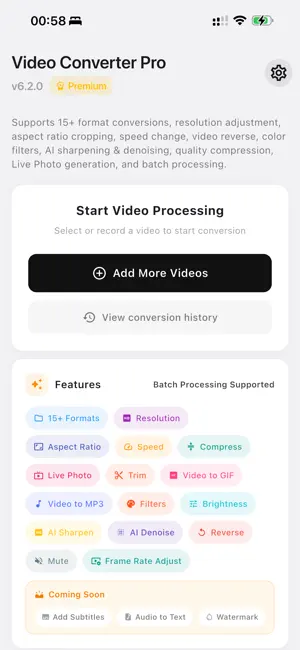
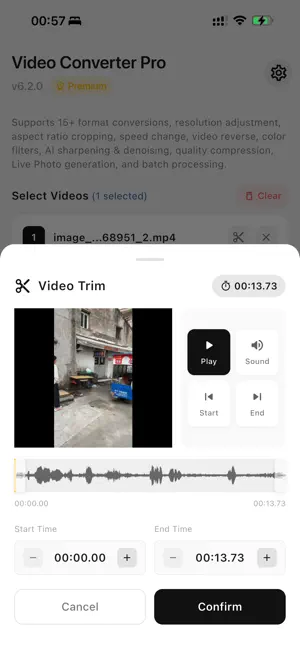
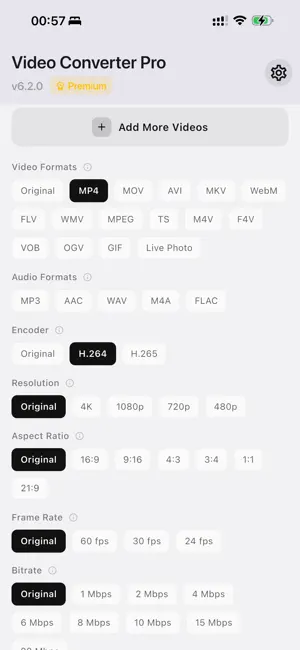
Video Converter Pro is a professional video processing tool that supports 15+ video format conversions, audio extraction, GIF creation, Live Photo making, and resolution/frame rate/bitrate adjustments. Featuring AI enhancement, color filters, and watermark tools - everything creators and everyday users need. Key Features: 【Format Conversion】 - 15+ Popular Formats: MP4, MOV, AVI, MKV, WebM, FLV, WMV, MPEG, TS, M4V, VOB, OGV and more - Audio Extraction: Extract MP3, AAC, WAV, M4A, FLAC high-quality audio from videos - GIF Creation: Turn video clips into animated GIFs - Live Photo Maker: Create dynamic wallpapers for iPhone 【Quality Adjustment】 - Resolution Control: 4K, 1080p, 720p, 480p options - Aspect Ratio: 16:9, 9:16, 4:3, 1:1, 21:9 and more - Smart Fill: Crop, pad, or blur fill modes 【Professional Editing】 - Speed Control: 0.25x ~ 4x playback speed - Reverse Video: Creative reverse playback effect - Frame Rate: 24/30/60 fps options - Bitrate Control: 1-20 Mbps precise file size control - Quality Compression: Smart compression with quality balance - Mute Audio: Remove audio with one tap 【AI Enhancement】 - AI Sharpening: Enhance video clarity - AI Denoising: Intelligently remove video noise - Color Filters: Vintage, B&W, Warm, Cool, Sepia and more - Brightness/Contrast/Saturation: Fine-tune video appearance 【Watermark Features】 - Text Watermark: Custom text, size, and transparency - Image Watermark: Add logo or signature from gallery - 9-Position Grid: Precise watermark placement - History Management: Save and reuse watermarks Why Choose Video Converter Pro: - All-in-One: Complete video toolkit in a single app - Easy to Use: Intuitive interface, one-tap operations - Fast & Reliable: Professional encoding engine for quick conversions - High Quality: 4K output support, preserve original quality - For Everyone: Perfect for creators, editors, and casual users Download Video Converter Pro today and start creating professional videos!
What’s new
Version 6.3.4 · Updated August 20, 2026
1. Improved app startup reliability 2. Improved video selection and conversion compatibility 3. General performance and stability improvements
App privacy
The developer, 恒盛 程, reported these privacy practices to Apple.
Data Not Collected
The developer does not collect any data from this app.
Alternatives to Video Converter Pro - Compress
Looking for apps like Video Converter Pro - Compress? Here are 6 similar apps on the App Store. The highest rated is GIFmaker: GIF Maker & Editor (5.0/5), and 4 of the 6 are free to download.
-
 TallyMonitorIOS
-
 VidiSlimi - ForeBony
-
 player-x - Video Tools
-
 Color Grading - Färg
-
 Meme Locker
-
 GIFmaker: GIF Maker & Editor
5.0
GIFmaker: GIF Maker & Editor
5.0
| App | Rating | Price | Last updated | Compare |
|---|---|---|---|---|
| Video Converter Pro - Compress | – | 0.39 USD | August 20, 2026 | |
| TallyMonitorIOS | – | Free | Sep 2, 2026 | Compare |
| VidiSlimi - ForeBony | – | Free | Jan 23, 2026 | Compare |
| player-x - Video Tools | – | 1.99 USD | Aug 22, 2026 | Compare |
| Color Grading - Färg | – | Free | Aug 31, 2026 | Compare |
| Meme Locker | – | Free | Jul 27, 2026 | Compare |
| GIFmaker: GIF Maker & Editor | 5.0 / 5 (1) | 0.99 USD | Oct 14, 2026 | Compare |