

MileTrack: Mileage & Tax Log
Kenneth Nygren Finance iPhoneiPadiPod touch
MileTrack: Mileage & Tax Log is a free Finance app for iPhone and iPad by Kenneth Nygren. Requires iOS 17.6. Updated October 5, 2026.
- Price
- Free
- on the App Store
- Size
- 5 MB
- Age 4+
- Updated
- Oct 5
- 2026 · v1.4.1
Screenshots
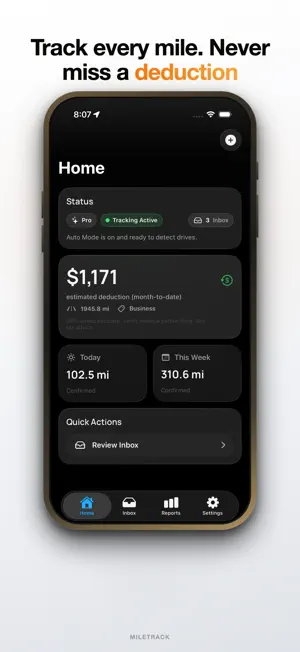
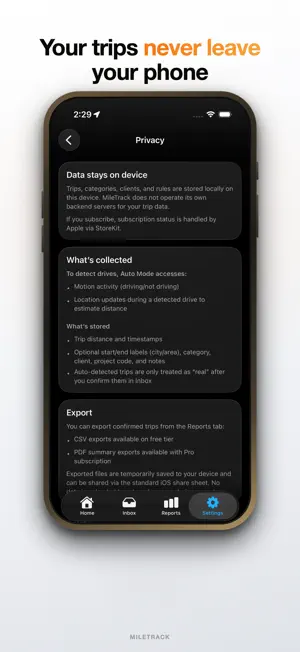

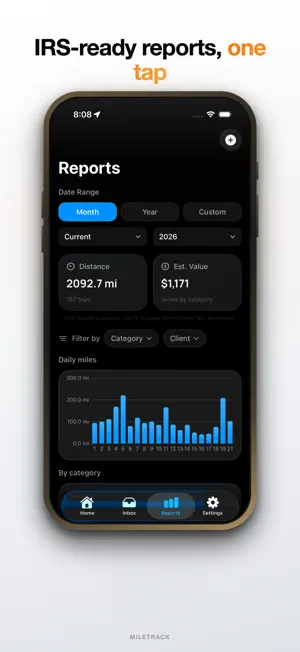
About MileTrack: Mileage & Tax Log
Automatic mileage tracking that respects your privacy — your trips never touch our servers. Zero data collected. IRS-ready reports whenever your accountant asks. Effortlessly track your business mileage and claim every deduction you've earned. MileTrack automatically detects when you're driving, logs your trips, and generates IRS-compliant reports – all without lifting a finger. WHY MILETRACK? Every business mile you drive is money back at tax time — but only if you can prove it. MileTrack builds that record in the background, so nothing is left on the table. KEY FEATURES Automatic Drive Detection • Background tracking detects trips automatically • Accurate mileage down to the tenth of a mile • Captures full trip routes with GPS precision Smart Trip Classification • Create custom categories (Business, Medical, Charity) • Set up rules for automatic categorization • Quick inbox review for unclassified trips • Add business purpose, client, and project codes Powerful Reporting & Export • Generate IRS-compliant mileage reports • Export to CSV for Excel and accounting software • PDF reports with professional formatting (Pro) • Filter by date range, category, client, or project • Include expense receipts in your reports Custom Categories & Rules • Create unlimited trip categories — no cap, free or Pro • Define rules based on locations, days, and times • Automatic trip classification saves time • Manage clients and vehicles Location Intelligence • Save frequent locations (Home, Office, etc.) • Auto-geocoding converts GPS to addresses, editable anytime • Waypoint tracking for multi-stop trips Data Backup & Sync • iCloud backup keeps your data safe — your iCloud, not ours • Restore trips across your devices • Export complete data backups • Never lose your mileage logs Widgets & Live Activities • Home screen widgets show trip stats • Live Activities and lock screen status during a trip • Quick glance at your mileage totals PERFECT FOR • Self-employed professionals • Freelancers and contractors • Real estate agents • Delivery drivers • Rideshare drivers • Anyone who drives for work MILETRACK PRO Every new install starts with 14 days of unlimited automatic trip detection. After that, the free plan includes 30 automatically detected trips each month — your usage is always visible in Settings before you reach the limit. Manual trips, the Inbox, reports, and CSV export stay free with no limits. Pro removes the monthly cap and adds the reporting tools you need when someone else reads your log: • Unlimited automatic trip detection • PDF export with professional formatting • Miles broken down by client, on screen and in your exports • Custom date ranges for any reporting period you need PRIVACY & SECURITY Your mileage data belongs to you. Trip logs are stored on your device, with optional backup to your own iCloud account. MileTrack runs no servers for your trip data. We never share or sell your location data — there is nothing for us to share. IRS COMPLIANCE MileTrack logs include the details the IRS asks for: • Date and time of travel • Starting and ending locations • Miles driven • Business purpose Remember that commuting between home and your regular workplace is not deductible. MileTrack keeps your categories separate so your business miles stand on their own. REQUIREMENTS • iOS 17.6 or later • Location permissions and background app refresh SUPPORT Questions? Contact us at [email protected] Visit plenitudo.ai for more information Important: MileTrack is for mileage logging and reporting purposes only. Consult a tax professional for advice on tax deductions and compliance. GPS-based mileage may vary slightly from odometer readings. MileTrack Pro is an auto-renewable subscription (monthly or annual). Terms of Use: https://www.apple.com/legal/internet-services/itunes/dev/stdeula/ Privacy Policy: https://www.plenitudo.ai/app/miletrack/privacy-policy
What’s new
Version 1.4.1 · Updated October 5, 2026
Choose how MileTrack looks. Settings › Units & Display now has a Theme option — System, Light, or Dark. Improved accuracy for trips that start from home.
App privacy
The developer, Kenneth Nygren, reported these privacy practices to Apple.
Data Not Collected
The developer does not collect any data from this app.
Alternatives to MileTrack: Mileage & Tax Log
Looking for apps like MileTrack: Mileage & Tax Log? Here are 6 similar apps on the App Store. The highest rated is TruMile: Mileage Tracker (5.0/5), and all 6 are free to download.
-
 MileX: Car Mileage Tax Tracker
-
 TruMile: Mileage Tracker
5.0
TruMile: Mileage Tracker
5.0
-
 Mileage Buddy-Track Miles&Pay
5.0
Mileage Buddy-Track Miles&Pay
5.0
-
 MileTrack: Mileage Log & Tax
5.0
MileTrack: Mileage Log & Tax
5.0
-
 Mileage Tracker by DriversLog
-
 DriveStack: Mileage Tracker
| App | Rating | Price | Last updated | Compare |
|---|---|---|---|---|
| MileTrack: Mileage & Tax Log | – | Free | October 5, 2026 | |
| MileX: Car Mileage Tax Tracker | – | Free | Sep 19, 2026 | Compare |
| TruMile: Mileage Tracker | 5.0 / 5 (2) | Free | Oct 15, 2026 | Compare |
| Mileage Buddy-Track Miles&Pay | 5.0 / 5 (1) | Free | May 29, 2026 | Compare |
| MileTrack: Mileage Log & Tax | 5.0 / 5 (2) | Free | Apr 25, 2026 | Compare |
| Mileage Tracker by DriversLog | – | Free | Aug 25, 2026 | Compare |
| DriveStack: Mileage Tracker | – | Free | Oct 12, 2026 | Compare |