

Phosphor Emulator
SquatchCraft LLC Games iPhoneiPadiPod touchMacApple Watch
Phosphor Emulator is a free Games app for iPhone and iPad by SquatchCraft LLC. Rated 4.6/5 from 33 ratings. Requires iOS 17.0. Updated October 14, 2026.
- Rating
- 4.6
- 33 ratings
- Price
- Free
- on the App Store
- Size
- 84 MB
- Age 4+
- Updated
- Oct 14
- 2026 · v5.3
Screenshots

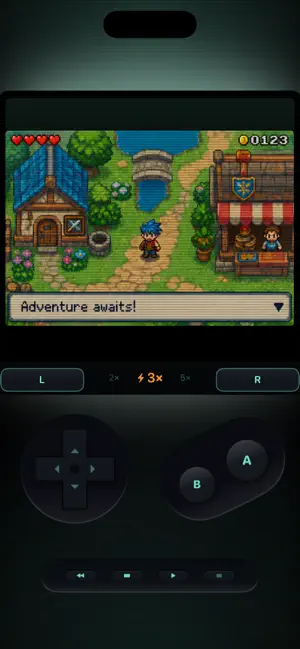
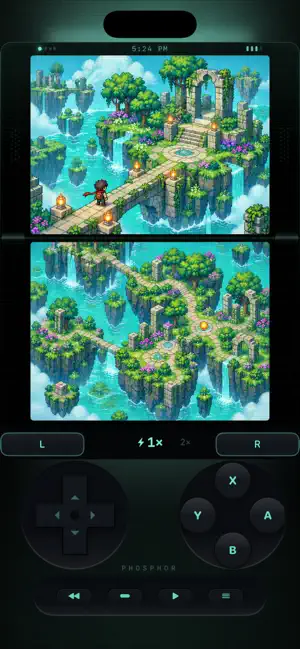
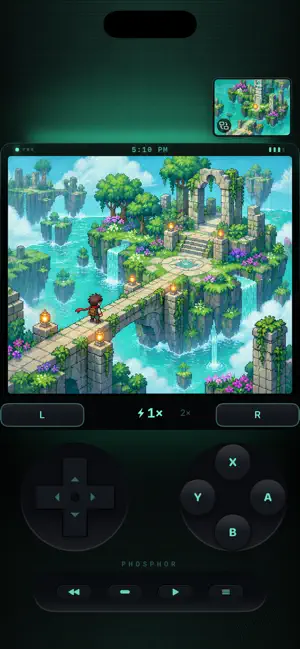
About Phosphor Emulator
Phosphor is a free retro game emulator for iPhone, iPad, Mac, and Apple Watch. Play Game Boy, Game Boy Color, and Game Boy Advance games, plus Nintendo DS games on iPhone and iPad, with save states, fast-forward, rewind, iCloud save sync, controller support, and community mods. No ads. No subscriptions. No accounts. No tracking. Import your own compatible ROM files through Files, iCloud Drive, or AirDrop. Organize your library, pick your controls, and take your favorite handheld games anywhere. WHY PHOSPHOR? Phosphor is designed to feel like a handheld console. Deep black screen wells, glowing CRT effects, responsive controls, and color themes bring classic games to modern Apple hardware. Play in portrait or landscape, adjust your speed with a scrolling dial, and return quickly to your last session. NINTENDO DS ON IPHONE AND IPAD Import compatible .nds files and choose single-screen or dual-screen play. Start with a focused single-screen layout, switch to both screens from the menu, and swap screens when you need to. Touch-screen input, microphone controls, and portrait and landscape layouts keep DS play flexible. MODS POWERED BY GEN1RECOMP Supported games can use the integrated gen1recomp engine to run compatible community mods inside Phosphor. Keep your library, controls, and display framing while exploring new ways to play. The updated engine brings gameplay and compatibility fixes. Features vary by game, engine, and mod. Rewind and cheat codes are available with Phosphor’s standard emulator core, not during gen1recomp play. FEATURES Classic handheld games Play compatible .gb, .gbc, and .gba ROMs, with .nds support on iPhone and iPad. Import individual games or supported ZIP archives and search your library. Link Cable trading Connect supported games over the same Wi-Fi network. Gen 3 Pokémon Link Cable support covers Ruby, Sapphire, Emerald, FireRed, and LeafGreen. Compatible games, in-game progress, and normal trading restrictions apply. Fast-forward up to 15× Choose 1×, 2×, 3×, 5×, 10×, or 15× where supported to move through battles, travel, and repeated sections. Available speeds depend on the game, core, and device. Live rewind Hold rewind to return to an earlier moment and try again with the standard emulator core. Save states and quick resume Create quick saves and save-state slots, then return to your session with quick resume where supported. iCloud saves Sync compatible in-game saves, quick saves, and save-state slots across devices using the same Apple ID. Check for saved progress in Settings and choose which copy to keep when saves conflict. Game files are not backed up; after reinstalling, reimport them with their original filenames to reconnect your saves. CRT display and themes Customize your screen with scanlines, phosphor glow, dot-grid texture, vignette, contrast, and color themes. External controllers Play with compatible controllers or use responsive touch controls, haptics, and layouts designed for portrait and landscape. Cheat codes Use supported cheat formats with compatible games on Phosphor’s standard emulator core. Apple Watch play Take supported games to your wrist. Platform and feature availability vary by device; Nintendo DS play is available on iPhone and iPad. Live Activities See your current game, play time, and quick-resume status from the Lock Screen. BRING YOUR OWN GAMES Phosphor does not include games or ROMs. Provide your own legally obtained, compatible game files. Community mods have their own authors, licenses, and compatibility requirements. Save states and other features may vary between emulator cores, engine versions, and devices. A classic handheld feel. Modern Apple features. Your games, your library, your way to play.
Ratings & reviews
4.6
33 ratings
What’s new
Version 5.3 · Updated October 14, 2026
Bug fixes
App privacy
The developer, SquatchCraft LLC, reported these privacy practices to Apple.
Data Not Collected
The developer does not collect any data from this app.
Alternatives to Phosphor Emulator
Looking for apps like Phosphor Emulator? Here are 6 similar apps on the App Store. The highest rated is GlassROM (5.0/5), and 5 of the 6 are free to download.
-
 SUMEE!
4.8
SUMEE!
4.8
-
 GlassROM
5.0
GlassROM
5.0
-
 Pocket8
4.5
Pocket8
4.5
-
 Dream Emulator
5.0
Dream Emulator
5.0
-
 Revo PS1 Emulator
3.8
Revo PS1 Emulator
3.8
-
 Retro Emulator: 4 Buttons
5.0
Retro Emulator: 4 Buttons
5.0
| App | Rating | Price | Last updated | Compare |
|---|---|---|---|---|
| Phosphor Emulator | 4.6 / 5 (33 ratings) | Free | October 14, 2026 | |
| SUMEE! | 4.8 / 5 (160) | 1.99 USD | Sep 23, 2026 | Compare |
| GlassROM | 5.0 / 5 (7) | Free | Aug 4, 2026 | Compare |
| Pocket8 | 4.5 / 5 (37) | Free | Apr 20, 2026 | Compare |
| Dream Emulator | 5.0 / 5 (3) | Free | Mar 23, 2026 | Compare |
| Revo PS1 Emulator | 3.8 / 5 (4) | Free | Sep 30, 2026 | Compare |
| Retro Emulator: 4 Buttons | 5.0 / 5 (1) | Free | Oct 15, 2026 | Compare |
Compare Phosphor Emulator with the top alternatives: ratings, updates, ASO score and keyword gaps →