

Learn to Play Cards
Joseph Lint Education iPhoneiPadiPod touch
Learn to Play Cards is a free Education app for iPhone and iPad by Joseph Lint. Rated 5.0/5 from 1 ratings. Requires iOS 17.0. Updated October 23, 2026.
- Rating
- 5.0
- 1 ratings
- Price
- Free
- on the App Store
- Size
- 22 MB
- Age 4+
- Updated
- Oct 23
- 2026 · v1.6
Screenshots


About Learn to Play Cards
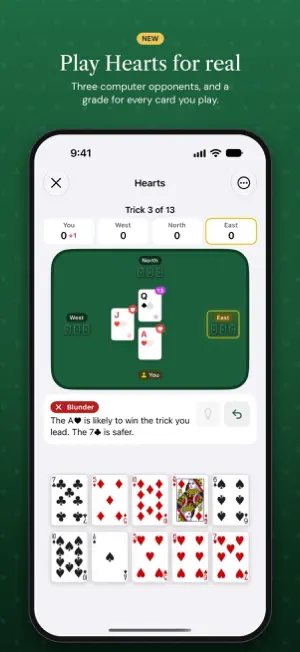
Learn to play 21 popular card games with step-by-step lessons, interactive quizzes, visual card table demonstrations — and hands-on Skill Drills that train you on real tables. New to cards? Start with a two-minute illustrated introduction: suits, ranks, how trump works, and a short history of playing cards told with real museum pieces, from China to the Joker. Whether you're a complete beginner or brushing up before game night, Learn Cards breaks down each game into bite-sized lessons that teach you the rules, strategy, and terminology you need to play with confidence. Then Practice drills turn that knowledge into instinct. GAMES INCLUDED - Casino Classics: Texas Hold'em Poker, Blackjack, Seven-Card Stud - Trick-Taking: Hearts, Spades, Euchre, Bridge, Pinochle - Rummy & Melding: Gin Rummy, Canasta, Cribbage - Solitaire: Klondike, Pyramid - Family Favorites: Go Fish, Old Maid, War, Crazy Eights, Spoons, Spit, Kings in the Corner, Bullshit SKILL DRILLS — PRACTICE ON REAL TABLES No lessons required — jump straight in: - Blackjack Basic Strategy: random hands, you make the call — hit, stand, double, split, or surrender — with instant coaching on every decision - Cribbage Count Your Hand: score the show yourself, then see the full breakdown of fifteens, pairs, runs, flush, and nobs - Follow the Rules (Hearts, Spades & Euchre): tap a legal card as tricky situations come at you — must-follow-suit, broken hearts and spades, and Euchre's infamous left bower - Texas Hold'em Who Wins?: read a showdown and call it — you, your opponent, or a split pot — then see both best hands and why Master a skill category and it earns you CardIQ — drills reward real skill, not grinding. PLAY HEARTS AGAINST THE COMPUTER Play whole games against three computer opponents at Beginner, Standard or Expert. Every card you play gets a grade with a one-line reason, and the coach can give hints and let you undo. FEATURES - A beginner's introduction to the deck, with real historical cards from museum collections - A short animated intro for every game - 130 structured lessons across 21 card games - 6 skill drills with endless generated situations and instant animated feedback - Interactive quizzes after every lesson to test your knowledge - Visual card table demonstrations showing real game scenarios - Progress syncs across your devices with iCloud — no account needed, and a new phone or reinstall won't lose your progress - Built-in glossary with game-specific terminology - CardIQ ranking system that tracks your progress across all games - Earn certificates of completion for each game you master - Share your certificates as polished PDF documents - Game Center leaderboards and 25 achievements - Progress tracking with XP and skill ranks from Novice to Grandmaster - Designed for iPhone and iPad, with VoiceOver, Dynamic Type, and Reduce Motion support HOW IT WORKS 1. Pick a card game 2. Work through lessons at your own pace 3. Take quizzes to lock in what you learned 4. Sharpen your instincts with Practice drills 5. Earn your certificate when you complete all lessons with 80%+ score 6. Climb the CardIQ leaderboard Learn Cards is the perfect companion for game nights, family gatherings, or anyone who wants to finally understand how Bridge bidding works.
What’s new
Version 1.6 · Updated October 23, 2026
Play Hearts against the computer, and meet every game before you learn it. Play Hearts • Play whole games against three computer players: Beginner, Standard or Expert • Every card you play gets a grade, from Best to Blunder, with a one-line reason • Turn the coach on for hints, undo and playable cards lit up, or off for a clean table • At the end of each game, see your accuracy and the moments that cost you most • Free for everyone, and your game saves after every move New to a game? Watch its intro • All 21 games now have a short animated intro: who plays, the deal, a turn and how you win, with a card to tap along the way • Find it at the top of each game's lessons, or replay it from the game screen Fixes • On iOS 27, VoiceOver can reach every game on the home screen • Clearer contrast on the home screen and lesson list • Fixed a Hearts quiz answer about the Queen of Spades on the first trick • The Dictionary's game tags show the game name again Good luck at the table!
App privacy
The developer, Joseph Lint, reported these privacy practices to Apple.
Data Used to Track You
The following data may be used to track you across apps and websites owned by other companies:
- Identifiers: Device ID
Alternatives to Learn to Play Cards
Looking for apps like Learn to Play Cards? Here are 6 similar apps on the App Store. The highest rated is Pilot Planner (5.0/5), and all 6 are free to download.
-
 ML_Engineering
-
 Abacus - Calc
-
 Studysoft: The Self-Study App
-
 Field Guide: Micro Lessons
-
 Jemko Game Rules
-
 Pilot Planner
5.0
Pilot Planner
5.0
| App | Rating | Price | Last updated | Compare |
|---|---|---|---|---|
| Learn to Play Cards | 5.0 / 5 (1 rating) | Free | October 23, 2026 | |
| ML_Engineering | – | Free | Aug 22, 2026 | Compare |
| Abacus - Calc | – | Free | May 7, 2025 | Compare |
| Studysoft: The Self-Study App | – | Free | Jun 3, 2026 | Compare |
| Field Guide: Micro Lessons | – | Free | Aug 26, 2026 | Compare |
| Jemko Game Rules | – | Free | Jan 2, 2025 | Compare |
| Pilot Planner | 5.0 / 5 (1) | Free | Aug 31, 2026 | Compare |