

Ultimate Focus: App Blocker
ZEN LABO LTD Health & Fitness iPhoneiPadiPod touch
Ultimate Focus: App Blocker is a free Health & Fitness app for iPhone and iPad by ZEN LABO LTD. Rated 2.0/5 from 1 ratings. Requires iOS 16.0.
- Rating
- 2.0
- 1 ratings
- Price
- Free
- on the App Store
- Size
- 35 MB
- Age 4+
- Updated
- Sep 9
- 2026 · v1.2.4
Screenshots
About Ultimate Focus: App Blocker
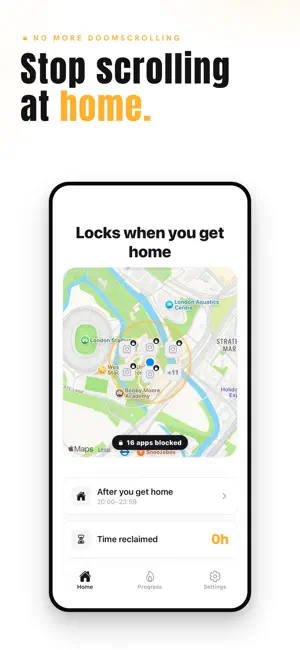
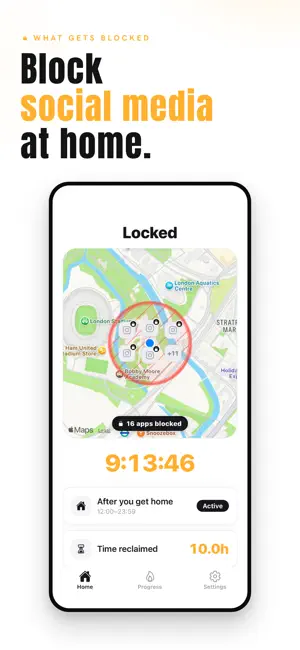
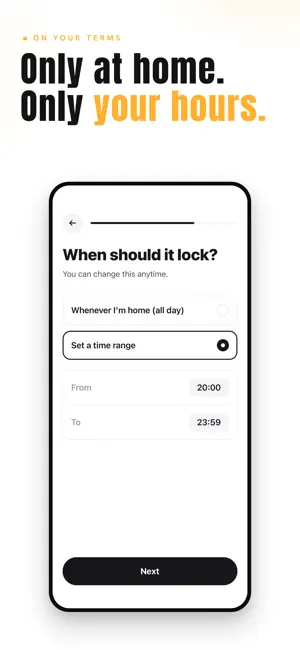
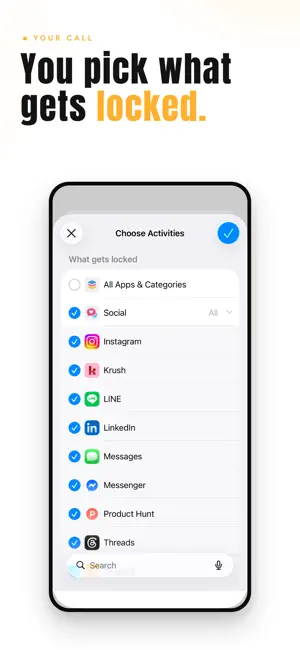
You got home, dropped onto the couch, and opened your feed "just for a second." Forty minutes later you're still scrolling. Again. That's not a discipline problem. That's what your phone is designed to do. NoScrollHome is a different kind of app. With NoScrollHome Pro, at a place and time you choose — like home, in the evening — it locks the apps that pull you in: social media, video, mail, browsers, games. They stay locked while you're there, so the moment you walk in the door, the pull is gone. App blocking and the full feature set described below require a NoScrollHome Pro subscription. A 7-day free trial is available with the Yearly plan. Without NoScrollHome Pro, you can explore the onboarding, but app blocking is disabled. When you leave home, or the time window ends, the lock lifts. Your phone is yours again, until the next time you come home. It's not about willpower. Blockers ask you to resist a button that's always one tap away. NoScrollHome makes the button disappear where and when it matters most — automatically, even if the app is force-quit — so there's nothing left to resist. How it works 1. Pick the apps that pull you in. 2. Set your home and the hours you want them gone. 3. Arrive home during that window, and they lock themselves. 4. See your home zone on a map, how many apps are blocked, and the nights you stayed off. Everything runs on your device. Your location and your app choices never leave your phone. How a day might look with NoScrollHome Pro 6:30 PM. You get home. Social apps lock on their own — no button to press, no settings to toggle. Dinner without a screen in your hand. 9:00 PM. Still locked. The evening is yours: read, talk, rest. If you genuinely need out, one emergency unlock is there — but you'll think twice. 7:00 AM. You leave for the day. The lock lifts on its own. Your phone is fully yours again, until tonight. A note on what we don't do No social feed. No friends leaderboard. No notifications begging you to come back. Nothing about NoScrollHome tries to keep you on your phone — the whole point is the opposite. Subscription details NoScrollHome Pro is required to use app blocking and the full feature set. A 7-day free trial is available with the Yearly plan. After the trial, the Yearly plan is billed annually at the price shown on the subscription screen. The Monthly plan is billed each month at the displayed monthly price. The Lifetime option is a one-time payment with no recurring charges. Your Yearly subscription renews automatically at the end of each 12-month period unless you cancel at least 24 hours before the trial or current period ends. Canceling stops future renewals; you keep access through the end of the period you've paid for. Subscriptions are managed in your App Store account. Deleting the app does not cancel your subscription. Terms of Use (EULA): https://zen-first.com/terms Privacy Policy: https://zen-first.com/privacy
What’s new
Version 1.2.4 · Updated September 9, 2026
Small refinements and stability improvements.
App privacy
The developer, ZEN LABO LTD, reported these privacy practices to Apple.
Data Linked to You
The following data, which may be collected and linked to your identity, may be used for the following purposes:
- Purchases: Purchase History
- User Content: Other User Content
Used for: App Functionality
Data Not Linked to You
The following data, which may be collected but is not linked to your identity, may be used for the following purposes:
- Purchases: Purchase History
- User Content: Other User Content
- Identifiers: Device ID
- Usage Data: Product Interaction
- Other Data: Other Data Types
Used for: Analytics
Alternatives to Ultimate Focus: App Blocker
Looking for apps like Ultimate Focus: App Blocker? Here are 6 similar apps on the App Store. The highest rated is Reboot: Quit Porn & Recover (5.0/5), and all 6 are free to download.
-
 拾光 - 你的专属戒色助手
-
 Reboot: Quit Porn & Recover
5.0
Reboot: Quit Porn & Recover
5.0
-
 Block It! - Block Apps & Focus
-
 Unplug: Digital Detox
-
 ZenLock – App Blocking App
-
 SleepShield: Sleep Screen Time
| App | Rating | Price | Last updated | Compare |
|---|---|---|---|---|
| Ultimate Focus: App Blocker | 2.0 / 5 (1 rating) | Free | September 9, 2026 | |
| 拾光 - 你的专属戒色助手 | – | Free | Feb 5, 2026 | Compare |
| Reboot: Quit Porn & Recover | 5.0 / 5 (1) | Free | May 21, 2026 | Compare |
| Block It! - Block Apps & Focus | – | Free | Oct 6, 2026 | Compare |
| Unplug: Digital Detox | – | Free | Jun 12, 2026 | Compare |
| ZenLock – App Blocking App | – | Free | Sep 23, 2025 | Compare |
| SleepShield: Sleep Screen Time | – | Free | Nov 26, 2025 | Compare |