

Form Up
Patrick James Breen Business iPhoneiPadiPod touch
Form Up is a free Business app for iPhone and iPad by Patrick James Breen. Rated 5.0/5 from 3 ratings. Requires iOS 15.1. Updated October 22, 2026.
- Rating
- 5.0
- 3 ratings
- Price
- Free
- on the App Store
- Size
- 48 MB
- Age 4+
- Updated
- Oct 22
- 2026 · v1.9.8
Screenshots


About Form Up
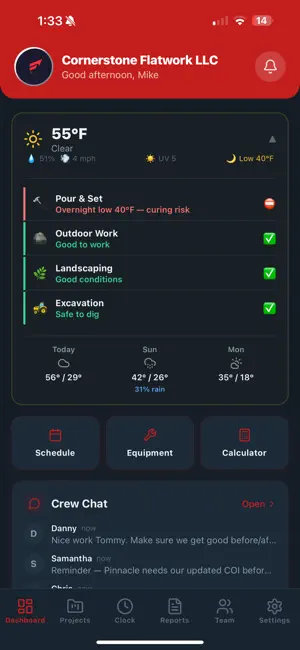
FormUp is the all-in-one app for construction and trade companies. Run your crew, projects, schedule, estimates and money from one place, so you can stop juggling a clipboard, spreadsheets, group texts and half a dozen apps that don't talk to each other. Built by a third-generation contractor who got tired of paying for five apps and none of them working together. WIN THE JOB Build a magazine-quality estimate on site, with photos, options and good, better, best packages. Send it as a link instead of just a PDF. Your client opens it on their phone, picks their options, watches the price update, signs, and pays the deposit. Let clients choose patterns, colors and finishes from your own catalog, priced to the square foot. Turn a signed estimate into a live project in one tap. A sales pipeline from new lead to won, with every call, text and email on one timeline. RUN THE JOB GPS-verified clock in and out, so you know who was on site and which job their hours belong to. Weekly crew schedule with copy-a-week templates, time off, open shifts and shift swaps. Assign a task to a day, not just to a job. Photos and video organized into albums, with a burst camera built for work gloves. Daily field reports, punch lists and assignable task checklists. Full PDF plan sets, with AI takeoff, RFIs, submittals and revision comparison. Scan paper documents into clean multi-page PDFs with your phone. GET PAID Set a payment schedule and deposit for every job, and track paid against owed. Invoices, receipts and branded job close-out reports as PDFs. Card on file and automatic charging through Square. QuickBooks sync for invoices, payments and expenses. Watch real profit per job as materials, clocked labor and sub costs roll in. Know your cost of doing business, your overhead, and the rate you actually need to charge. YOUR CLIENTS Every client gets a portal with their estimate, project progress, photos and invoices. Message clients inside the app instead of losing it in a text thread. Automatic review requests once the job is done. CREW AND SUBS Role-based access for owner, admin, manager, office, estimator, foreman, worker and sub. Subs see the job, schedule, tasks, photos and chat they need, and never see your numbers. Share one job with an outside contractor through a link. Track sub payments and year-end 1099 totals. Messages and reports auto-translate, so English and Spanish speaking crews stay together. AI THAT DOES REAL WORK Snap jobsite photos and get an estimate back with line items and pricing. Turn a plan set into a phased job with tasks and crew assignments. Turn rough notes into a clean daily report. Ask about your own jobs, hours and money, and get a real answer from your real data. FRONT DESK, OPTIONAL ADD-ON An AI receptionist answers your phone when you are on a ladder. It books estimate visits, takes messages, and texts you the lead before you climb down. ALSO INSIDE Recurring maintenance: properties, service plans, routes and visit billing. Material load lists and calculators for concrete, decking, fencing, framing and roofing. Equipment tracking, a document vault with expiring-document alerts, and e-signatures. Easy Mode, a stripped-down five-tab version for crews who only need today's work. Dark mode, custom accent colors, and full English, Spanish and Portuguese. Works across concrete, masonry, decks, landscaping, roofing, plumbing, electrical and every trade. FormUp. Win the job. Run the job. Get paid. A subscription is required after your free trial. Front Desk is a separate add-on. Terms of Use (EULA): https://www.apple.com/legal/internet-services/itunes/dev/stdeula/ Privacy Policy: https://useformup.com/privacy
What’s new
Version 1.9.8 · Updated October 22, 2026
Profit and Loss: the dashboard widget now counts each job’s estimated costs, not just logged receipts. It shows Income, Estimated job costs and Logged receipts. Estimate PDF: rebuilt so pages break cleanly, with no overlapping bands or stranded headings. The look is unchanged, and your logo prints top left on estimates and invoices. Invoices: one Send sheet (Email, Text, Both, or QuickBooks), with a New invoice button, sequential numbers and status chips. Receipts: Scan receipt reads the receipt with AI, and rows open an edit sheet. Plus button: a new button in the center of the tab bar for Estimate, Invoice, Receipt, Project, Client, Task, Photo, Time entry and Schedule. AI fixes: AI actions that were failing silently work again (receipt scan, photo captions, daily report, job plan, invoice descriptions, client messages, learning articles). Documents and camera: documents open inside the app, and the camera has a 0.5x lens.
App privacy
The developer, Patrick James Breen, reported these privacy practices to Apple.
Data Linked to You
The following data, which may be collected and linked to your identity, may be used for the following purposes:
- Financial Info: Payment Info
- Location: Precise Location
- Contact Info: Email Address, Name, Phone Number
- User Content: Photos or Videos, Customer Support
- Identifiers: User ID
Used for: App Functionality
Alternatives to Form Up
Looking for apps like Form Up? Here are 6 similar apps on the App Store. The highest rated is Foreman: Construction PM (5.0/5), and all 6 are free to download.
-
 Foreman: Construction PM
5.0
Foreman: Construction PM
5.0
-
 OneForeman
5.0
OneForeman
5.0
-
 BookAPlumber Plumber
-
 Gravitas Studio Pro
-
 Qbitt - Instant Appointments
5.0
Qbitt - Instant Appointments
5.0
-
 Varto OS - Small Business OS
5.0
Varto OS - Small Business OS
5.0
| App | Rating | Price | Last updated | Compare |
|---|---|---|---|---|
| Form Up | 5.0 / 5 (3 ratings) | Free | October 22, 2026 | |
| Foreman: Construction PM | 5.0 / 5 (2) | Free | Aug 23, 2026 | Compare |
| OneForeman | 5.0 / 5 (1) | Free | Oct 2, 2026 | Compare |
| BookAPlumber Plumber | – | Free | Sep 12, 2026 | Compare |
| Gravitas Studio Pro | – | Free | Jul 24, 2026 | Compare |
| Qbitt - Instant Appointments | 5.0 / 5 (10) | Free | Nov 20, 2024 | Compare |
| Varto OS - Small Business OS | 5.0 / 5 (6) | Free | Jul 9, 2026 | Compare |
Compare Form Up with the top alternatives: ratings, updates, ASO score and keyword gaps →