

Quivlo
Ronit Amar Bhatia Education iPhoneiPadiPod touch
Quivlo is a free Education app for iPhone and iPad by Ronit Amar Bhatia. Requires iOS 17.0. Updated March 29, 2026.
- Price
- Free
- on the App Store
- Size
- 991 MB
- Age 4+
- Updated
- Mar 29
- 2026 · v2.0
Screenshots

About Quivlo
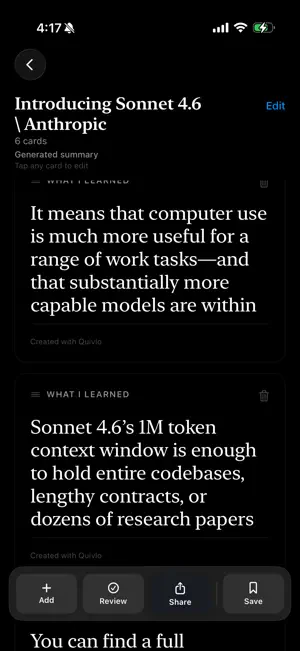
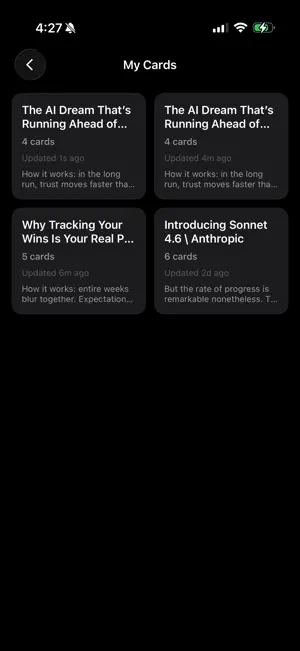
Quivlo helps you turn information overload into clear, memorable flashcards. Paste text, add an article link, or import a screenshot, and Quivlo uses on-device AI to identify the most valuable ideas, rewrite them into clear flashcards, and organize them into a format you can review, edit, and share. The result is a faster, more private, and more seamless way to turn reading into usable knowledge. Whether you’re learning from articles, research notes, newsletters, study material, or saved screenshots, Quivlo helps you capture what matters and retain it. What you can do with Quivlo: 1. Create cards from pasted text Paste raw notes, copied highlights, or long-form content and generate structured flashcards quickly. 2. Extract text from article links Paste a URL and Quivlo pulls readable article text so you can generate cards without manual cleanup. 3. Import screenshots with OCR Capture text from screenshots and convert it into editable study cards. 4. Generate with on-device AI Quivlo uses on-device AI to analyze source material, surface high-value ideas, and rewrite them into more useful flashcards for learning and recall. 5. Edit every card your way Refine wording, reorder cards, delete weaker cards, and add new ones to shape the final set the way you want. 6. Review and polish before sharing Use review mode to tighten your message and prepare a clean final card set. 7. Share ready-to-post card images Export cards as crisp PNG images for LinkedIn-style carousels or share through Messages, AirDrop, Files, and more. 8. Save your best sets Store card sets in My Cards, reopen them anytime, rename, update, and reuse them later. Why Quivlo: 1. On-device AI for a more private and responsive experience 2. Fast capture from multiple inputs including text, links, and screenshots 3. Clear, readable flashcards designed for learning, retention, and communication 4. Full editing control before review or sharing 5. No account required for the core experience Use Quivlo to study smarter, summarize faster, and turn reading into reusable knowledge.
What’s new
Version 2.0 · Updated March 29, 2026
Quivlo is now faster, smarter, and more reliable. This release introduces on-device AI-powered flashcard generation, allowing Quivlo to process text directly on your device for a more seamless, responsive, and private experience. We also improved how Quivlo identifies and rewrites the most valuable ideas from longer text and article inputs, helping generate flashcards that feel clearer, more relevant, and more useful for learning and recall. Alongside these AI upgrades, this update enhances progress visibility during creation and delivers a more polished end-to-end experience.
App privacy
The developer, Ronit Amar Bhatia, reported these privacy practices to Apple.
Data Not Collected
The developer does not collect any data from this app.
Alternatives to Quivlo
Looking for apps like Quivlo? Here are 6 similar apps on the App Store. The highest rated is JCSC Mobile (5.0/5), and all 6 are free to download.
-
 Campus Credentials
-
 Dryden Central Schools NY
-
 JCSC Mobile
5.0
JCSC Mobile
5.0
-
 Collegepond Study Abroad
-
 SnapLearn: AI Study Flashcard
-
 Osho Talks - Audio Discourses
5.0
Osho Talks - Audio Discourses
5.0
| App | Rating | Price | Last updated | Compare |
|---|---|---|---|---|
| Quivlo | – | Free | March 29, 2026 | |
| Campus Credentials | – | Free | Dec 30, 2025 | Compare |
| Dryden Central Schools NY | – | Free | Oct 23, 2026 | Compare |
| JCSC Mobile | 5.0 / 5 (8) | Free | Sep 16, 2026 | Compare |
| Collegepond Study Abroad | – | Free | Nov 5, 2025 | Compare |
| SnapLearn: AI Study Flashcard | – | Free | Jul 20, 2026 | Compare |
| Osho Talks - Audio Discourses | 5.0 / 5 (8) | Free | Oct 19, 2026 | Compare |
Compare Quivlo with the top alternatives: ratings, updates, ASO score and keyword gaps →