

Sift : Pour. Sift. Learn.
Sunghwan Shin Productivity iPhoneiPadiPod touch
Sift : Pour. Sift. Learn. is a free Productivity app for iPhone and iPad by Sunghwan Shin. Requires iOS 15.1. Updated April 8, 2026.
- Price
- Free
- on the App Store
- Size
- 33 MB
- Age 17+
- Updated
- Apr 8
- 2026 · vSift 1.0
Screenshots


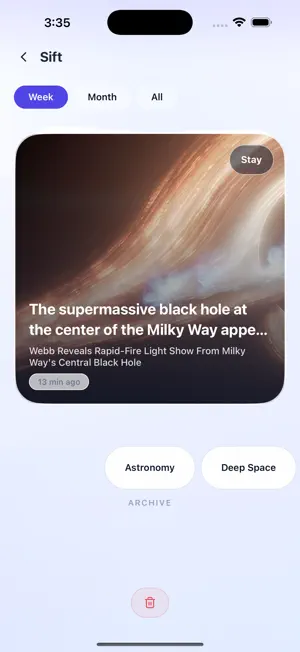
About Sift : Pour. Sift. Learn.
Sift is your read-later app for links you want to come back to. Save anything from any app in one tap — no switching, no friction. HOW IT WORKS 1. Save — Hit the share button in any app and Sift captures the link instantly. A subtle toast confirms it's saved. No app switch required. 2. Browse — Your saved links appear as rich preview cards on the home screen. See the title, excerpt, and image at a glance. 3. Sift — Work through your backlog one card at a time. Archive the keepers, delete the rest, or leave it for later. 4. Archive — Everything you've archived, organized by tag. Filter by tag and open links in the built-in browser. KEY FEATURES • Instant save — Share Sheet integration with no app switching • Rich previews — Bento-style cards with title, excerpt, and image • Tags — Label links and filter your archive with one tap • Sift mode — Period filter (Today / This Week / All) to clear your backlog fast • In-app browser — Read without ever leaving the app • Fully offline — Local-only SQLite, no server, no account • X (Twitter) & Threads — Full post text and images extracted automatically Your data lives on your device. No account. No cloud. No tracking.
App privacy
The developer, Sunghwan Shin, reported these privacy practices to Apple.
Data Used to Track You
The following data may be used to track you across apps and websites owned by other companies:
- Identifiers: Device ID
- Usage Data: Product Interaction, Advertising Data
Data Not Linked to You
The following data, which may be collected but is not linked to your identity, may be used for the following purposes:
- Identifiers: Device ID
- Usage Data: Product Interaction, Advertising Data
- Diagnostics: Crash Data
Used for: Third-Party Advertising, Analytics, App Functionality