

Export Reminders to CSV & JSON
OpsOh LLC Utilities iPhoneiPadiPod touch
Export Reminders to CSV & JSON is a paid Utilities app for iPhone and iPad by OpsOh LLC. Rated 3.0/5 from 1 ratings. Requires iOS 17.6.
- Rating
- 3.0
- 1 ratings
- Price
- 1.99 USD
- on the App Store
- Size
- 3 MB
- Age 4+
- Updated
- Oct 23
- 2026 · v2.0
Screenshots


About Export Reminders to CSV & JSON
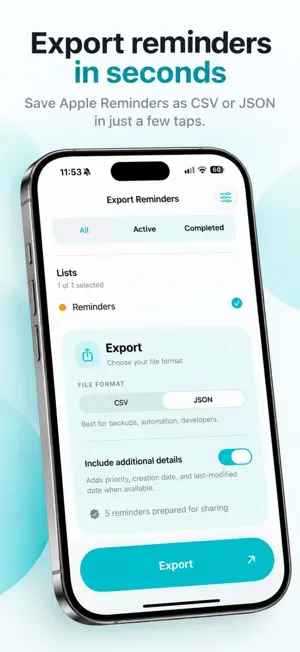
Export your Apple Reminders to CSV or JSON in seconds. Back up your tasks, organize your lists, and turn your reminders into useful files — all with a beautifully redesigned, easy-to-use interface. Whether you're creating a personal backup, working with spreadsheets, or preparing reminder data for another workflow, Export Reminders makes it simple. EXPORT YOUR WAY • Export all reminders or choose specific lists. • Filter by status: All, Active, or Completed. • Export reminders within a custom date range. • Save as CSV for Excel, Numbers, and Google Sheets. • Save as JSON for developers and automation workflows. • Share files using AirDrop, Files, email, or other available sharing options. MORE DETAILS WHEN YOU NEED THEM Choose to include additional information in your exports: • Reminder priority • Creation date • Last-modified date Your exports can also include reminder titles, notes, list names, due dates, and completion information. A BETTER EXPORTING EXPERIENCE Version 2.0 introduces a completely refreshed interface designed to make exporting reminders easier than ever. • Modern, clean design with elegant teal styling. • Simple controls for selecting lists and filtering tasks. • Clear CSV and JSON export options. • Improved layouts for compatible iPhone displays. • More accurate date-range exports, including completed reminders. • Improved progress reporting and cancellation handling. PERFECT FOR • Keeping personal backups of important reminders. • Organizing tasks in spreadsheets. • Creating reports from completed work. • Preparing reminder data for use with other tools. • Developers working with structured JSON. • Sharing exported task information with others. PRIVATE BY DESIGN Your reminders are processed directly on your device. Exported files are shared only when you choose to save or share them. No account or login required. No cloud upload is needed to generate your files. SIMPLE. FLEXIBLE. YOUR REMINDERS. Choose your lists, select your format, and export in just a few taps. Export Reminders — thoughtfully made by OpsOh.
What’s new
Version 2.0 · Updated October 23, 2026
Export Reminders 2.0 is here! A fresh new look, useful new features, and an even smoother exporting experience. • Beautiful new design — A completely refreshed interface with a cleaner layout, modern teal styling, and support for iPhone Duo. • More control over exports — Choose to export all reminders, only active reminders, or only completed ones. • More details when you need them — Optionally include priority, creation date, and last-modified date in your CSV or JSON exports. • Improved reliability — More accurate date-range exports, better cancellation handling, and smoother progress reporting. Everything you love about Export Reminders, now even better. Thank you for supporting OpsOh!
App privacy
The developer, OpsOh LLC, reported these privacy practices to Apple.
Data Not Collected
The developer does not collect any data from this app.
Alternatives to Export Reminders to CSV & JSON
Looking for apps like Export Reminders to CSV & JSON? Here are 6 similar apps on the App Store. The highest rated is Export Reminders: CSV/PDF/Docx (5.0/5), and 5 of the 6 are free to download.
-
 Export Reminders: CSV/PDF/Docx
5.0
Export Reminders: CSV/PDF/Docx
5.0
-
 Pylo · HomeKit Camera
5.0
Pylo · HomeKit Camera
5.0
-
 Text To Speech: AI Reader
5.0
Text To Speech: AI Reader
5.0
-
 PickforMe - Discover the Best
4.8
PickforMe - Discover the Best
4.8
-
 WakeyToo
5.0
WakeyToo
5.0
-
 Trending AI
5.0
Trending AI
5.0
| App | Rating | Price | Last updated | Compare |
|---|---|---|---|---|
| Export Reminders to CSV & JSON | 3.0 / 5 (1 rating) | 1.99 USD | October 23, 2026 | |
| Export Reminders: CSV/PDF/Docx | 5.0 / 5 (10) | Free | Oct 23, 2026 | Compare |
| Pylo · HomeKit Camera | 5.0 / 5 (5) | 4.99 USD | Apr 30, 2026 | Compare |
| Text To Speech: AI Reader | 5.0 / 5 (1) | Free | Jul 20, 2026 | Compare |
| PickforMe - Discover the Best | 4.8 / 5 (33) | Free | Apr 5, 2026 | Compare |
| WakeyToo | 5.0 / 5 (1) | Free | Dec 16, 2024 | Compare |
| Trending AI | 5.0 / 5 (1) | Free | May 27, 2024 | Compare |