

MSRX PDF Compressor
Mrinal Singh Raja Productivity iPhoneiPadiPod touch
MSRX PDF Compressor is a free Productivity app for iPhone and iPad by Mrinal Singh Raja. Requires iOS 17.0. Updated August 11, 2026.
- Price
- Free
- on the App Store
- Size
- 7 MB
- Age 4+
- Updated
- Aug 11
- 2026 · v3.0
Screenshots


About MSRX PDF Compressor
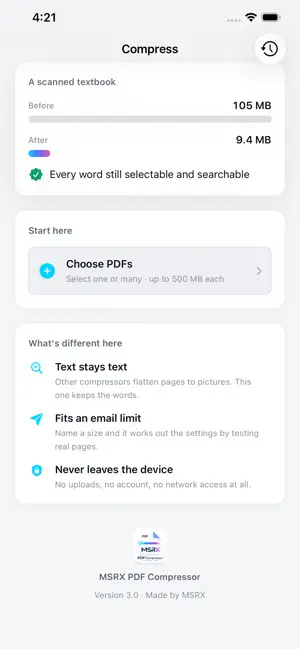
MSRX PDF Compressor makes PDFs smaller without turning your text into pictures. Most PDF compressors flatten every page to an image. The file shrinks, but you lose selectable text, search, links, and anything a screen reader can use. This one looks at each page first. Pages with real text keep it. Pages that are scans or photographs get re-encoded, which is where nearly all the saving in a scanned document lives anyway. TEXT STAYS TEXT A 135-page workbook came out 33% smaller with all 138,000 characters still selectable and searchable. A 224-page scanned textbook went from 100 MB to 9 MB. The difference is the document, not the setting — and the app tells you which one you have before you commit. FIT UNDER A LIMIT Tell it the limit your email or upload form imposes — 5, 10, 20 or 25 MB — and it works out the settings for you, testing real pages rather than guessing. If it cannot reach your limit, it says so and hands back the smallest file it managed. It will not pretend it succeeded. SEE WHERE THE MEGABYTES ARE Before you compress, the app breaks the file down: images, fonts, page content, overhead. Then it tells you plainly what to expect — "10 of 28 pages are scans. Those compress well; the rest keep their text." COMPARE BEFORE AND AFTER Put the original and the result side by side, page by page, and confirm for yourself that nothing was lost. ALSO IN THIS VERSION • Compress several PDFs at once, with per-file results • History, with a running total of everything you have saved • Greyscale conversion for scans and photographs • Compress from any app's share sheet, without opening this one • A Shortcuts action, for compressing as part of an automation • Full Dark Mode, Dynamic Type, and VoiceOver support HONEST ABOUT WHAT IT CANNOT DO Compression works on images. A document that is mostly text and embedded fonts has very little to give, and the app says so up front instead of letting you find out afterwards. Scanned documents are where you will see the dramatic numbers. PRIVATE BY DESIGN Everything happens on your iPhone or iPad. Your files are never uploaded, and the app has no analytics, no accounts, and no network access at all. FILE LIMITS Up to 500 MB and 2,000 pages per document. Free. No ads, no subscriptions, no in-app purchases.
What’s new
Version 3.0 · Updated August 11, 2026
Rebuilt from the ground up. YOUR TEXT STAYS TEXT The old version turned every page into an image. Files got smaller, but you lost selection, search, links, and anything VoiceOver could read. This version looks at each page first: pages with a real text layer are kept as they are, and only pages that are genuinely scans get re-encoded. A 135-page workbook now comes out 33% smaller with all 138,000 characters intact. NEW • Compress several PDFs at once, with per-file results • Fit a file under 5, 10, 20 or 25 MB — it finds the settings by testing real pages, and tells you honestly if your limit cannot be reached • See where your megabytes are before you compress, broken down by images, fonts and page content • Compare the original and the result side by side, page by page • History, with a running total of everything you have saved • Greyscale conversion for scans and photographs • Compress straight from any app's share sheet • A Shortcuts action, for use in automations FIXED • A crash on files whose size could not be read • Pages rotated 90 or 270 degrees rendering sideways • Large documents running out of memory — a 224-page, 100 MB scan now peaks at 35 MB of memory and finishes in about four seconds • Text-only PDFs coming back larger than they started; those are now reported as already optimised and left alone CHANGED • Redesigned throughout, with full Dark Mode and Dynamic Type support • The app is now called MSRX PDF Compressor • The compression recommendation reads the document's actual structure instead of guessing from the filename
App privacy
The developer, Mrinal Singh Raja, reported these privacy practices to Apple.
Data Not Collected
The developer does not collect any data from this app.
Alternatives to MSRX PDF Compressor
Looking for apps like MSRX PDF Compressor? Here are 6 similar apps on the App Store.
-
 Smart PDF Compressor Offline
-
 TinyPDF — PDF Compressor
-
 PDF Compressor: Sign Scan
-
 Artifacto
-
 PDFWorldEditor: PDF Editor
-
 PDF Tools Merge & Compress
| App | Rating | Price | Last updated | Compare |
|---|---|---|---|---|
| MSRX PDF Compressor | – | Free | August 11, 2026 | |
| Smart PDF Compressor Offline | – | Free | Mar 28, 2026 | Compare |
| TinyPDF — PDF Compressor | – | Free | Oct 7, 2026 | Compare |
| PDF Compressor: Sign Scan | – | Free | Sep 21, 2026 | Compare |
| Artifacto | – | Free | Aug 9, 2026 | Compare |
| PDFWorldEditor: PDF Editor | – | Free | Sep 20, 2026 | Compare |
| PDF Tools Merge & Compress | – | Free | May 5, 2026 | Compare |