

QLoop
David Smith Productivity iPhoneiPadiPod touch
QLoop is a free Productivity app for iPhone and iPad by David Smith. Requires iOS 17.0. Updated April 29, 2026.
- Price
- Free
- on the App Store
- Size
- 37 MB
- Age 4+
- Updated
- Apr 29
- 2026 · v2.1.0
Screenshots


About QLoop
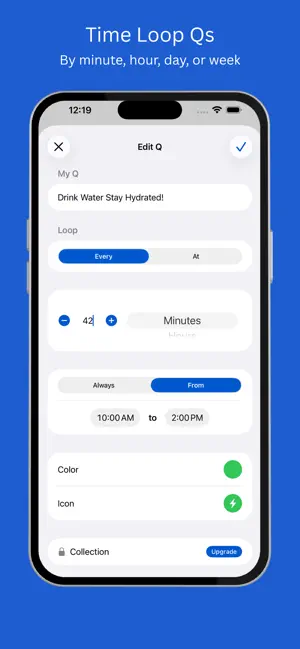
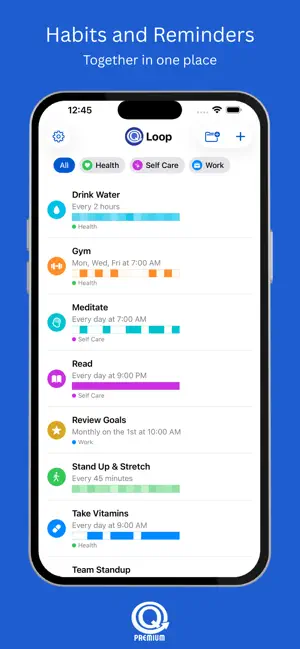
QLoop is built for recurring reminders on any schedule—so you can remember the little things and build habits. Create Qs (Cues) that “loop” automatically until you pause them or they reach an end condition. Choose a simple repeat (like every 45 minutes) or a calendar schedule (at a specific time). SCHEDULING THAT FITS REAL LIFE • Two modes: time-based repeat and calendar-based • Time-based repeat: any number of minutes, hours, days, or weeks (ex: every 45 minutes) • Calendar recurrence: hourly, daily, weekly (select multiple days), monthly (pick a day of month) • Pause & resume any Q anytime • Automatic scheduling so your Qs keep repeating without extra setup • End conditions (Premium): stop after a certain number of completions (tapping Done) or stop on a date • NEW FREE FEATURE: Set an active window for Qs with intervals of 30 minutes or more. Example: Every 1 hour, 9:00 AM - 6:00 PM • NEW PREMIUM FEATURE: Edit a Q to enable completion tracking. A colored bar will appear on the Q showing completions for the last two weeks. When Qs are marked as done from the notification, the tracker is updated and the colors in the bar become less transparent. Tap on the bar to view all completion history in two-week blocks. Tap on an individual square to view counts. NOTIFICATIONS THAT DO MORE THAN “PING” • Actions right on the notification: Snooze (5 min), Pause, Done • Snooze appears only when your repeat is longer than 5 minutes • Tap a notification to open the Q for quick editing • Built to respect iOS scheduling limits — you’ll get a clear alert if your schedule is full • NEW FREE FEATURE: Set the snooze length per Q. Free includes up to 5 active Qs. Upgrade to Premium to unlock: • Unlimited active Qs (Cues) • Collections to group Qs together • End conditions (Premium) • Custom colors and icons • Custom sounds with in-app preview • Restore purchases support Privacy: QLoop is local-first — no account required. Notes: Notification scheduling is managed by iOS, which limits how many notifications can be pending at once. QLoop will warn you when the schedule is full.
What’s new
Version 2.1.0 · Updated April 29, 2026
• NEW FREE FEATURE: Set the snooze length per Q. • Minor improvements and bug fixes
App privacy
The developer, David Smith, reported these privacy practices to Apple.
Data Not Collected
The developer does not collect any data from this app.
Alternatives to QLoop
Looking for apps like QLoop? Here are 6 similar apps on the App Store. The highest rated is Pingo: Recurring Reminders (5.0/5), and all 6 are free to download.
-
 Pomodoro for Reminders
-
 CueTask: Reminders & todo list
-
 Pingo: Recurring Reminders
5.0
-
 Laps: Pomodoro & Focus Timer
-
 Name It - App Name Generator
-
 Capush: Save the Internet
5.0
| App | Rating | Price | Last updated | Compare |
|---|---|---|---|---|
| QLoop | – | Free | April 29, 2026 | |
| Pomodoro for Reminders | – | Free | Jul 16, 2026 | Compare |
| CueTask: Reminders & todo list | – | Free | Jun 24, 2026 | Compare |
| Pingo: Recurring Reminders | 5.0 / 5 (1) | Free | Aug 16, 2026 | Compare |
| Laps: Pomodoro & Focus Timer | – | Free | Oct 5, 2026 | Compare |
| Name It - App Name Generator | – | Free | Mar 4, 2026 | Compare |
| Capush: Save the Internet | 5.0 / 5 (4) | Free | Aug 18, 2026 | Compare |
Compare QLoop with the top alternatives: ratings, updates, ASO score and keyword gaps →