

FileShift: Send Files Offline
ExtreemTek BV Utilities iPhoneiPadiPod touch
FileShift: Send Files Offline is a free Utilities app for iPhone and iPad by ExtreemTek BV. Rated 5.0/5 from 1 ratings. Requires iOS 15.1.
- Rating
- 5.0
- 1 ratings
- Price
- Free
- on the App Store
- Size
- 73 MB
- Age 4+
- Updated
- Oct 15
- 2026 · v1.4.8
Screenshots


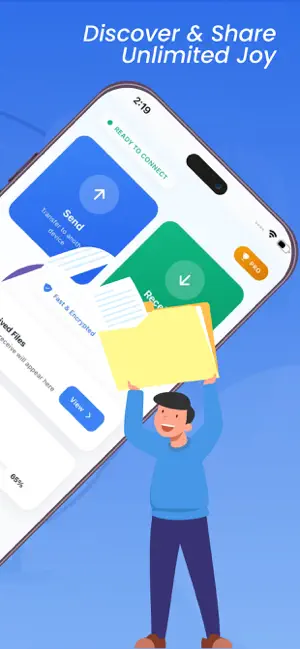

About FileShift: Send Files Offline
FileShift — The Fastest Way to Transfer Files Between Devices Tired of slow Bluetooth, messy cables, or burning through mobile data just to send a file? FileShift lets you transfer anything — photos, videos, music, documents and more — directly between devices at lightning speed. No internet required. No cloud. No limits. WHY FILESHIFT? Most file sharing apps are slow, complicated, or need both devices on the same WiFi network. FileShift creates its own direct peer-to-peer connection, so you can transfer files anywhere — at home, at the office, or somewhere with zero signal. It just works. TRANSFER ANYTHING Photos and videos in full original quality. Music and audio files. Documents, PDFs, spreadsheets and apps. Even large files that other apps simply refuse to handle. If it's on your device, FileShift can send it. BLAZING FAST SPEEDS FileShift uses direct WiFi peer-to-peer technology to achieve transfer speeds up to 200x faster than Bluetooth. Send a full HD movie in seconds, not minutes. Share hundreds of photos in one go without the wait. 100% OFFLINE — NO INTERNET NEEDED Unlike cloud-based sharing apps, FileShift works completely offline. Your files go directly from one device to another — they never touch a server, never get stored in the cloud, and never cost you a single MB of mobile data. PRIVATE AND SECURE BY DEFAULT Your files are yours. FileShift uses encrypted peer-to-peer connections so nobody can intercept your transfers. No account needed. No sign-up. We don't see, store, or have access to the files you transfer. WORKS ACROSS ALL APPLE DEVICES Send and receive between iPhone, iPad, and other supported devices with no setup. HOW IT WORKS Open FileShift on both devices. One taps send, the other taps receive. Select your files and the transfer begins instantly. Most transfers complete in seconds. That's really all there is to it. Perfect for sharing photos and videos with friends and family, moving files between your own devices without a cable, sending large files that WhatsApp or email won't allow, and backing up content to another device offline. It's also ideal when you're traveling, in a remote area, or anywhere without a reliable internet connection. FREE TO USE — OPTIONAL PREMIUM FileShift is free to download and use, with no caps on file size or number of transfers. The free version is supported by ads. Want a cleaner experience? FileShift Premium removes all ads and unlocks the full experience as an optional auto-renewing subscription. The core file-transfer features remain free. SUBSCRIPTION DETAILS FileShift Premium is an auto-renewable subscription. - FileShift Weekly — 1 week — $0.99 - FileShift Monthly — 1 month — $4.99 - FileShift Yearly — 1 year — $17.99 Payment is charged to your Apple ID account at confirmation of purchase. The subscription renews automatically unless it is canceled at least 24 hours before the end of the current period. Your account is charged for renewal within 24 hours before the end of the current period. You can manage or cancel your subscription any time in your App Store account settings after purchase. Any unused portion of a free trial, if offered, is forfeited when you purchase a subscription. Privacy Policy: https://sites.google.com/view/file-shift-privacy-policy/home Terms of Use (EULA): https://www.apple.com/legal/internet-services/itunes/dev/stdeula/ (The Terms of Use link above is Apple's standard EULA, which Apple accepts and resolves this rejection immediately. If you prefer your own custom EULA, publish the FileShift Terms of Use page — e.g. on Google Sites, the same way as the privacy policy — and replace the link above with that URL.)
What’s new
Version 1.4.8 · Updated October 15, 2026
• Direct Wi-Fi with Android: your iPhone or iPad now connects straight to an Android phone over its own fast Wi-Fi link. No router or internet needed. • Pair without a QR code: find nearby Android phones over Bluetooth and enter the 6-digit code they show. • See what's happening: clear progress while your devices connect, including when to tap Join on the Wi-Fi prompt. • Tapped Cancel by mistake? You'll get a chance to try the faster connection again. • Works with older versions: if a direct connection isn't possible, FileShift switches to another method automatically. • New look: the tab bar now uses Liquid Glass on iOS. • iPad: the QR scanner now fits properly in landscape. • Fixes: Receive no longer reopens a finished transfer, no ad right after buying Pro, and a clear message if a purchase can't be confirmed.
App privacy
The developer, ExtreemTek BV, reported these privacy practices to Apple.
Data Used to Track You
The following data may be used to track you across apps and websites owned by other companies:
- Identifiers: Device ID
Data Not Linked to You
The following data, which may be collected but is not linked to your identity, may be used for the following purposes:
- Identifiers: Device ID
- Contacts: Contacts
- User Content: Photos or Videos, Audio Data
Used for: Developer’s Advertising or Marketing, Analytics, App Functionality
Alternatives to FileShift: Send Files Offline
Looking for apps like FileShift: Send Files Offline? Here are 6 similar apps on the App Store. The highest rated is IP Address Lookup - MyIPNow (5.0/5), and all 6 are free to download.
-
 FileShift
-
 Keylix — Loyalty Card Wallet
-
 QR Offline - Lite
-
 coin snap identify coin value
4.0
coin snap identify coin value
4.0
-
 TV Remote - Universal Control⁺
4.0
TV Remote - Universal Control⁺
4.0
-
 IP Address Lookup - MyIPNow
5.0
IP Address Lookup - MyIPNow
5.0
| App | Rating | Price | Last updated | Compare |
|---|---|---|---|---|
| FileShift: Send Files Offline | 5.0 / 5 (1 rating) | Free | October 15, 2026 | |
| FileShift | – | Free | Mar 31, 2025 | Compare |
| Keylix — Loyalty Card Wallet | – | Free | Apr 3, 2026 | Compare |
| QR Offline - Lite | – | Free | Aug 3, 2026 | Compare |
| coin snap identify coin value | 4.0 / 5 (1) | Free | Sep 10, 2026 | Compare |
| TV Remote - Universal Control⁺ | 4.0 / 5 (1) | Free | Oct 21, 2026 | Compare |
| IP Address Lookup - MyIPNow | 5.0 / 5 (1) | Free | Jun 10, 2026 | Compare |